
Testing and Simulate
TrigScript can run a script without starting the game, in a simulator built into the editor. Simulate shows what the script does in its first twenty seconds. Tests are checks you write that run after every change. Neither adds anything to the map.
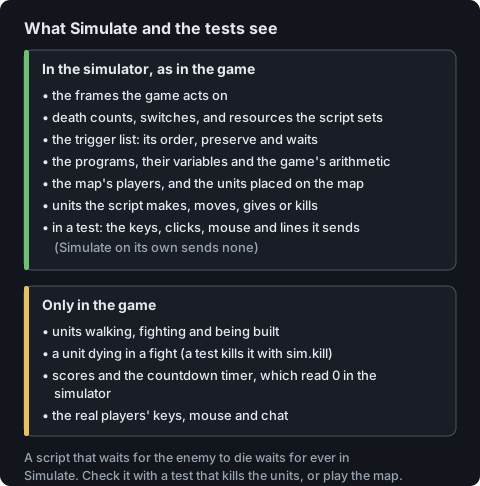
The simulator models death counts, switches, preserve, the order of the trigger list, the
game's arithmetic and the map's players. It has units: the ones placed on the map, then
whatever createUnit makes, giveUnits hands over, moveUnit moves and killUnitAt
kills, which bring and command count. It leaves out what it cannot know without the
game: nothing walks, nothing fights and nothing is built, so no unit dies unless the
script (or a test) kills it. Scores and the countdown read 0, and keys, clicks, the mouse
and chat read as nothing. The picture sets the two lists side by side.
The simulator keeps the game's time, so the frames it lists are the frames the game would act on: the first pass on frame 2, then one every 31 frames, or every frame in a map with a program. A Wait holds its trigger for its time at Fastest. See How triggers run.
Simulate#
Simulate (Ctrl+F5 in the TrigScript window) runs the script for 480 frames, twenty seconds of the game at Fastest. It lists, under the code, every action that ran with its frame and its line in the script, and the final value of every program variable. Triggers and programs run side by side, so a death count a program sets is seen by a trigger. A program or a trigger of a force runs for each of its players, and each line says whose it is.
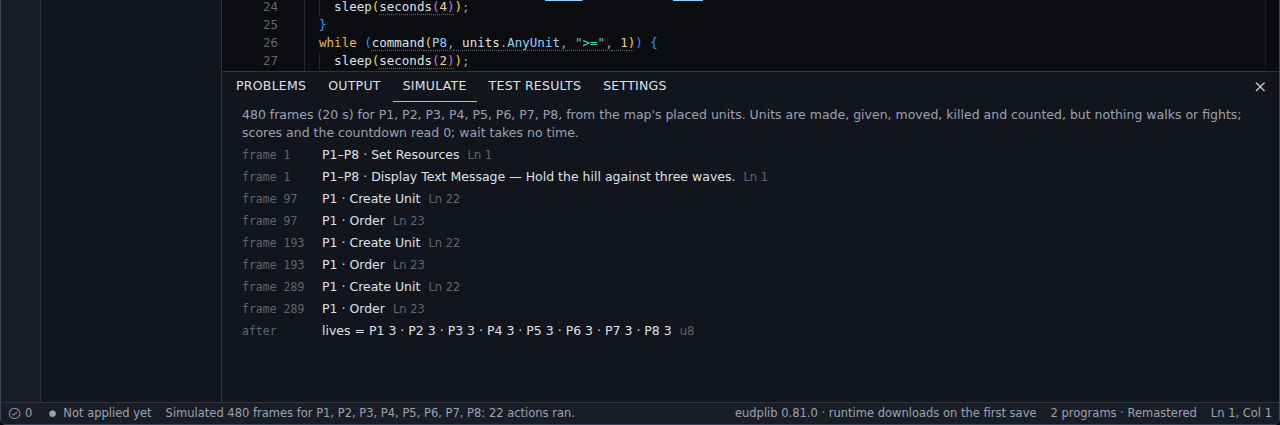
Simulate is a check on the logic. A script that waits for the enemy to die waits for ever here; for the fight, write a test that kills the units, or play the map.
Tests#
A test is ordinary TypeScript that runs in the simulator after every change that compiles.
It never runs in the game and adds nothing to the map. If you have used Vitest or Jest,
the names are the same: test, describe, beforeEach, test.only, test.skip,
test.each and expect, imported from "trigscript".
A test of a trigger:
import { test, expect } from "trigscript";

trigger(P1, [bring(P1, units.TerranCivilian, locations.Shop, ">=", 1)], [
  moveUnit(P1, units.TerranCivilian, 1, locations.Shop, locations.Spawn),
  createUnit(P1, units.TerranMarine, 4, locations.Spawn),
], { preserve: true });

test("a civilian at the shop buys four marines", (sim) => {
  sim.place(P1, units.TerranCivilian, locations.Shop);
  sim.seconds(3);
  expect(sim.count(P1, units.TerranMarine, locations.Spawn)).toBe(4);
});
A test of a program, which reads the program's variables by name:
import { test, expect } from "trigscript";

// A Marine on the beacon calls the next wave, each bigger than the last.
program(() => {
  let wave = 0;
  while (true) {
    if (countUnits(P1, units.TerranMarine, locations.Beacon) > 0) {
      wave += 1;
      createUnit(P8, units.ZergZergling, wave * 4, locations.Spawn);
      print(`Wave ${wave}`);
      killUnitAt(P1, units.TerranMarine, "All", locations.Beacon);
    }
    sleep(frames(1));
  }
}, { name: "waves" });

test("the second wave is bigger", (sim) => {
  sim.place(P1, units.TerranMarine, locations.Beacon);
  sim.until(() => sim.program("waves").wave === 1);
  sim.place(P1, units.TerranMarine, locations.Beacon);
  sim.until(() => sim.program("waves").wave === 2);
  expect(sim.count(P8, units.ZergZergling, locations.Spawn)).toBe(12);
  expect(sim).toHavePrinted("Wave 2");
});
Every test gets sim, a world of its own: the map's placed units, locations and players,
the script's programs and triggers, and the same random() results every run. Time in a
test is the game's: nothing runs on frame 1, the first pass is on frame 2, and
sim.frames(3) gives a program two runs.
| What a test does | With |
|---|---|
| Change the world | sim.place(player, type, location, count?), sim.kill(unit), sim.remove(unit), sim.give(unit, to), sim.move(unit, to) |
| Let time pass | sim.frames(n), sim.seconds(n), sim.until(() => …) |
| Act as a player | sim.press("F2"), sim.click(), sim.type("-give 100"), sim.moveMouse(x, y) |
| Read the world | sim.count(player, type, location?), sim.units(filter?), sim.resources(player), sim.deaths(player, type), sim.switch(n) |
| Read a program | sim.program("waves").wave |
| See what was shown | sim.printed(), expect(sim).toHavePrinted("Wave 2") |
placegives the new units back, andkillstands in for a fight.untilfails the test if its condition is still not true after 2400 frames, so no test hangs.- What a player does is found by the program on the next frame.
sim.program(…)gives a program's variables by their names in the code: numbers, texts, arrays, and a record as an object. Name the program in its options ({ name: "waves" }), or give its place in the script, counting from 0:sim.program(0). For a per-player program, name the player too:sim.program("lives", P2).
A test fails when an expect does not hold, when it throws, and when a program does
something that is always a mistake and that the game would pass over in silence, such as
reading past the end of an array. A test that means to check for that says
expect(sim).toHaveFaulted().
Tests live beside what they test, as above, or in files whose names end in .test.ts, in
any folder. A test file can import the script's own functions and test them as plain
TypeScript. A test file is never part of the map: main.ts cannot import one, and a
trigger() or a program() inside one is an error.
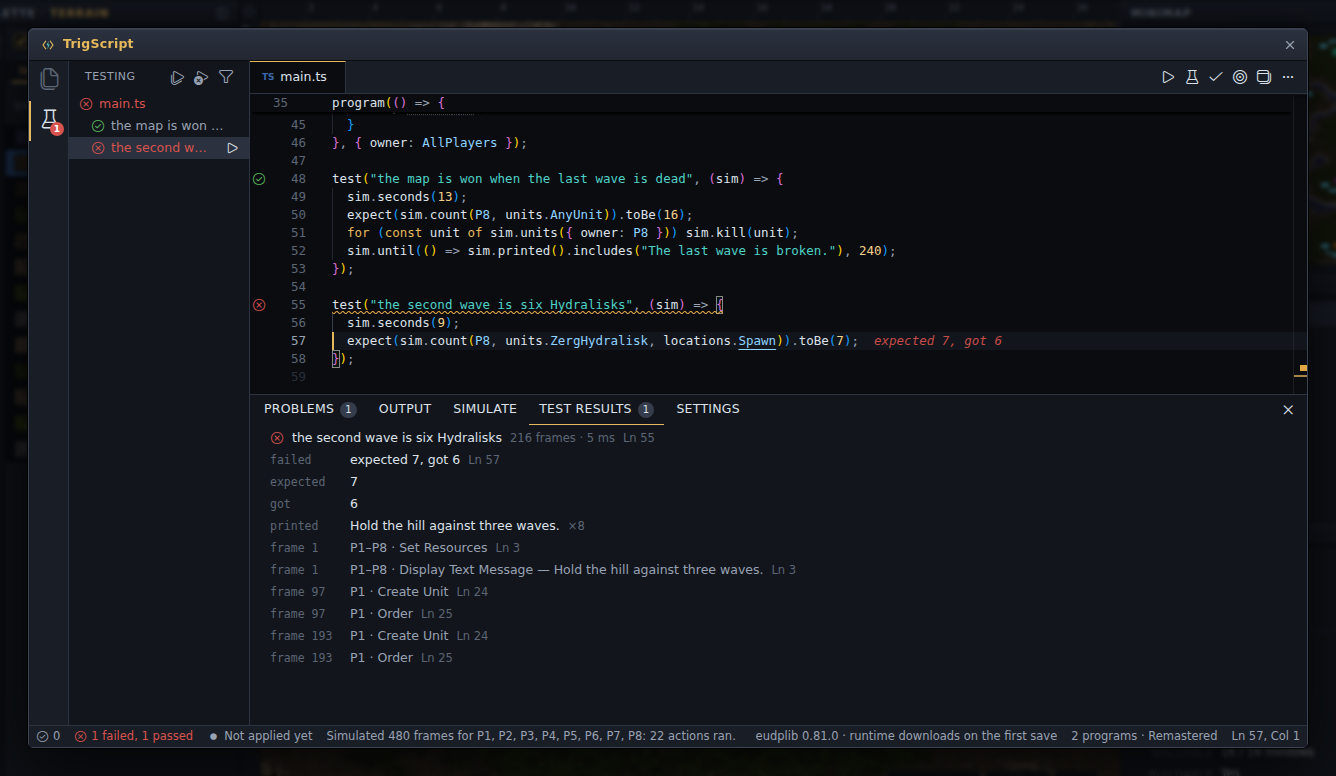
In the editor, every test( has a mark in the margin (passed, failed or not run), and a
click on the mark runs that test. A failure is shown where it happened, as
expected 7, got 6 at the end of the line.
- The Testing view, from the strip at the far left, lists the tests by folder, file
and
describe. It runs all of them, one of them or the ones that failed, and can show only the failing ones. - The status bar keeps the count.
- Test Results, under the code, has the chosen test's message, what it printed and what happened frame by frame.
A failing test is a warning, not an error: the map still saves and builds. The Tests setting in the workspace's Settings view, kept in the map, makes a failing test stop the build instead.