
The API, group by group
This part covers what each group is for and the rules that matter when using it, with an example for each. For every call's signature and options, follow the Reference link under each heading or start at docs.scmjs.dev/api.
The examples are written as playground snippets, with api already defined. In a plugin
the same lines go inside activate(api).
Three conventions hold everywhere:
- Tiles and pixels. Terrain, fog and rectangles count tiles. Units, sprites and
locations are placed in map pixels, 32 to a tile (
api.consts.tile). A rectangle is{ x0, y0, x1, y1 }in tiles, withx1andy1exclusive. - Players count from 0.
owner0 is Player 1, as in the map file. - Ids are the game's. A unit id is its row in
units.dat(0 is the Terran Marine), and upgrades and technologies likewise.api.namesturns any of them into a name.
Asynchronous calls, and the one synchronous builder#
Asynchronous calls return promises. There are no completion callbacks. When the user
dismisses something (Esc, Cancel, a right-click, the ×), the promise resolves with null
or false instead of rejecting, so the normal path needs no try. This covers opening,
saving and exporting maps, loading game data, and everything that waits for the user
(pickers, confirm, prompt and so on).
const rect = await api.ui.pickArea({ prompt: "Pick an area to flatten" });
if (rect) {                                   // null: Esc, a right-click, or no map
  await api.tileset.load();                   // the graphics the fill needs
  const [, ground] = api.terrain.types();     // the tileset's second flat terrain
  if (ground) api.document.edit("Flatten", (tx) => tx.stampTerrain(rect, ground.id));
  else api.ui.status("The tileset graphics are not installed.");
}
The remaining callbacks are real callbacks: event listeners, widget handlers, a dialog's
mount, and the pointer and draw hooks of map tools and overlays. Each returns a
Disposable or cleanup function.
A transaction's function must be synchronous. document.edit(label, build) and
document.update(label, build) commit the moment build returns. An async function
would commit at its first await, and the rest would change the map outside the undo
entry. TypeScript refuses one, and the editor catches it at run time too.
Wrong, because the edit commits at the await and the placement lands outside it:
api.document.edit("Place", async (tx) => {
  await api.data.load();
  tx.placeUnit(0, 0, 128, 128);
});
Right: await first, then write.
await api.data.load();
api.document.edit("Place", (tx) => { tx.placeUnit(0, 0, 128, 128); });
For long work, api.ui.progress shows a panel over the map that does not block editing.
Check cancelled() in your loop. Its signal is an AbortSignal, so a
fetch(url, { signal: job.signal }) stops when the user cancels.
const triggers = api.triggers.list();
const job = api.ui.progress("Reading triggers", { cancellable: true });
try {
  for (let i = 0; i < triggers.length && !job.cancelled(); i++) {
    job.report(i / triggers.length, `Trigger ${i + 1} of ${triggers.length}`);
    await new Promise((next) => setTimeout(next, 20)); // the slow part of your work goes here
  }
} finally {
  job.done();
}
The three kinds of write#
Every change a plugin makes to the map goes through one of three calls, matching the editor's own three ways of writing: a brush stroke, a dialog's OK, and a raw file edit.
| Call | Covers | Undo | If your function throws |
|---|---|---|---|
document.edit(label, build) |
Terrain and objects: tiles, ISOM, units, sprites, doodads, locations, fog. | One history entry. | Rolled back. |
document.update(label, build) |
Tables and settings: triggers, briefing, strings, switch names, name and description, players, forces, unit / upgrade / tech settings, sounds, map revision. | One history entry, as with a settings dialog's OK. | What was written stays, as one entry. |
document.sections.* |
The file's raw bytes, any section. | None, and the history is cleared. | Nothing is written. |
In both transactions each operation applies immediately, so a later one sees what an earlier one did. Calling the transaction after the function has returned throws.
Once a plugin is turned off, anything it left behind can no longer change the map: writes do nothing and log a line in the Debug Console.
api.document#
The open map as a whole.
- Reading:
isOpen(),info()(name, size, tileset, whether modified),history()(the undo and redo labels), andscenario()for the whole parsed map. It is the editor's own live object, typed read-only: a line that writes to it does not compile, because a direct write skips undo, is not saved and never repaints. Copy what you want to change ({ ...scn.units[0], x: 64 }is an ordinary record) and hand it to a transaction. A helper of your own that only reads takesReadonlyScenario, orreadonly UnitRecord[]for one of its lists. - Writing:
editandupdate(above), andundo()/redo(). - Files:
open,create,save,saveAs,close,export(the map as aFile, the way Save writes it, ready to upload) andrenderImage(a PNG). - Whole-map changes:
resizeandchangeTileset. Both clear the undo history, as the editor's own dialogs do. - Several open maps:
id()is the map in front,list()every open map,activate(id)brings one to the front. Every other call works on the map in front. Key anything you keep per map onid(). Only switch maps when the user asked for it. - Files inside the archive:
extraslists, reads and writes files stored next to the scenario (list,get,set,remove). Keep yours in a folder of your own (my-plugin\notes.json); they are written on the next Save. - Maps to look at, not change:
open(bytes, name, { viewOnly: { label: "Replay" } })opens a map beside the others that can't be edited. That suits a replay's map, or a preview of one from a website. It can be panned, zoomed and selected in, but the editing tools, menus and dialogs are switched off. Every write throws with the reason:edit,update, the clipboard,extras,save(as anything but a copy) and the rest.info().viewOnlyandlist()say which maps are like this. File ▸ Edit a Copy gives the person an ordinary copy to change.
Reading, and a file of the plugin's own that travels with the map:
const info = api.document.info();
if (info) api.log(`${info.name}: ${info.width} × ${info.height}, ${info.tileset}${info.modified ? ", unsaved changes" : ""}`);

const name = "my-plugin\\notes.json";
const stored = api.document.extras.get(name);
const notes = stored ? JSON.parse(new TextDecoder().decode(stored)) : { opened: 0 };
notes.opened++;
api.document.extras.set(name, new TextEncoder().encode(JSON.stringify(notes)));
api.log(`runs of this snippet on this map: ${notes.opened}`);
A new map, and a picture of it:
if (await api.document.create({ width: 96, height: 96, tileset: "jungle", name: "Sketch", startLocations: 2 })) {
  const png = await api.document.renderImage({ pixelsPerTile: 4 });
  if (png) await api.ui.saveFile(png, "sketch.png");
}
api.document.sections#
The map file as a list of sections, as the game reads it and Save writes it, with unsaved edits already included. Section Explorer is built on it, and Repair uses its helpers.
- Reading:
list()gives each section's name, offset, size and what the editor knows about it.bytes(index)is one section's payload,combined(name)what the game uses when a name is repeated, andfile()the whole file. - Writing:
write,rename,insert,remove,moveandreplaceFile. After each, the file is parsed again from scratch and becomes the open map, so the change reaches every part of the editor even for sections it does not understand. The undo history and selections are cleared, and the"document"event fires with reason"replace". Each returns the parser'swarnings. Indices shift after an insert or remove, so calllist()again. Every write marks the map modified, exceptreplaceFile(bytes, { asOpened: true }), which takes the bytes as the file that was opened: for a repair made right after"open", before the user changed anything, so the map does not ask to be saved when nothing the user did changed it. Save still writes the bytes. - Helpers for repairs:
required()(the sections this map's revision must have),defaults(name)(what File ▸ New would write),trailing()(bytes after the last readable section),chkOf(file)(the scenario inside an.scx/.scm) andrebuild(names?)(re-encode sections from the editor's model, fixing sizes, repeats and broken string offsets).
// Sections the map must have and does not, and sections that appear more than once.
const sections = api.document.sections.list();
const present = new Set(sections.map((s) => s.name));
api.log("missing:", api.document.sections.required().filter((name) => !present.has(name)));
api.log("repeated:", [...new Set(sections.filter((s) => s.occurrences > 1).map((s) => s.name))]);
api.document.buildSteps#
For a plugin that compiles something into the map, such as a script turned into triggers.
A build step runs whenever the map leaves the editor (Save, Test Map and
document.export), so the user keeps one file and keeps editing the unbuilt map.
api.document.buildSteps.add({
  id: "compile",
  label: "My Compiler",
  // Only maps that carry the plugin's source file are built.
  applies: () => api.document.extras.get("my-plugin\\main.txt") !== null,
  async run({ map, fileName, purpose }) {
    api.log(`building ${fileName} (${map.length} bytes) for ${purpose}`);
    return map; // an .scx in, an .scx out: return your compiled map here
  },
});
applies()is asked on every save and must be cheap. While it is false, Save is unchanged.rungets the map as Save would write it and returns the built map. Steps from several plugins run one after another, in activation order.purposeis"save","test"or"export".- The editor keeps the unbuilt scenario inside the file and shows that one when the map is opened again, so generated triggers never appear in the trigger list. See Opening and saving maps.
- A step cannot cost the user a save. If
runthrows, the map is saved unbuilt and a notice shows your error message, so write it for the user. A Save without it button aborts thesignalthatrunis also given. Test Map stops on an error instead. before({ id, label, applies?, run })runs earlier, on the open map rather than on the bytes, and may usedocument.updateanddocument.edit. TrigScript uses it to write its triggers into the trigger list before every save.builtBy()says which steps built the file the open map came from.
A bare .chk is never built, since it has nowhere to keep the unbuilt copy.
EditTransaction#
What document.edit passes to its function. When the function returns, the transaction
removes doodads the terrain change broke and units the new ground cannot hold (if the
Units palette's Remove stranded units is on), commits and repaints.
- Terrain: read and set tiles (
tileAt,setTile,setTiles), the editor's brushes (stampTerrain,paintIsom,fillArea,placeBlend,replaceTerrain,fillFlat), and the ISOM lattice (rebuildIsom,tilesFromIsom). Most brushes need the tileset graphics. - Objects: units (
placeUnit,canPlaceUnit,addUnits,moveUnits,updateUnits,placeStartLocations, …), sprites, doodads (placeDoodad,convertDoodads), locations (addLocation,editLocation; slot 63, Anywhere, is protected), fog (setFog,floodFog, …) andpastefor a wholeClip. - Symmetry:
mirrorandmirrorPointgive the positions Tools ▸ Symmetry would also paint, so your edit can follow the user's setting. note(text)adds a line to the status bar message.
placeUnit places the way the Units palette does but makes no checks; ask canPlaceUnit
first if you want them.
Several operations, one undo entry: a ring of eight marines round the middle of the map, with a location over them.
const info = api.document.info();
if (info) {
  const t = api.consts.tile;
  const cx = (info.width * t) / 2;
  const cy = (info.height * t) / 2;
  const result = api.document.edit("Ring of marines", (tx) => {
    for (let i = 0; i < 8; i++) {
      const x = cx + Math.cos((i * Math.PI) / 4) * 3 * t;
      const y = cy + Math.sin((i * Math.PI) / 4) * 3 * t;
      if (tx.canPlaceUnit(0, x, y)) tx.placeUnit(0, 0, x, y);
    }
    tx.addLocation({ left: cx - 4 * t, top: cy - 4 * t, right: cx + 4 * t, bottom: cy + 4 * t }, "The Ring");
  });
  api.ui.status(`${result.units} marines, ${result.locations} location`);
}
Terrain with the isometric brush, which draws the cliffs and shores for you:
await api.tileset.load();
const [terrain] = api.terrain.isomTypes();
if (terrain !== undefined) {
  api.document.edit("Paint a patch", (tx) => {
    for (const d of api.terrain.diamondsIn({ x0: 8, y0: 8, x1: 16, y1: 16 })) tx.paintIsom(d, terrain);
  });
}
UpdateTransaction#
What document.update passes to its function. The result's sections lists the file
sections actually changed, and changed is false when nothing was.
| Part | What it covers |
|---|---|
tx.triggers, tx.briefing |
The trigger and briefing lists: list, add, replace, remove, move, set, fromText. |
tx.strings |
The string table. intern(text) reuses an identical string or adds one and never overwrites, since an index may be shared. set(index, text) overwrites a slot. |
tx.switches |
Switch names. |
tx.properties |
The scenario's name and description. |
tx.players, tx.forces |
Player slots (type, race, colour, force) and the four forces. |
tx.unitTypes, tx.upgrades, tx.techs |
Unit, upgrade and technology settings, with the game's defaults alongside. |
tx.sounds, tx.cuwp |
WAV slots, and the unit property slots used by Create Unit with Properties. |
tx.setVersion, tx.setTextEncoding |
The map revision and the text encoding. |
A settings change, the way a dialog's OK makes one:
api.document.update("Set up the scenario", (tx) => {
  tx.properties({ name: "Last Stand", description: "Hold the ring for ten minutes." });
  tx.unitTypes.set(0, { hitPoints: 80, name: "Veteran Marine" });
  tx.switches.setName(0, "Gate is open");
});
A trigger built record by record:
const { condition, action, comparison, player } = api.consts.triggers;

api.document.update("Add a countdown", (tx) => {
  const trigger = api.triggers.newTrigger([player.Player1]);
  const timer = api.triggers.newCondition(condition.CountdownTimer);
  timer.comparison = comparison.AtMost;
  timer.amount = 30;
  trigger.conditions[0] = timer;

  const say = api.triggers.newAction(action.DisplayText);
  say.text = tx.strings.intern("30 seconds remaining");
  trigger.actions[0] = say;
  trigger.actions[1] = api.triggers.newAction(action.PreserveTrigger);
  tx.triggers.add(trigger);
});
The update is one undo entry under its label, like a dialog's OK: api.document.undo()
or Ctrl+Z takes back everything it wrote.
api.settings#
The same views as the UpdateTransaction parts, for reading without a transaction:
players, forces, unit types, upgrades, techs, sounds, unit property slots, and
version() (revision and text encoding). Write through document.update.
for (const p of api.settings.players().slice(0, 8)) {
  api.log(`Player ${p.slot + 1}: ${p.typeName}, ${p.raceName}, ${p.forceName ?? "no force"}`);
}
const marine = api.settings.unitType(0);
if (marine) api.log(`${marine.name}: ${marine.hitPoints} HP${marine.useDefault ? " (the game's default)" : ""}`);
api.triggers#
Reading triggers and everything needed to show one. Writing is document.update.
list()andbriefing()return copies. A record is 16 conditions and 64 actions of plain numbers.defssays what each condition and action type means and which record field holds each argument.textprints and parses the text trigger format.summarizegives the three lines the trigger list shows.newTrigger,newConditionandnewActionmake blank records.usage()lists every death counter and switch the triggers use, for a plugin that needs counters of its own.epdandaddressOfdo EUD address arithmetic.references()says what each trigger reads, writes and names: switches, death counters, memory addresses, locations, the countdown timer, ore and gas, scores, units, strings, sounds, AI scripts and Victory / Defeat / Draw. A condition reads; an action writes, or uses something without changing it (the location units are created at, the text a message shows). Player groups come resolved to slots, withapproximateset for groups the game settles only while it runs, such as Foes.resolvePlayers(group)does that resolution on its own.
Every trigger as the trigger list shows it:
for (const trigger of api.triggers.list()) {
  const line = api.triggers.summarize(trigger);
  api.log(`${line.players}: ${line.conditions} → ${line.actions}`);
}
Switches a condition tests that no action ever sets. The Trigger Map plugin draws its whole graph from this one call.
const refs = api.triggers.references().flatMap((t) => t.refs).filter((r) => r.kind === "switch");
const set = new Set(refs.filter((r) => r.access === "write").map((r) => r.id));
const neverSet = [...new Set(refs.filter((r) => r.access === "read" && !set.has(r.id)).map((r) => r.id))];
api.log(neverSet.map((id) => api.names.switch(id)));
To generate triggers, write text. tx.triggers.fromText parses the text format,
interns its strings and resolves names against the open map. That is easier than filling
records field by field:
const source = `
Trigger("Player 1"){
Conditions:
  Bring("Current Player", "Any unit", "Anywhere", At least, 1);
Actions:
  Display Text Message(Always Display, "You have arrived.");
  Preserve Trigger();
}`;
try {
  api.document.update("Add the arrival trigger", (tx) => { tx.triggers.fromText(source); });
} catch (error) {
  api.ui.status(String(error)); // a parse error names the line
}
A location or unit the text names has to exist in the map, or the parse fails with the
line number. The trigger reference lists every condition and action in
this form. Use newTrigger / newCondition / newAction to change one field of an
existing record.
Claiming generated triggers. claim(spec) marks a run of the trigger list as made by
your plugin. The Trigger Editor badges and locks those rows and shows your description
with a button that opens your plugin. The Text Trigger Editor fences them off, and Import
Triggers warns before replacing them.
The run is found by content: spec.locate(list) returns { start, count }, or null when
the triggers were edited or removed. Keep a fingerprint of each trigger you generated and
search for them, as TrigScript does. Call refresh() on the handle after regenerating.
claims() lists every plugin's claimed runs.
const mine = new Set<string>(); // fingerprints of the triggers this plugin generated

api.document.update("Generate", (tx) => {
  const trigger = api.triggers.newTrigger();
  trigger.actions[0] = api.triggers.newAction(api.consts.triggers.action.PreserveTrigger);
  mine.add(api.triggers.fingerprint(trigger));
  tx.triggers.add(trigger);
});

api.triggers.claim({
  label: "the wave generator",
  badge: "waves",
  locate(list) {
    const start = list.findIndex((t) => mine.has(api.triggers.fingerprint(t)));
    if (start < 0) return null;
    let count = 1;
    while (start + count < list.length && mine.has(api.triggers.fingerprint(list[start + count]))) count++;
    return { start, count };
  },
  describe: () => "Made by the wave generator. Change the waves there, not here.",
});
Open Triggers ▸ Trigger Editor… after running it: the new row carries the badge and is locked, and the form is replaced by your description.
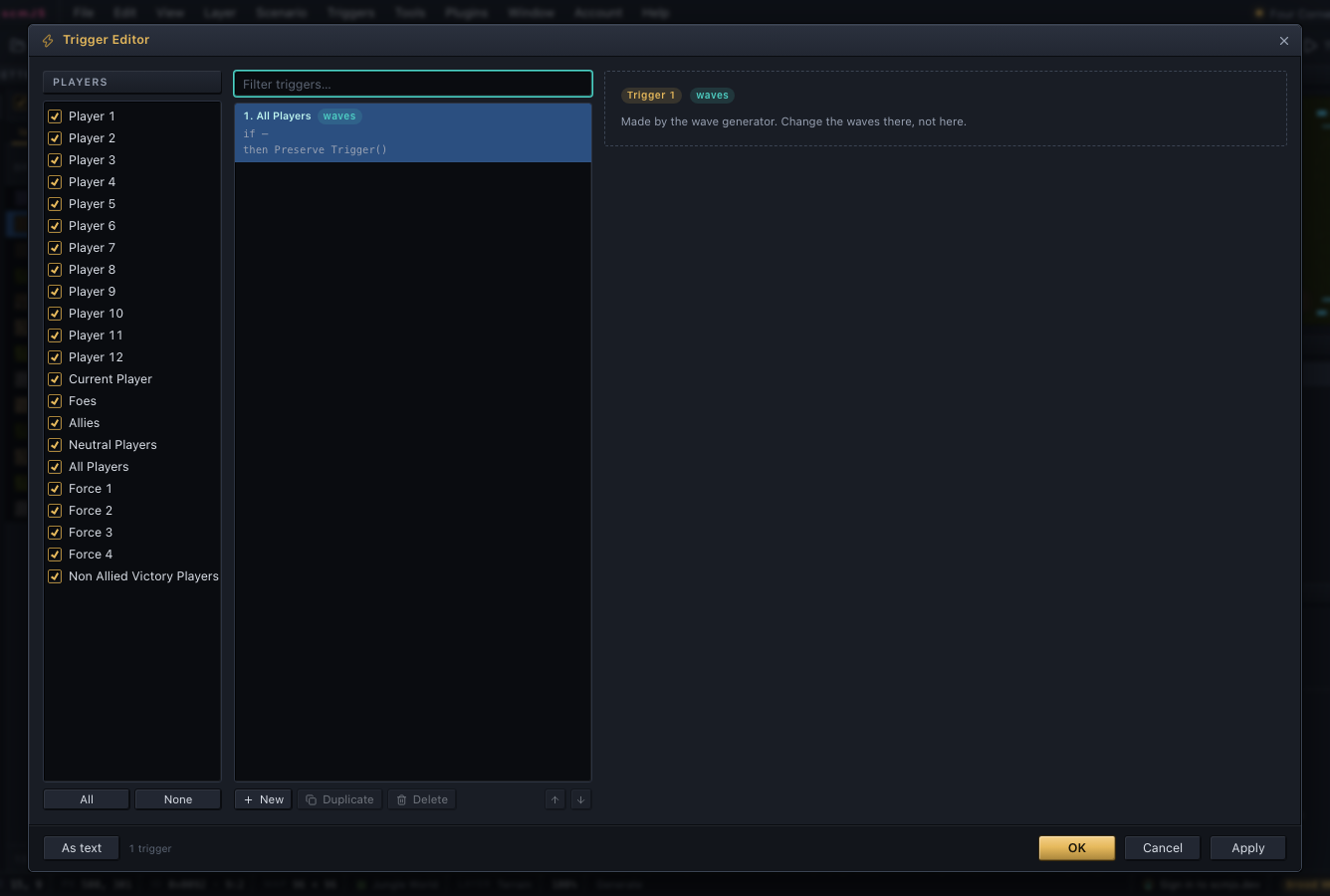
The As text button at the bottom left of the picture is a dialog slot.
api.query#
Read-only questions about the open map.
- What is where:
unitAt,spriteAt,doodadAt,locationAt,unitsIn,unitsOf,startLocations,fogAt. - Placement:
placement(unitId, x, y)gives the Units palette's verdict with a reason in words;doodadPlacementchecks a doodad's ground. - The editor's own tools:
validate()(Check Map's issues),statistics(),find(options)(the Ctrl+F search),strings(),stringUsage(),unusedStrings().
A map linter is mostly validate() and somewhere to go. An issue's target is a unit,
location or trigger that view.goTo accepts, or a settings dialog to open:
const issues = api.query.validate();
for (const issue of issues) api.log(issue.level, issue.where, issue.text);

const target = issues.find((i) => i.target)?.target;
if (target?.kind === "dialog") api.ui.open(target.id);
else if (target) api.view.goTo(target);
Where a Command Center fits, asked the way the Units palette asks:
const at = await api.ui.pickTile({ prompt: "Click where the Command Center should go" });
if (at) {
  const t = api.consts.tile;
  const verdict = api.query.placement(106, at.x * t, at.y * t); // 106 is the Terran Command Center
  api.ui.status(verdict?.problem ? `Blocked: ${verdict.reason}` : "It fits.");
}
api.view#
Where the map view is looking, and showing the user something.
zoom/setZoom,visible(),center(x, y),cursorTile(), the View menu's options (flags/setFlags) and grid size.goTo(target)scrolls to a tile, unit, sprite or location and selects it, or opens the Trigger Editor on a trigger ({ kind: "trigger", index }).reveal(rect)glides the view to show an area, and resolvesfalseif the user moved the view first. A plugin following its own work should stop following then.flash(target)briefly highlights tiles, units or locations. Use it for "this just changed" so every plugin's highlight looks the same.
// Visit each start location in turn, until the user takes the view back.
for (const start of api.query.startLocations()) {
  const area = { x0: start.tx - 6, y0: start.ty - 6, x1: start.tx + 6, y1: start.ty + 6 };
  if (!(await api.view.reveal(area))) break;
  api.view.flash({ units: [start.index], kind: "attention" });
  await new Promise((next) => setTimeout(next, 800));
}
api.data#
The game's own tables (units.dat and the rest): hit points, costs, weapons, flags,
graphics. Call load() first. Everything is null when the game data was never installed,
so degrade instead of throwing.
if (await api.data.load()) {
  const units = api.data.units()!;
  // units.dat keeps hit points in 256ths.
  api.log(`Marine: ${units.hitPoints[0] / 256} HP, ${units.mineralCost[0]} minerals, ${api.data.race(0)}`);
} else {
  api.log("no game data installed");
}
api.gameData#
Which set of game files the editor uses (the game's own, or a mod's), and installing,
switching and removing sets; the plugin side of Help ▸ Game Data…. The "gameData" event
fires on every change.
A mod's files replace the game's in the same formats, so data, tileset, graphics and
names follow them automatically. Mods that extend the game's table sizes are not
covered. A plugin written only for the game's own data can check profile().id
("starcraft") and turn itself off for anything else.
read(path) hands over one of the extracted files as bytes, for a plugin that reads the
game's formats itself: arr/units.dat, tileset/jungle.cv5, unit/zerg/drone.grp. Paths
are the archive's, in lower case with forward slashes, and tileset/manifest.json and
unit/manifest.json list what was extracted. It answers null for a file the copy does
not have.
const source = api.gameData.source();
api.log(source ? `${source.profile.name}: ${source.label}` : "still starting up");

const dat = await api.gameData.read("arr/units.dat");
api.log(dat ? `units.dat is ${dat.length} bytes` : "no game data installed");
api.consts#
The numbers the map file is written in, so a plugin does not hard-code them: pixels per
tile, the start location and resource unit ids, the unit and sprite flag bits, the
Anywhere location's slot, and triggers, which has every condition and action type,
player group and argument value.
// Make the selected units invincible: the state bit, and the two masks that say it is set.
const { state, valid, used } = api.consts.unit;
const selected = api.selection.units();
api.document.edit("Invincible", (tx) => tx.updateUnits(selected, (u) => ({
  stateFlags: u.stateFlags | state.Invincible,
  validProperties: u.validProperties | valid.Invincible,
  validStates: u.validStates | used.State,
})));
For an argument that takes one of a fixed set of values, api.triggers.defs.choices
gives the values with their labels:
// What each argument of a Set Switch action can be.
const def = api.triggers.defs.action(api.consts.triggers.action.SetSwitch);
for (const arg of def?.args ?? []) {
  api.log(arg.label, api.triggers.defs.choices(arg.kind).map((c) => `${c.label} = ${c.value}`));
}
These live on api rather than in the npm package because the package is types only. A
value imported from it type-checks and is then undefined at run time. Anything you need
while running has to come from api.
api.graphics#
The images the map view draws, for your own lists and previews: unitImage,
spriteImage, tileImage, doodadImage, renderRect (part of the map as a PNG) and
renderClip (a Clip as the paste preview draws it). icon(kind, id) is the game's own
button picture for a unit type, an upgrade or a technology, the one its command card
shows, in yellow, or grey or white with { look: "disabled" } or { look: "selected" }.
It suits a list or a tooltip better than a unit's picture from the map. A copy of the game
data installed by an older version of the editor has no icons until it is installed again;
show the name instead.
Unit and sprite images and the icons load lazily, so the first request often returns
null. Call requestUnit / requestSprite / requestIcons, and redraw in onImageLoaded. An image is the editor's
own cached canvas: draw from it onto a canvas of yours instead of moving it into your
page.
await api.graphics.load();
api.ui.panel({
  title: "Marine",
  mount(body) {
    const show = () => {
      const picture = api.graphics.unitImage(0, { owner: 1 }); // in Player 2's colours
      if (!picture) { body.textContent = api.names.unit(0); return; } // not loaded, or no graphics
      const canvas = api.ui.el("canvas", { width: picture.width, height: picture.height });
      canvas.getContext("2d")?.drawImage(picture.image, 0, 0);
      body.replaceChildren(canvas);
    };
    api.graphics.requestUnit(0);
    const loaded = api.graphics.onImageLoaded(show);
    show();
    return () => loaded.dispose();
  },
});
api.commands#
Named actions, so a menu item, a hotkey, a context-menu entry and another plugin can all reach the same one:
api.commands.register({ id: "count", title: "Count units", run: () => api.document.scenario()?.units.length ?? 0 });
api.menu.add("Tools", { label: "Count units", command: "count" });
api.hotkeys.add("Ctrl+Alt+U", { command: "count" });

// Any plugin can run it by its full id, and gets what it returns.
api.log(api.commands.run(`${api.plugin.id}.count`));
An id without a dot is prefixed with your plugin's id ("convert" becomes
"image-to-terrain.convert"); one with a dot is used as is, for a name other plugins can
rely on. run(id) runs anyone's command. Since plugins start in no fixed order, check
has(id) or listen for the "commands" event before calling another plugin's.
api.services#
A command is one action; a service is an object to share, such as an account, a server connection or a compiler. One plugin provides it by name and others reach it by that name, whichever starts first.
interface Clock { now(): number }

// The provider. The name becomes "<plugin id>.clock".
api.services.provide<Clock>("clock", { now: () => Date.now() }, { version: 1 });

// A consumer, in any plugin, whichever of the two started first.
api.services.watch<Clock>(`${api.plugin.id}.clock`, (clock, info) => {
  api.log(clock ? `clock v${info?.version}: ${clock.now()}` : "no clock yet");
});
watch calls you immediately and again whenever the provider changes. Names follow the
command rule. The object's shape is up to the provider: publish a contract.d.ts in its
repository for consumers to import with import type, and pass a version to provide
so consumers can check it. The scmjs.dev plugin provides its account this way as
scmjs-dev.account, and eudplib its compiler as eudplib.build.
api.sync#
Editing a map together. The editor turns each change to the map into an op (plain JSON) and applies other people's ops in the order a server gives. Your plugin carries them between the two. The scmjs.dev plugin's shared maps are built on this.
This example needs a server of your own, so it has no Try it link:
const session = api.sync.start({
  send: (op) => socket.send(JSON.stringify({ type: "op", op })),
  onEnd: (reason) => leaveRoom(reason),
});
socket.onmessage = (m) => {
  const msg = JSON.parse(m.data);
  if (msg.type === "ack") session?.confirm();      // the server accepted our oldest op
  if (msg.type === "op") session?.receive(msg.op); // someone else's, in the server's order
};
The server's job is small: put everyone's ops in one order, confirm each to its sender, and pass it on to the others. It never needs to read the map.
The editor does the rest. Your own ops apply at once. If someone else's arrives before the server has confirmed yours, the editor undoes yours, applies theirs and reapplies yours, so every editor ends with the same map. Changes find their objects by content, so an edit to a unit someone else deleted is dropped.
startanswers null when no map is open or another session is already running.- Incoming ops wait while the user holds a mouse button on the map, while a dialog that
edits the map is open, or while another map is in front (
holding()says which). snapshot()is the map as a file for people joining. It is null while anything is pending.- One session runs at a time. It ends on
stop(), when the map closes, or when the plugin is turned off. If the server rejects one of your ops, end the session: your copy no longer matches.
api.terrain#
Read-only help with the current tileset: the terrains that can be painted (types,
isomTypes), what a tile is (tileInfo, terrainAt, color, heightOf), the ISOM
lattice (diamondAt, diamondsIn), floodRegion and blendCandidates. Also the
Terrain palette's current brush (active / setActive) and Tools ▸ Symmetry
(symmetry / setSymmetry, mirror).
await api.tileset.load();
for (const t of api.terrain.types()) api.log(t.id, t.name, `height ${t.height}`, t.buildable ? "buildable" : "");

// How much of the map is the same ground as the tile under the pointer.
const { x, y } = api.view.cursorTile();
api.ui.status(`${api.terrain.floodRegion(x, y).length} tiles in this region`);
checkIsom() measures how well the ISOM lattice matches the tiles. Offer a rebuild when
it reports stale, not merely mismatched: some mismatch (hand-placed tiles, blends)
never goes away.
const report = await api.terrain.checkIsom();
if (report?.stale && (await api.ui.confirm("The isometric data is out of step with the tiles. Rebuild it?"))) {
  api.document.edit("Rebuild ISOM", (tx) => { tx.rebuildIsom(); });
}
api.tileset#
The open map's tileset: id(), name(), isLoaded(), load() and raw() for the
decoded data. load() resolves false when the graphics were never installed, which is
a normal state. load("jungle") fetches another tileset without changing the map, which
graphics.renderClip needs to draw a clip from a map on that tileset.
if (await api.tileset.load()) api.log(`${api.tileset.name()} is loaded`);
else api.ui.toast({ kind: "warn", title: "No tileset graphics", detail: "Install them from Help ▸ Game Data…" });
api.selection#
The marked area (markedArea / markArea), the selected units, sprites, doodads and
locations (by index, with a setter for each), the active layer, and the Layers panel's
locks.
// Select Player 1's units inside the marked area.
const area = api.selection.markedArea();
if (area) {
  const mine = new Set(api.query.unitsOf(0));
  api.selection.setLayer("units");
  api.selection.setUnits(api.query.unitsIn(area).filter((i) => mine.has(i)));
} else {
  api.ui.status("Mark an area on the Clipboard layer first.");
}
api.clipboard#
The Cut / Copy / Paste layer, sharing the user's clipboard: copy, cut, paste,
clip / setClip, and the parts and paste mode. A Clip can be pasted into another map.
capture() returns what copy would take without touching the user's clipboard, for a
plugin that keeps its own clips, like Stamp Library.
// Take the top-left 8 × 8 tiles without touching the user's clipboard,
// and stamp them twice in one undo entry.
const clip = api.clipboard.capture({ rect: { x0: 0, y0: 0, x1: 8, y1: 8 } });
if (clip) {
  api.ui.status(api.clipboard.summary(clip));
  api.document.edit("Stamp twice", (tx) => {
    tx.paste(clip, 8, 0);
    tx.paste(clip, 16, 0);
  });
}
api.exchange#
The formats behind File ▸ Import / Export: SCMDraft's .trg trigger files
(encodeTrg / decodeTrg) and the tab-separated strings file (formatStrings /
parseStrings).
// The triggers as a .trg file SCMDraft opens.
const trg = api.exchange.encodeTrg(api.triggers.list());
await api.ui.saveFile(trg, "triggers.trg");
api.palette#
What the Units, Sprites, Doodads and Fog palettes have picked and what they list, so a
plugin can use "whatever the user chose" without a picker of its own. Paint does this.
It also holds the placement rules (collision, terrain, snap to grid, remove stranded
units) that placeUnit, canPlaceUnit and query.placement follow. The Terrain
palette's pick is terrain.active().
// Place whatever the Units palette has picked, for the player it has picked.
const { unit, owner } = api.palette.active();
const at = await api.ui.pickTile({ prompt: `Click where the ${api.palette.unitName(unit)} goes` });
if (at) {
  const t = api.consts.tile;
  api.document.edit("Place", (tx) => { tx.placeUnit(unit, owner, at.x * t + t / 2, at.y * t + t / 2); });
}
api.names#
The names behind the numbers in a map: units, upgrades, techs, weapons, player types,
races, player groups, trigger types and AI scripts from the game (with a mod's own names
under a mod's data set, see docs/game-data.md), and strings,
locations, switches, players and tiles from the open map. The list forms return
{ value, label }[] for a drop-down.
// How many of each unit type the map has, by name.
const counts = new Map<string, number>();
for (const u of api.document.scenario()?.units ?? []) {
  const name = api.names.unit(u.unitId);
  counts.set(name, (counts.get(name) ?? 0) + 1);
}
api.log([...counts].sort((a, b) => b[1] - a[1]));

// A list form, straight into a drop-down.
const upgrade = api.ui.widgets.select(api.names.upgrades());
api.text#
StarCraft's text control codes (bytes 0x01–0x1F, written <XX>), from the same table the
String Editor uses. Use it rather than your own copy: the numbering is easy to get wrong.
codes()lists every code;runs(text)splits a string into coloured runs the way the game draws it;plain(text)removes the codes.- Colour carried across lines. The original game reset the colour at each line break;
Remastered carries it on.
bleedingLinesfinds lines that now draw in a colour their author did not choose, andfixBleedingfixes them without changing the text. - Stacked text. The original game drew
Name<12>by Authoras two pieces on one line; Remastered does not.stackedLinesfinds these lines andflattenStackslays them out left to right. The original look cannot be restored, so offer this repair rather than applying it by default.
Repair's string checks are these functions over api.query.strings().
// Every string in the map as the game would draw it, one coloured span per run.
const lines = api.query.strings().flatMap((s) => (s ? api.text.runs(s) : []));
api.ui.dialog({
  title: "Strings as the game draws them",
  mount(body) {
    body.style.background = "#000";
    for (const line of lines.slice(0, 40)) {
      body.append(api.ui.el("div", {}, ...line.runs.map((run) => api.ui.el("span", { style: { color: run.color } }, run.text))));
    }
  },
});
// Fix every string whose colour carries onto a line that did not ask for it.
const strings = api.query.strings();
const result = api.document.update("Fix carried colours", (tx) => {
  strings.forEach((s, i) => {
    if (s && api.text.bleedingLines(s).length > 0) tx.strings.set(i, api.text.fixBleeding(s));
  });
});
api.ui.status(result.changed ? "Strings repaired." : "Nothing to repair.");
api.ui#
Everything a plugin shows. The main pieces:
| Call | What it is |
|---|---|
status, toast |
The status bar, and a notice over the map that goes away by itself. |
confirm, alert, prompt |
Simple questions in the editor's style. |
dialog(spec) |
A modal dialog. |
panel(spec) |
A panel that floats over the map, sits in the right-hand dock, or sits in a strip under the map. |
mapView(spec) |
Another way to look at a map, shown in the map's place, with a switch between it and the map. |
statusItem(spec) |
A cell of your own in the status bar. |
mapButton(spec) |
A button in the row at the map's bottom-right corner. |
dialogSlot(id, spec) |
A button or row added to a built-in dialog's footer. |
preferencesPage(spec) |
A page of your own in Edit ▸ Preferences. |
mapTool(spec) |
Take over the pointer on the map. |
overlay(spec) |
A drawing over the map the user can switch on and off. |
pickArea, pickTile, pickObject, pickFiles |
Ask the user to choose something. |
widgets, el |
Build dialog and panel content in the editor's style. |
tooltip(element, content) |
A tooltip in the editor's style over an element of yours, in place of the browser's. |
progress |
A progress panel over the map for long work. |
saveFile, loadImage, readClipboardImage |
Files and pictures. |
open, ask, openDialogs |
Built-in dialogs. |
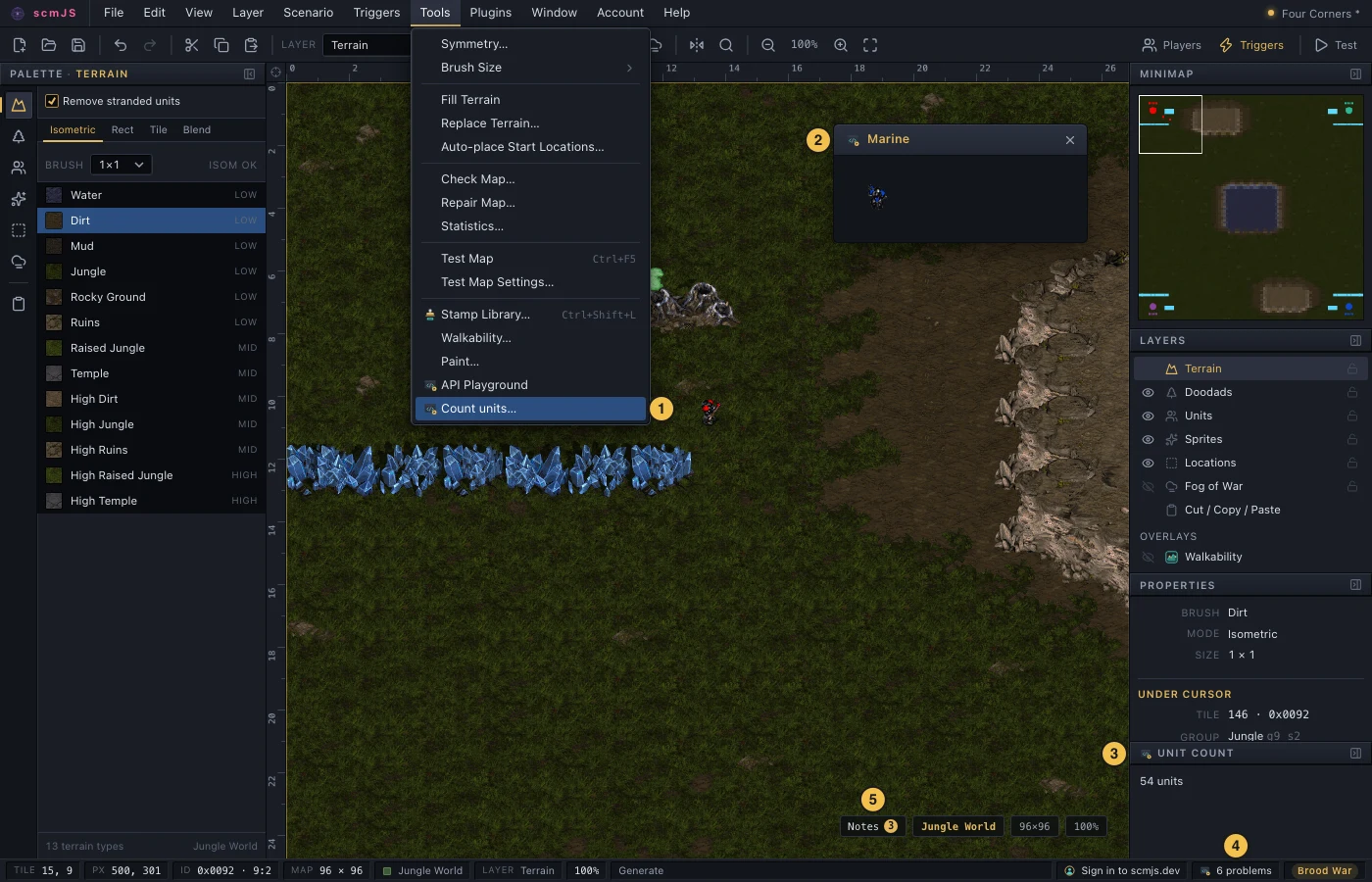
Where the main pieces appear: a menu item (1), a floating panel (2), a docked panel (3), a status bar cell (4) and a map button (5). The icon beside each is the plugin's own.
There is no framework here. A dialog or panel gives you an empty element, and you fill
it with plain DOM. api.ui.widgets builds buttons, fields, forms and lists in the
editor's own style, and api.ui.el(tag, props, ...children) makes any other element.
widgets.tabs gives a row of tabs over a panel each, filled the first time it is shown
and kept after, and widgets.segmented a few buttons of which one is on, for a short
choice that should stay in view.
Questions resolve with the answer, or null / false when the user cancels:
const name = await api.ui.prompt("Name the map", { value: api.document.info()?.name, confirmLabel: "Rename" });
if (name) {
  api.document.update("Rename", (tx) => tx.properties({ name }));
  api.ui.toast({ kind: "ok", title: "Renamed", detail: name });
}
Tooltips. api.ui.tooltip(element, content) puts the editor's own tooltip on an
element of yours. The content is a line of text, or a function that builds what to show
where the pointer is: rows, bars, pictures. A function is called again as the pointer
moves, so a chart can say what is under it. Return null to show nothing at that spot.
The editor keeps the tooltip beside the pointer and on screen, and removes it when the
pointer leaves. Leave out the element's title, or the browser's tooltip shows as well.
api.ui.tooltip(canvas, (at) => {
  const i = Math.floor((at.offsetX / canvas.clientWidth) * minerals.length);
  return minerals[i] === undefined ? null : api.ui.el("div", {}, api.ui.el("b", {}, String(minerals[i])), " minerals");
});
Dialogs are modal and cover the map. mount(body, handle) fills an empty element;
buttons sets the footer (an empty list removes it); onPaste and onDrop receive
pasted or dropped files and text. To pick something on the map from a dialog, close it,
pick, and reopen it with the result, as Terrain from Image does. A dialog can offer a slot
of its own (spec.slot) for other plugins to add to.
const w = api.ui.widgets;
const owner = w.select(Array.from({ length: 8 }, (_, slot) => ({ value: slot, label: api.names.player(slot) })));
const count = w.number({ value: 4, min: 1, max: 12 });

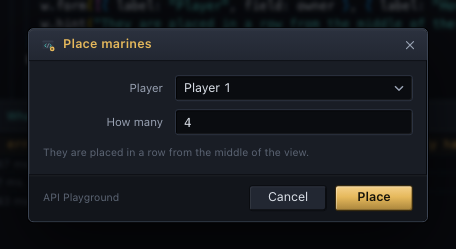
api.ui.dialog({
  title: "Place marines",
  size: "sm",
  mount: (body) => body.append(
    w.form([{ label: "Player", field: owner }, { label: "How many", field: count }]),
    w.hint("They are placed in a row from the middle of the view."),
  ),
  buttons: [
    { label: "Cancel" },
    {
      label: "Place",
      primary: true,
      run: () => {
        const view = api.view.visible();
        const t = api.consts.tile;
        const y = ((view.y0 + view.y1) / 2) * t;
        const x = ((view.x0 + view.x1) / 2) * t;
        api.document.edit("Place marines", (tx) => {
          for (let i = 0; i < Number(count.value); i++) tx.placeUnit(0, Number(owner.value), x + i * t, y);
        });
      },
    },
  ],
});
Panels block nothing: the user keeps editing while one is open. A floating panel can
be dragged and, with resizable: true, resized. With maximizable: true a button in its
title strip, or a double-click on the strip, makes it fill the map's area and puts it back,
for a window of charts or tables read at length (handle.maximize() does it too). dock: "right" puts it in the dock
under the built-in panels, which suits anything kept open while working. dock: "bottom"
puts it in a strip under the map, as wide as the map, for things read across its width
such as a timeline. The user drags the strip's top edge to make it taller or shorter;
height sets where it starts.
// A unit count that follows the map, docked under the built-in panels.
api.ui.panel({
  title: "Unit count",
  dock: "right",
  mount(body) {
    const show = () => { body.textContent = `${api.document.scenario()?.units.length ?? 0} units`; };
    show();
    const sub = api.events.on("units", show);
    return () => sub.dispose();
  },
});
File types let a plugin open a kind of file the editor doesn't. Once you claim an
extension, a file with it that is dropped on the editor or picked in File ▸ Open comes to
you instead of being read as a map. Several dropped together arrive in one call. The
editor's own .scm, .scx and .chk can't be claimed, and the first plugin to claim an
extension keeps it.
// Replays dropped on the editor, or picked in File ▸ Open, come here.
api.ui.fileType({
  name: "StarCraft replay",
  extensions: [".rep"],
  open: (files) => api.log(`${files.length} replays: ${files.map((f) => f.name).join(", ")}`),
});
Map views show something else where the map is drawn: a replay's game played out, a
picture of the map made another way. You choose which maps offer the view. A map that
offers one has a small switch in the top-left corner of its area, Map first and then
your view by its title, and each map stays on whichever the user left it on. You can also
switch it yourself with show. The editor gives the view one element for its whole life
and never moves it, so an iframe inside isn't loaded again when the user switches back
and forth or goes to another tab and back.
// A view of its own for the maps this plugin opens.
const game = api.ui.mapView({
  title: "Game",
  mount(el) {
    const frame = document.createElement("iframe");
    frame.src = "https://example.com/viewer/";
    frame.style.cssText = "border: 0; width: 100%; height: 100%";
    el.append(frame);
  },
});
game.onChange((shown) => api.log(shown ? "the game is shown" : "the map is shown"));

// A map just opened is the one in front: offer the view there and show it.
if (await api.document.open(bytes, "replay.scx", { viewOnly: { label: "Replay" } })) game.show(true);
A view that can be moved around the map should feel like the map itself. Three things make
that happen. Say where the view is looking with setCamera, in map pixels (its middle and how
much of the map it shows). The editor's minimap then draws its box there, and switching back
to Map opens the map on the same place at the same scale. onShow hears where the map was
looking when the user switches to your view, so you can open there. And minimap replaces
what the minimap shows while your view is in front. The minimap draws the map's ground, then
your draw in place of the map's units, start locations and fog, and a press or a drag on it
goes to your press instead of moving the hidden map.
let units: { x: number; y: number; colour: string }[] = [];
const replay = api.ui.mapView({
  title: "Replay",
  mount: (el) => el.append(frame),
  onShow: (look) => viewer.lookAt(look.x, look.y, look.height),
  minimap: {
    draw(ctx, m) {
      for (const u of units) { ctx.fillStyle = u.colour; ctx.fillRect(m.x(u.x) - 1, m.y(u.y) - 1, 2, 2); }
    },
    press: (x, y) => viewer.lookAt(x, y),
  },
});
viewer.onMove((c) => replay.setCamera({ x: c.x, y: c.y, width: c.width, height: c.height }));
viewer.onUnits((list) => { units = list; replay.redrawMinimap(); });
Status items and map buttons are for things that should stay visible without a panel,
like a background job or an unread count. Keep the handle and call set(...) as things
change. Use map buttons sparingly; the row is small.
// Check Map's problem count in the status bar; a click opens the full list.
const count = () => api.query.validate().filter((i) => i.level !== "info").length;
const cell = api.ui.statusItem({ text: `${count()} problems`, onClick: () => api.ui.open("validateMap") });
api.events.on("commit", () => {
  const n = count();
  cell.set({ text: `${n} problems`, warn: n > 0 });
});
Preferences pages are where settings belong, rather than behind a menu item of your own. One page per plugin, listed under Plugins.
const settings = api.storage.get("settings", { dock: "float" });
let pending: (() => void) | null = null;

api.ui.preferencesPage({
  mount(body) {
    const w = api.ui.widgets;
    const dock = w.select([{ value: "float", label: "Floating" }, { value: "right", label: "Docked" }], { value: settings.dock });
    body.append(w.form([{ label: "Panel", field: dock }]), w.hint("Where the panel opens."));
    pending = () => api.storage.set("settings", { dock: dock.value });
  },
  // OK and Apply write it; Cancel leaves the stored value alone.
  apply: () => pending?.(),
});
api.ui.open("preferences", { page: `plugin:${api.plugin.id}` });
Dialog slots add a button or row to a built-in dialog's footer, or to another
plugin's dialog that offers one. Your mount receives the dialog's fields: the form as
the user sees it, not yet applied to the map. The slot can read a field and fill it in,
and the user still presses OK.
| Dialog id | Fields it lends |
|---|---|
mapProperties |
name, description |
triggerEditor, missionBriefing |
selected, modified |
stringEditor, playerSettings |
none |
trigedit.text (TrigEdit's Text Trigger Editor) |
text |
selected is the index of the selected trigger as text ("" for none), and setting it
selects a different row. modified is "1" while the dialog holds changes that have not
been applied. Closing the dialog from a slot discards those changes, so ask first when it
is set.
// A button in the Trigger Editor that shows the selected trigger as text.
api.ui.dialogSlot("triggerEditor", {
  mount(body, dlg) {
    body.append(api.ui.widgets.button("As text", { onClick: () => {
      const trigger = api.triggers.list()[Number(dlg.fields.selected.get())];
      if (trigger) void api.ui.alert(api.triggers.text.one(trigger), { title: "Trigger text" });
    } }));
  },
});
Map tools receive every press, move and release on the map before the active layer does, and can draw a preview. Esc or a right-click stops the tool, and only one runs at a time. Paint is the example.
// Click to drop a marine, with a ring under the pointer. Esc or a right-click ends the tool.
let at: { px: number; py: number } | null = null;
const tool = api.ui.mapTool({
  name: "Drop marines",
  hint: "click to place, Esc to stop",
  onMove(p) { at = p.inMap ? p : null; tool.redraw(); },
  onDown(p) { api.document.edit("Drop a marine", (tx) => { tx.placeUnit(0, 0, p.px, p.py); }); },
  draw(ctx, view) {
    if (!at) return;
    ctx.strokeStyle = "#ffd24a";
    ctx.beginPath();
    ctx.arc(view.x(at.px), view.y(at.py), view.tilePx / 2, 0, Math.PI * 2);
    ctx.stroke();
  },
});
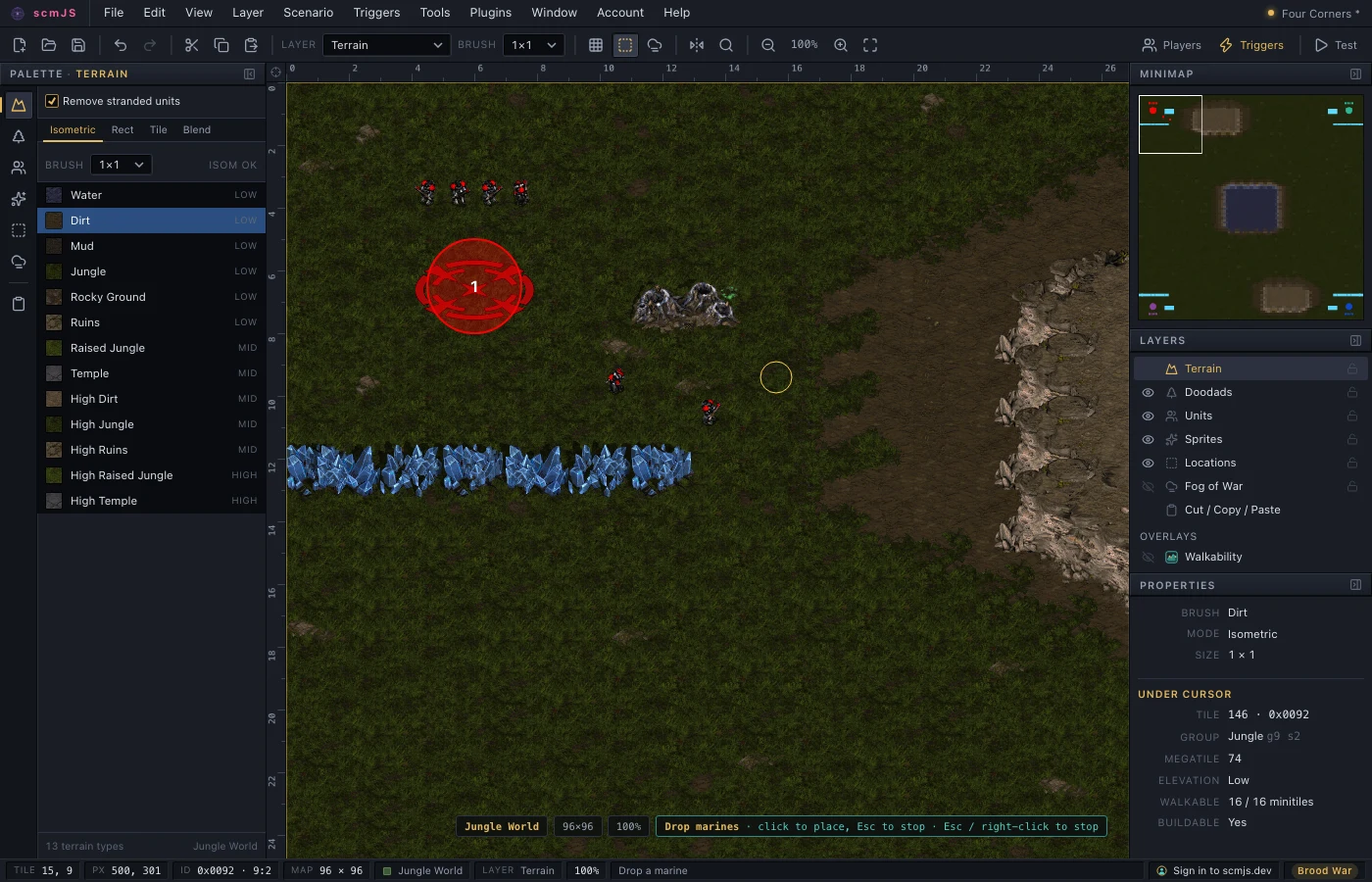
In draw, view.x(px) and view.y(py) turn map pixels into canvas pixels, and
view.tilePx is the size of a tile on screen at the current zoom.
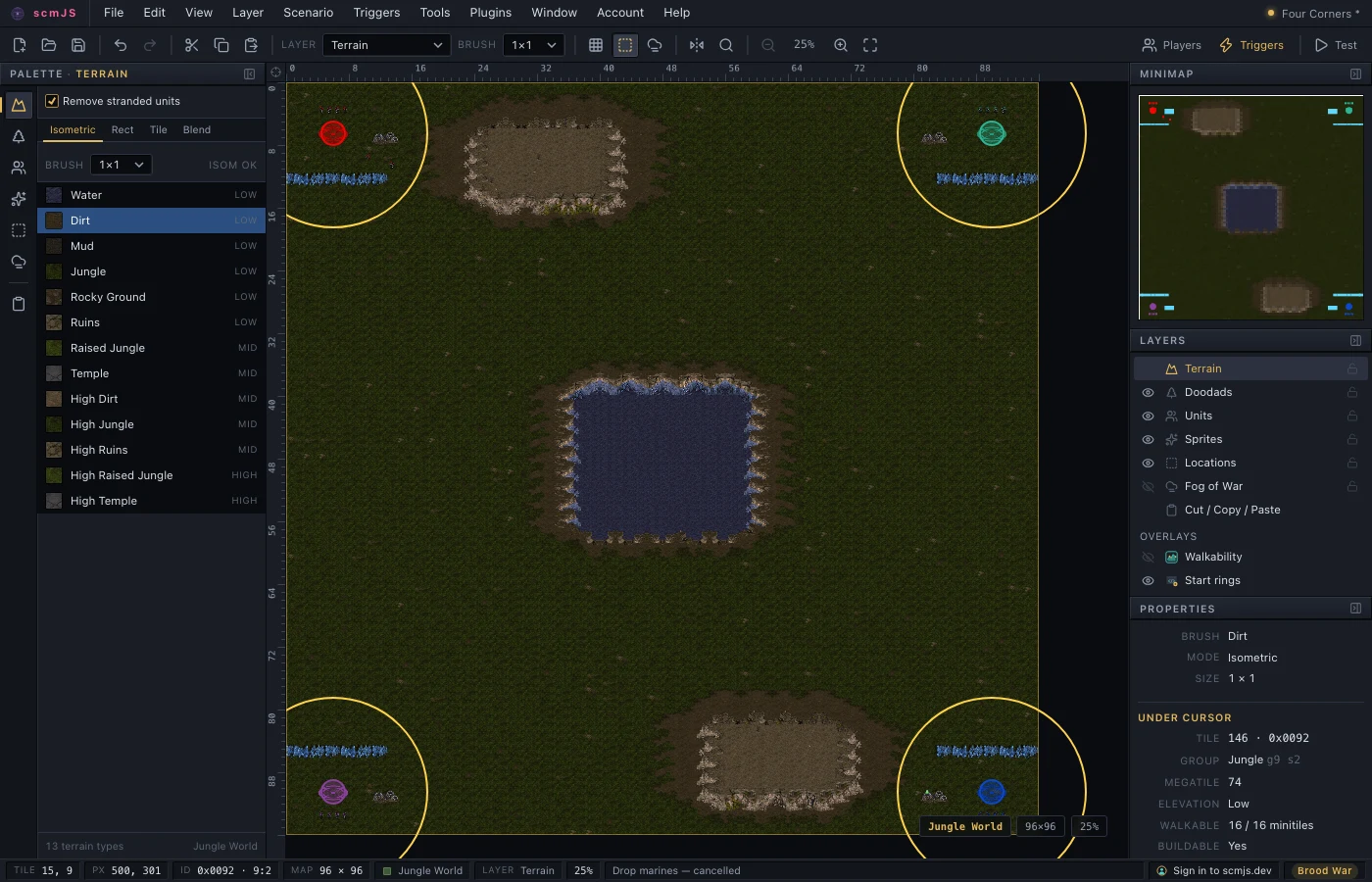
Overlays draw over the map while the user works on any layer, and never take the pointer. They appear under View and in the Layers panel with a visibility toggle. Walkability is the example.
// A ring twelve tiles wide round every start location, listed under View ▸ Overlays.
const overlay = api.ui.overlay({
  name: "Start rings",
  above: "objects",
  draw(ctx, view) {
    ctx.strokeStyle = "#ffd24a";
    ctx.lineWidth = 2;
    for (const start of api.query.startLocations()) {
      ctx.beginPath();
      ctx.arc(view.x(start.x), view.y(start.y), 12 * view.tilePx, 0, Math.PI * 2);
      ctx.stroke();
    }
  },
});
api.events.on("units", () => overlay.redraw());
Showing that work is in progress. A dialog that does not change while it works looks
broken. ui.widgets has one set of tools for this, so plugins look alike:
| Widget | When to use it |
|---|---|
spinner |
Waiting for something of unknown length. |
progressBar |
Work whose length is known, such as a download. |
skeleton |
A grey placeholder in the shape of a list or picture that is coming. |
busy(target) |
Cover a box while its contents are replaced. |
button(label, { busy }) |
Disable a button while the work it started runs. |
statusLine |
One line at the bottom of a dialog for progress, the result, errors and a Cancel. |
steps, fold |
Work in stages, and a block folded to one summary line. |
A search dialog that uses four of them. The wait stands in for a request to a server:
const w = api.ui.widgets;

function wait(ms: number, signal: AbortSignal) {
  return new Promise<void>((resolve, reject) => {
    const timer = setTimeout(resolve, ms);
    signal.addEventListener("abort", () => { clearTimeout(timer); reject(new Error("stopped")); });
  });
}

api.ui.dialog({
  title: "Find units",
  mount(body) {
    const query = w.text({ placeholder: "marine" });
    const results = api.ui.el("div", { style: { minHeight: "120px" } });
    const status = w.statusLine({ text: "Type part of a unit's name." });
    const search = w.button("Search", { primary: true, onClick: () => void run() });
    body.append(w.row(query, search), results, status);

    async function run() {
      const stop = new AbortController();
      const cover = w.busy(results, "Searching…");
      status.busy("Searching…");
      status.cancel(() => stop.abort(), "Stop");
      search.setBusy(true);
      try {
        await wait(1500, stop.signal); // your fetch goes here, with { signal: stop.signal }
        const found = api.query.find({ kind: "units", query: query.value });
        results.replaceChildren(w.list(found.map((f) => ({ label: f.label, hint: f.detail, value: f.index }))));
        status.set(`${found.length} found.`, "ok");
      } catch (error) {
        status.set(stop.signal.aborted ? "Stopped." : String(error), stop.signal.aborted ? "warn" : "error");
      } finally {
        cover.done();
        search.setBusy(false);
        status.cancel(null);
      }
    }
  },
});
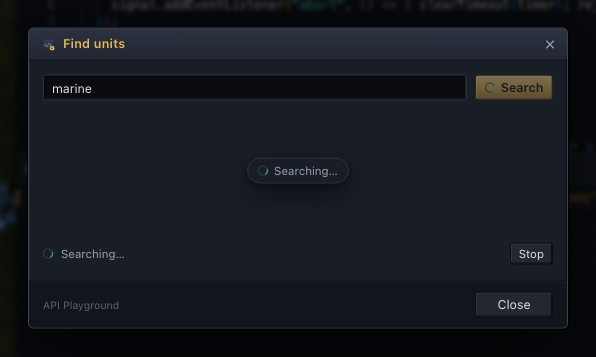
Work started from a dialog belongs on that dialog's status line. ui.progress is for work
that runs while the user carries on editing the map.
api.menu / api.contextMenu / api.hotkeys#
References: menu, context menu, hotkeys
menu.add(path, item).pathis a menu ("Tools") or a submenu ("File/Import"), always in English, and so is the item'slabel: labels are how items find each other, whatever language the menu shows. The editor translates built-in labels itself, and yours through the catalogues you register withapi.i18n. Items go at the end of the menu unlessafternames an item to follow. A path that names no existing submenu creates one for your plugin ("Tools/AI"), and one that names no menu creates a top-level menu before Help ("Account").icon: "plugin"marks an item with your plugin's icon.contextMenu.add(surface, item). Surfaces are"viewport"(the map) and"terrainPalette". The item's functions receive what was under the pointer. A fixedlabelis English and translated like a menu label; a function label is called when the menu opens, so translate it there withapi.i18n.t.hotkeys.add("Ctrl+Shift+I", run). Plugin hotkeys are checked before the built-in ones, and never while typing or while a dialog is open.
All three accept a command id instead of run; see api.commands.
api.menu.add("Tools", {
  label: "Count units…",
  icon: "plugin",
  enabled: () => api.document.isOpen(),
  run: () => api.ui.alert(`Player 1 has ${api.query.unitsOf(0).length} units.`),
});

// Right-click the map: copy the position of the tile under the pointer.
api.contextMenu.add("viewport", {
  label: (ctx) => (ctx.tile ? `Copy position (${ctx.tile.x}, ${ctx.tile.y})` : "Copy position"),
  enabled: (ctx) => ctx.tile !== null,
  run: (ctx) => { if (ctx.tile) void navigator.clipboard.writeText(`${ctx.tile.x}, ${ctx.tile.y}`); },
});

api.hotkeys.add("Ctrl+Alt+G", () => api.view.setFlags({ grid: !api.view.flags().grid }));
api.i18n#
Translating your plugin the way the editor translates itself: the English text is the key, and a missing translation shows the English.
api.i18n.register({ ko: {
  "Count units…": "유닛 세기…",
  "{n, plural, one {# unit} other {# units}}": "유닛 {n, plural, other {#개}}",
} });
api.menu.add("Tools", {
  label: "Count units…", // English: the menu shows it through the catalogue above
  run: () => api.ui.alert(api.i18n.t("{n, plural, one {# unit} other {# units}}", { n: api.query.unitsOf(0).length })),
});
t(text, params)translates;tc(context, text, params)does the same for identical English meant two ways.- Placeholders are a subset of ICU MessageFormat:
{name},pluralandselect. For Korean,{name|을}picks the particle that agrees with the value (을/를, 이/가, 은/는, 과/와, 으로/로). - Menu labels, fixed context-menu labels, overlay names and a trigger claim's
label,badgeandopenLabelare the exception: give them in English and the editor translates them with your catalogues when it draws them. Your manifest'snameis shown the same way once the plugin is running, so a descriptive name ("Stamp Library") can have an entry; a product name needs none. languageis the current language ("en","ko"). The"language"event fires when it changes, so you can relabel what is showing.
The editor's scripts/i18n.mjs can check a plugin's catalogues against its source too;
see docs/development.md.
api.events#
on(event, fn) returns a Disposable. Listeners run after the change, in plugin
activation order, and cannot block or change it. A listener that rewrites the map (Repair
does) causes a new "document" event that every listener sees.
| Event | When |
|---|---|
"document" |
The map in front changed. reason is "open", "new", "close", "replace" (reparsed after a raw edit) or "switch" (another open map came to the front). Carries the map's id. |
"commit" |
One change was committed: reason ("edit", "undo", "redo", "tables", "whole", "remote"), its label, the tile area it touched, and which parts changed. For following changes one by one, as Timelapse does. |
"terrain" |
Any committed map edit, undo or redo. |
"units", "doodads", "sprites", "locations" |
That list changed. |
"settings", "triggers" |
A settings dialog's OK; the trigger or briefing list. |
"layer", "selection", "clipboard" |
The active layer, the selection, the marked area or clip. |
"view", "tool" |
The view moved or its options changed; a map tool or pick started or stopped. |
"palette", "options" |
A palette's pick; an editing option or preference. |
"modified", "file" |
The unsaved-changes flag; the file's name, save options, archive files or recent list. |
"commands", "services" |
A plugin added or removed a command or service. |
"dialogs" |
A dialog opened or closed. |
"gameData", "language" |
The game data or the editor's language changed. |
Only "document" and "commit" carry a payload. The others say that something changed,
and you read the new state from the API.
api.events.on("document", (e) => {
  if (e.reason === "open") api.ui.status(`Opened ${e.fileName ?? "a map"}`);
});

// Flash where each change landed, and log what kind of change it was.
api.events.on("commit", (e) => {
  if (e.area) api.view.flash({ rect: e.area, kind: "attention" });
  const parts = Object.entries(e.parts).filter(([, changed]) => changed).map(([part]) => part);
  api.log(e.reason, e.label, parts);
});
A plugin that acts on maps as they open listens for "open". One that keeps data per map
keys it on id and drops entries document.list() no longer has:
const notes = new Map<number, string[]>(); // per open map, by its id

api.events.on("document", (e) => {
  const open = new Set(api.document.list().map((map) => map.id));
  for (const id of notes.keys()) if (!open.has(id)) notes.delete(id);
  if (e.id !== null && !notes.has(e.id)) notes.set(e.id, []);
});
api.storage#
get(key, fallback), set(key, value) and remove(key) keep JSON in the browser under
your plugin's id. set returns false when the browser refuses (the quota is a few
megabytes for the whole editor), so a plugin storing the user's work can say so. Users
can see and clear your keys in Preferences ▸ Storage, so never keep the only copy of
something there.
const runs = api.storage.get("runs", 0) + 1;
const kept = api.storage.set("runs", runs);
api.log(kept ? `run number ${runs}` : "the browser's storage is full");
For data that belongs to one map, use document.extras instead, so it travels with the
file.
api.scope()#
A child of your api that can be removed as a whole. Everything registered through
scope.api (menu items, hotkeys, listeners, panels, dialogs, overlays, map tools,
commands, services) is removed when you call scope.dispose(), and the plugin's own
registrations stay. After the dispose, writes to the map through scope.api are refused,
as they are for a plugin that has been turned off, so a timer or a request that finishes
late cannot change the map. Scopes can contain scopes, and turning the plugin off removes
every scope it made.
// A mode the user turns on and off: its menu item and listener come and go together.
let mode: ReturnType<typeof api.scope> | null = null;

api.menu.add("Tools", {
  label: "Toggle Watch Mode",
  run: () => {
    if (mode) {
      mode.dispose();
      mode = null;
      return;
    }
    mode = api.scope();
    mode.api.menu.add("Tools", { label: "Watch Mode is on", enabled: () => false });
    mode.api.events.on("commit", (e) => api.log("changed:", e.label));
  },
});
It is for a plugin that runs other code for a while and then takes it back: the API Playground runs each snippet in a scope. A scope uses the plugin's own id, storage and name in the log. Timers and sockets are not registrations, so clear them yourself.
api.plugin, api.apiVersion, api.log(...)#
Your plugin's id, name and source, the API version, and a logger. log writes to
the browser console and to the editor's View ▸ Debug Console, which users copy into bug
reports, so write lines someone else could follow. The console also records when your
plugin starts, the edits it makes, and listeners that throw; with Verbose on, it
records every API call.
api.log(`${api.plugin.name} (${api.plugin.id}) from ${api.plugin.source}, API ${api.apiVersion}`);