
Writing a plugin
A plugin is one TypeScript or JavaScript file exporting an activate(api) function, next
to a plugin.json, in a public repository. There is no build step to start with: the
editor fetches the source, transpiles it in the browser and calls activate.
Your first plugin walks through writing one. This part is the reference for each piece.
Trying the API first#
The API Playground plugin lets you
call the API before setting anything up. Install it from Plugins ▸ Browse Plugins… and
open Tools ▸ API Playground. Its panel has a code editor where api is already defined.
Write a few lines, press Ctrl+Enter, and they run against the open map.
- Stop removes everything the run added: menu items, listeners, panels, overlays, map tools and timers. Running again stops the previous run first.
- Undo Run undoes the run's edits to the map.
- The list at the top has worked examples, one idea each.
- Export as Plugin… saves the snippet as a zip holding
plugin.json, aplugin.tswith the snippet as the body ofactivate, and the typings and build setup described below. - A whole
plugin.tspasted in runs too: itsactivateis called, and what it returns is called on Stop.
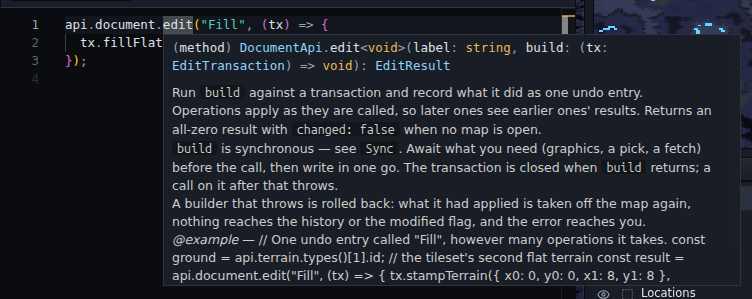
Type api. for completion. Hovering over a name shows its documentation, the same text
as the API reference.
On the documentation site, an example that runs as it is written has a Try it link. It opens the editor with the example in the playground, and offers to install the playground if you do not have it. Nothing runs until you press Run. Copy Link, at the foot of the panel, makes the same kind of link for your own snippet.
Examples without a link are fragments: they need something only your plugin has, such as a server to talk to.
Starting a plugin#
Start from Hello World, or from a snippet
exported from the playground. Hello World's plugin.ts is about sixty lines, mostly
comments, and the typings, type-check, build and CI described below are already set up
in it.
The two files#
plugin.json:
{
  "name": "Hello",
  "version": "1.0.0",
  "description": "Says hello from the Tools menu.",
  "entry": "plugin.ts",
  "icon": "icon.svg",
  "api": 1
}
| Field | Meaning |
|---|---|
name |
The only required field. |
id |
Used for storage keys and log lines. Derived from name when absent. |
version, description, author, homepage |
Shown on the Add screen and in Manage Plugins. |
entry |
The source file. Defaults to plugin.ts, then plugin.js. |
api |
The API version the plugin needs. An older editor refuses to load it. |
icon |
See The icon. |
build |
A pre-built bundle to load instead of the source. See Building. |
requires |
Other plugins this one needs. See Requiring another plugin. |
plugin.ts:
import type { PluginApi } from "@scm-js/plugin-api";

export default function activate(api: PluginApi) {
  api.menu.add("Tools", {
    label: "Say Hello",
    enabled: () => api.document.isOpen(),
    run: () => api.ui.status(`Hello, ${api.document.info()?.name}!`),
  });
}
Everything add and on return is a Disposable. Keep the ones you want to remove early
and ignore the rest: turning the plugin off disposes all of them. A function returned from
activate also runs when the plugin is turned off, for things the API does not know about,
such as timers or sockets:
import type { PluginApi } from "@scm-js/plugin-api";

export default function activate(api: PluginApi) {
  const timer = setInterval(() => api.log("still running"), 60_000);
  return () => clearInterval(timer);
}
activate may be async.
Developing locally#
npx serve --cors .
Paste http://localhost:3000/ into Plugins ▸ Manage Plugins…, and press Reload on its
row after each change.
The typings#
npm i -D @scm-js/plugin-api
The package is types only: one index.d.ts. The import type line is removed before the
file runs, so the package matters only for editing and type-checking. The same files are
tagged at scm-js/plugin-api if you prefer a git
dependency.
The package's major version is the API version, so ^1 in package.json is right. New
calls do not change the version, since they break nothing that does not use them; the
version is kept for a change that would.
What the editor does for you#
- Every edit is one undo entry.
api.document.edittakes a label and a function, applies your operations, and commits them as one history entry, the way a brush stroke is recorded. The right file sections are saved, the map repaints, and doodads or units your terrain change left stranded are handled in the same entry. If your function throws, the edit is rolled back. - What you add is removed for you. Menu items, hotkeys, dialogs, panels, overlays, map tools and listeners are all tracked, and turning the plugin off, reloading or removing it takes them away whether or not you cleaned up.
- The map you read cannot be written by accident.
document.scenario()and a transaction'sscenarioare typed read-only all the way down, so a change has to go throughedit,updateorsections, where it is recorded. - Reading is safe with no map open. Reads answer
null,[]orfalseinstead of throwing. The exception is the raw-bytes path,document.sections, whosefile()andbytes()throw. - The game's graphics may be missing. The editor works without Blizzard's data, so anything needing the tileset degrades: a terrain operation writes nothing and says so in its result. Check what you get back.
Imports and dependencies#
- Relative imports work, with or without an extension (
./convert,./convert.jsmeaningconvert.ts, or a folder'sindex.ts). - Package imports need a bundle.
import x from "some-package"is refused when the editor loads source, because it has no module resolver.import typefrom@scm-js/plugin-apiis fine, since it is removed first. For a real dependency, ship a bundle (see Building). - There is no UI framework to import. Dialogs and panels hand you a DOM element, and
api.ui.widgetsbuilds controls in the editor's style. If you want a framework, bundle it.
The icon#
icon is shown in Manage Plugins and in the title bar of your plugin's dialogs.
icon |
Meaning |
|---|---|
"icon.svg", "art/mark.png" |
An image beside the manifest (.png .svg .jpg .gif .webp .avif .ico). |
"https://…/mark.png" |
An image anywhere. |
"data:image/svg+xml,…" |
An image inline in the manifest. |
"🗺️" |
Up to four characters, drawn as text. |
Anything else, or an image that fails to load, shows the default plugin mark. Draw for a
30 px square (it is also shown at 14 px) with no frame: an icon that is a bordered square
looks like a second checkbox next to the row's own. Terrain from Image's icon.svg is an
example.
Building#
A plugin can ship a bundle and name it in the manifest:
"build": "dist/plugin.js"
The editor then imports that one file instead of compiling your source file by file. It
is faster for anything bigger than one file, and the only way to use an npm dependency.
Keep entry in the manifest too: it is what people read, and what loads when no bundle
is published.
The project's plugins all build with one esbuild command:
"build": "esbuild plugin.ts --bundle --format=esm --target=es2022 --platform=browser --outfile=dist/plugin.js",
"dev": "npm run build -- --watch"
Commit dist/plugin.js, because the editor loads it straight from the repository at the
version the address names. The shared workflow in
scm-js/.github does the rest:
name: CI
on:
  push: { branches: [main], tags: ["v*"] }
  pull_request:
  schedule: [{ cron: "0 6 * * 1" }]
permissions: { contents: write }
jobs:
  ci:
    uses: scm-js/.github/.github/workflows/plugin-ci.yml@main
- On a push to
mainit type-checks, tests, rebuilds the bundle and commits it. - On a
v*tag it rebuilds and checks the committed bundle matches, so a pinned version is exactly what its source builds to. - Weekly, it type-checks against the newest
@scm-js/plugin-api.
Ship the bundle unminified. Users judge a plugin by reading its repository.
When something goes wrong#
- The plugin does not load. The editor raises a notice, and the plugin's row in
Plugins ▸ Manage Plugins… shows the error: a manifest it could not read, a file it
could not fetch, an import it refused, or what
activatethrew. - It loads and misbehaves. View ▸ Debug Console lists when each plugin started, every
api.logline, each edit a plugin made, and every listener that threw. Turn on Verbose to add a line for every call your plugin makes into the editor. It is noisy, and it turns itself off when the editor is next loaded. - Someone else reports a problem. Help ▸ Copy Bug Report puts that log on the clipboard under a header naming the editor's version and each plugin's, so ask for it.

The mistakes that come up most:
| What you see | Why |
|---|---|
| A change does not appear after you edit the file. | The editor is running the copy it fetched. Press Reload on the plugin's row. |
fetch of your local folder fails. |
The folder is served without cross-origin headers. Use npx serve --cors .. |
| "a transaction builder must be synchronous". | The function given to document.edit or document.update is async. Await before the call. |
A line that writes to scenario() does not compile. |
The map is read-only by design. Make the change in a transaction. |
A constant imported from @scm-js/plugin-api is undefined. |
The package is types only. Take values from api.consts. |
import x from "some-package" is refused. |
The editor loads source without a module resolver. Ship a bundle; see Building. |
| A terrain call changes nothing and returns 0, false or null. | The tileset graphics are not loaded or not installed. await api.tileset.load() first, and handle false. |
| A unit lands in the top-left corner. | Units are placed in pixels, not tiles. Multiply by api.consts.tile. |
| Writes do nothing after the plugin was turned off. | A timer or request outlived the plugin. The Debug Console logs each refused write; clear timers in the function activate returns. |
| In the playground, a command or service of yours replaces the playground's. | A snippet runs as the playground, so its ids are prefixed with the playground's id. Use a dotted id of your own ("my-plugin.open"). |
Testing#
The project's plugins keep their logic in files that take plain data and never touch
api, and test those files alone. plugin.ts is then a thin layer that reads from the
API, calls the logic and writes the result back. Paint's geometry, Terrain from Image's
conversion and Stamp Library's storage format are all tested this way.
For Base Check that means moving the counting into a file of its own:
// census.ts
import type { UnitRecord } from "@scm-js/plugin-api";

export interface Start { owner: number; x: number; y: number }

/** Mineral fields and geysers within `radius` pixels of each start. */
export function census(units: readonly UnitRecord[], starts: readonly Start[], radius: number) {
  return starts.map((start) => {
    const near = units.filter((u) => Math.hypot(u.x - start.x, u.y - start.y) <= radius);
    return {
      owner: start.owner,
      minerals: near.filter((u) => u.unitId >= 176 && u.unitId <= 178).length,
      geysers: near.filter((u) => u.unitId === 188).length,
    };
  });
}
and testing it with Vitest, with no editor involved:
// tests/census.test.ts
import { expect, it } from "vitest";
import type { UnitRecord } from "@scm-js/plugin-api";
import { census } from "../census";

const unit = (unitId: number, x: number, y: number) => ({ unitId, x, y }) as UnitRecord;

it("counts only what is inside the radius", () => {
  const units = [unit(176, 100, 100), unit(177, 140, 100), unit(188, 100, 180), unit(176, 900, 900)];
  expect(census(units, [{ owner: 0, x: 100, y: 100 }], 200)).toEqual([{ owner: 0, minerals: 2, geysers: 1 }]);
});
When the logic needs a few calls of the API, give it a parameter typed as just those
calls, and pass the real api.text in the plugin and a stand-in in the test. Repair's
string checks are written this way:
import type { PluginApi } from "@scm-js/plugin-api";

type TextHelpers = Pick<PluginApi["text"], "bleedingLines" | "fixBleeding">;

export function repairs(strings: readonly (string | null)[], text: TextHelpers) {
  return strings.flatMap((s, index) => (s && text.bleedingLines(s).length > 0 ? [{ index, fixed: text.fixBleeding(s) }] : []));
}
The whole plugin is tested by running it: load it from your machine, or paste it into the playground. The shared CI workflow in Building runs the type-check and the tests on every push.
What your users see#
- Your manifest is all they see before deciding. Fill in name, version, author, description, icon, repository and homepage.
- They are pinned to a commit. A push reaches nobody already running the plugin. They move forward with the update check, which shows them your new manifest first. Tag your releases: tags are what the registry lists and what the update check offers.
- They may run a copy saved in their browser, replaced only when they press Reload.
Requiring another plugin#
A plugin can depend on another, such as a trigger editor that needs a compiler. Name it in the manifest with the same address you would paste into Manage Plugins:
{ "name": "Magenta", "requires": ["github:scm-js/plugin-eudplib"] }
The editor then treats the two as a pair:
- Adding yours adds the required one first, with the same options.
- Turning yours on turns it on, and at startup it starts before yours.
- While yours is on, it cannot be turned off or removed; its row says which plugin needs it.
The manifest does not say which version is enough. The two meet through api.services:
the required plugin provides a service with a version, and yours checks it and explains in
its own UI when it is too old. If the required plugin is missing, yours still starts and
sees no service.
Talking to a server#
You call fetch yourself. Two things only show up in the desktop app:
- The desktop app's origin is
app://scmjs. The web builds' origin ishttps://scmjs.dev, the stable editor and the nightly alike (the nightly used to be athttps://nightly.editor.scmjs.dev). Your server's CORS settings need to allow both, or desktop requests fail as if the server were down. - Open a sign-in popup blank, then point it. A link opens in the user's real browser,
which cannot post a session back. Open an empty named window
(
window.open("", "my-plugin-signin", "width=540,height=720")) and set itslocation.hrefonce your server says where to go.
Getting listed#
scm-js/registry is generated from the scm-js
organisation: every repository named plugin-…, or with both the scmjs and plugin
topics, is listed with the plugin.json at its newest version tag. It refreshes hourly.
For a plugin anywhere else, fill in the
submission form
with your repository's address and the search words you want. The listing reads the rest
from your plugin.json. A bot checks the repository right away and replies with what it
found, and then someone reads the code and decides whether to list it.
Any URL serving a file in the same format is a registry, and users can add one under Sources.