
Looking inside a map
These commands read a map and change nothing.
What a map holds#
scmjs map info (or scmjs info) prints a map's summary: its size, tileset and version,
the players, units, resources, triggers and strings, and what Check Map makes of it.
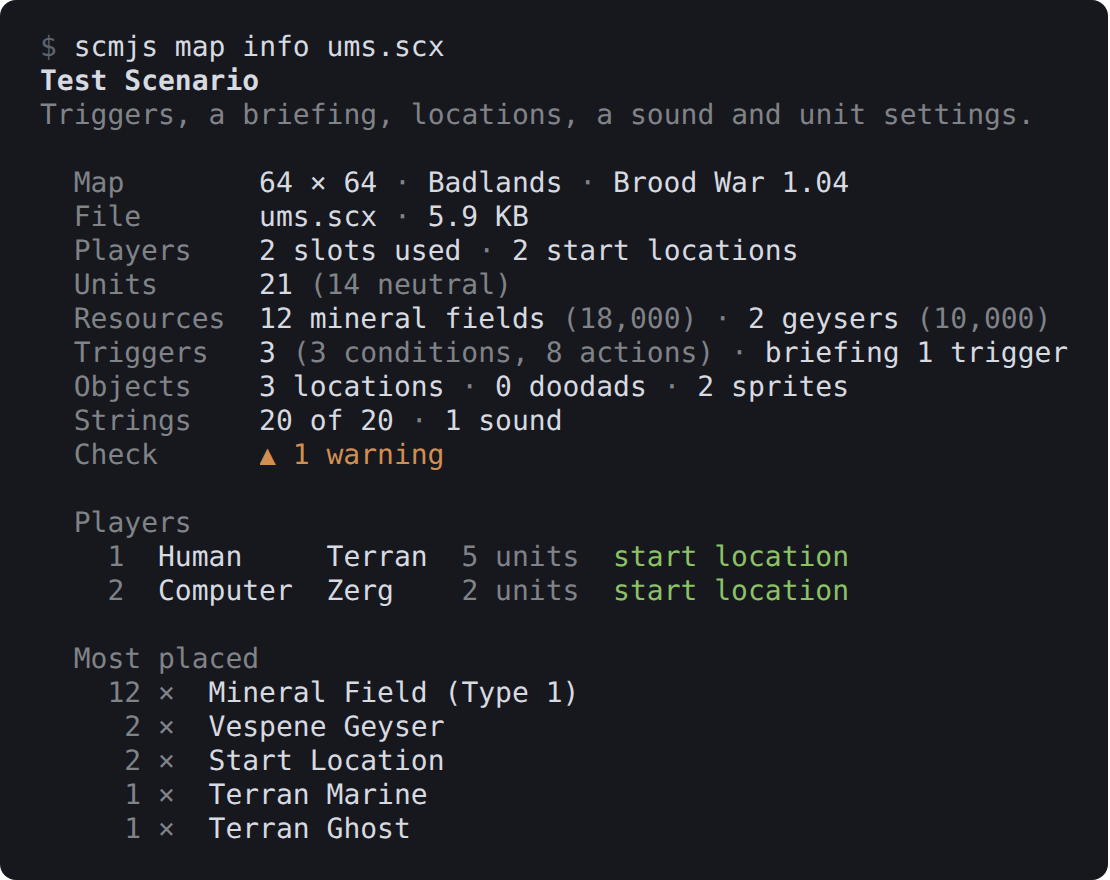
scmjs map info ums.scx. The name and description keep their colours in a terminal with
full colour.
--table prints one row per map instead, for a folder of them:
$ scmjs map info --table *.scx
File            Name                      Size     Tileset       Version           Players  Units  Triggers  Check
melee.scx       Test Melee                64 × 64  Jungle World  Brood War 1.04    2        16     0         ✔ no problems
remastered.scx  Test Remastered 리마스터  64 × 64  Ice           Remastered 1.21+  2        16     0         ✔ no problems
ums.scx         Test Scenario             64 × 64  Badlands      Brood War 1.04    2        21     3         ▲ 1 warning
Checking a map#
scmjs map check runs Check Map, as the editor does, and lists the errors and then the
warnings, each with the part of the map it is in. --all adds the notes. The command
exits with 1 when a map has errors, so it can stop a build; --strict fails a map on
warnings too.
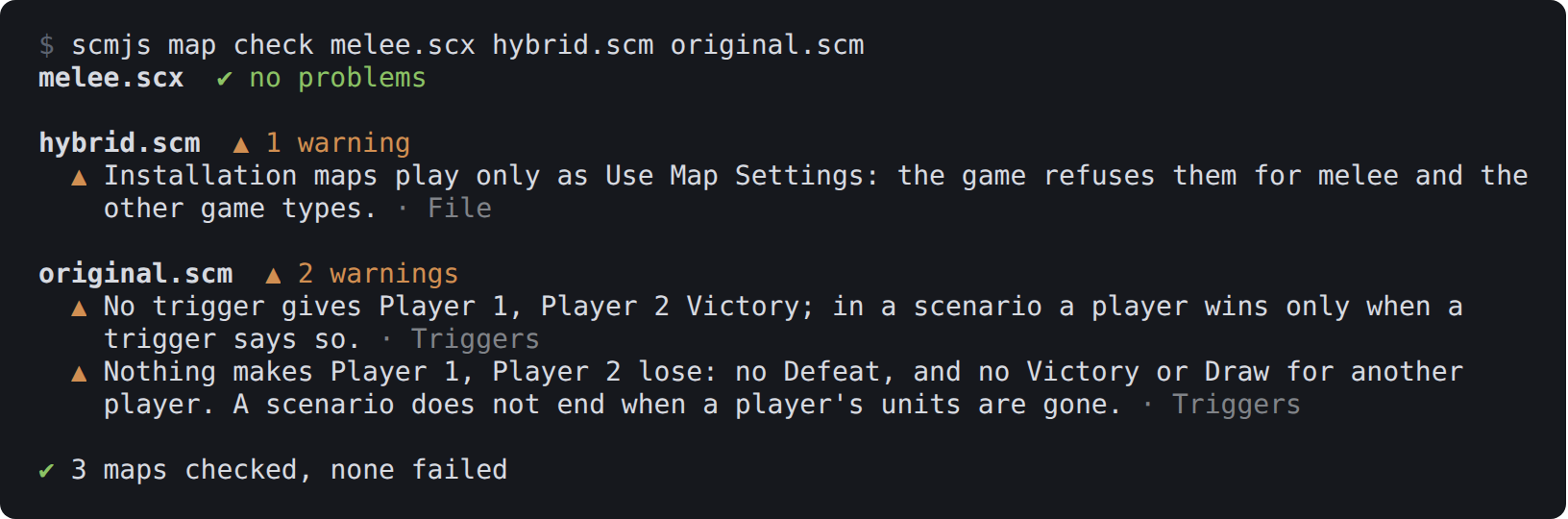
scmjs map check over three of the test maps.
A few checks need the game's graphics or unit data, such as units placed where they cannot walk. The command does not run those. The editor does, once it has the game data.
For CI, --format writes the findings in a form other tools read:
| Format | What it is |
|---|---|
github |
GitHub Actions annotations: each finding shows on the pull request, beside the map |
junit |
JUnit XML, one test case per map, for any CI system that takes test results |
sarif |
SARIF 2.1.0, for code scanning tools such as GitHub's upload-sarif action |
The exit code is the same whatever the format. A step in a GitHub workflow that checks a pull request's maps:
- run: npx @scm-js/cli map check maps/*.scx --strict --format github
scmjs init writes a whole workflow that runs it on every
push.
A baseline for old maps#
A map made years ago, or by other tools, can have hundreds of findings, so --strict
would fail it on every push. A baseline lets you start from where the map is.
--write-baseline keeps the findings the maps have now in a file, and --baseline then
reports and fails only on findings that file does not hold:
scmjs map check maps/*.scx --write-baseline            # once: today's findings, in .scmjs-baseline.json
scmjs map check maps/*.scx --baseline --strict         # from then on: only new findings fail
$ scmjs map check maps/* --baseline --strict
ridge.scx  ✔ no new problems · 1 fixed since the baseline

wakka.scm  ▲ 1 new warning · 72 known
  ▲ Trigger 1: Create Unit with Properties names properties slot 0; the slots are 1 to 64. ·
    Triggers

✖ 1 map of 2 failed the check · 72 known findings left out, 1 fixed since the baseline
A trigger was added at the top of wakka.scm, and a Defeat to ridge.scx. The 72 known
findings of the triggers below the new one still match.
Without a file name both options use .scmjs-baseline.json in the current folder; give
one to keep it elsewhere. The file is JSON, one list of findings for each map, keyed by
the map's path from the file's folder, so one file serves a whole folder of maps. Commit
it beside the maps.
A finding is matched by the part of the map it is in and its text, with the parts that move taken out. A trigger is known by its text, not by its number, so adding a trigger above it, or renumbering the strings, does not make its findings new. Counts are left out too: one more unit in a slot that is not in the game is the same finding as before. Editing the trigger itself, or renaming a location it uses, makes its findings new again, so look at them again.
Findings the baseline holds that are gone are counted as fixed since the baseline. They do
not fail anything, and --write-baseline drops them. Run it again whenever you accept the
findings as they are. --format github, junit and sarif list only the new findings,
so the CI step is one line:
- run: npx @scm-js/cli map check maps/*.scx --baseline --strict --format github
With --json, each map has a baseline entry: the file, how many findings it left out
(suppressed), how many are new, and how many are fixed, with the fixed findings listed.
The whole map as text#
scmjs map dump ridge.scx prints everything in the map as text: the header, the players
and forces, every unit and location, the triggers in the trigger window's text form, the
strings, the archive's other files with their sizes and hashes, and the scenario's
sections with their sizes. Nothing is cut. The same file always gives the same text, so
you can search it with grep, keep it beside the map, or have git show a map's changes
with it (Reading maps in git diff).
# ridge.scx — scmjs map dump 1

## Map
  Name         Ridge
  Size         96 × 64
  Tileset      Jungle World
  …
## Units (14)
  Start Location  Player 1  336,1744
  Mineral Field (Type 1)  Neutral  176,1552  resources 1500
  …
## Triggers (3)
Trigger("Player 1"){
Conditions:
	Always();
…
--json gives the same data as JSON, with the units and triggers as the records the
editor holds.
Searching maps#
scmjs map find <text> <maps…> is Edit ▸ Find over any number of maps. It finds units,
locations, sprites and doodads whose name holds the text, and strings and triggers whose
text does. A number also matches a unit id, a location's slot, a string's number or a
trigger's number.
$ scmjs map find Marine maps/*.scx
ums.scx  4 matches
  unit     Test Marine  Player 1 · 14, 50
  string   Test Marine  String #13
  string   Bring a Marine to the middle.  String #17
  trigger  Trigger 1  Bring a Marine to the middle.
--in strings,triggers searches only those kinds: units, locations, sprites, doodads,
strings, triggers and briefing. --case matches case. A map with no match prints nothing.
Like grep, the command exits with 1 when nothing matched in any map, so a script can ask
whether any map still says something.
A picture of a map#
scmjs map preview draws the map with the game's tileset graphics, read from your copy of
StarCraft. Only the map's own tileset is read, which takes a fraction of a second. Without
a copy of the game there is no picture, and the command says how to name one.
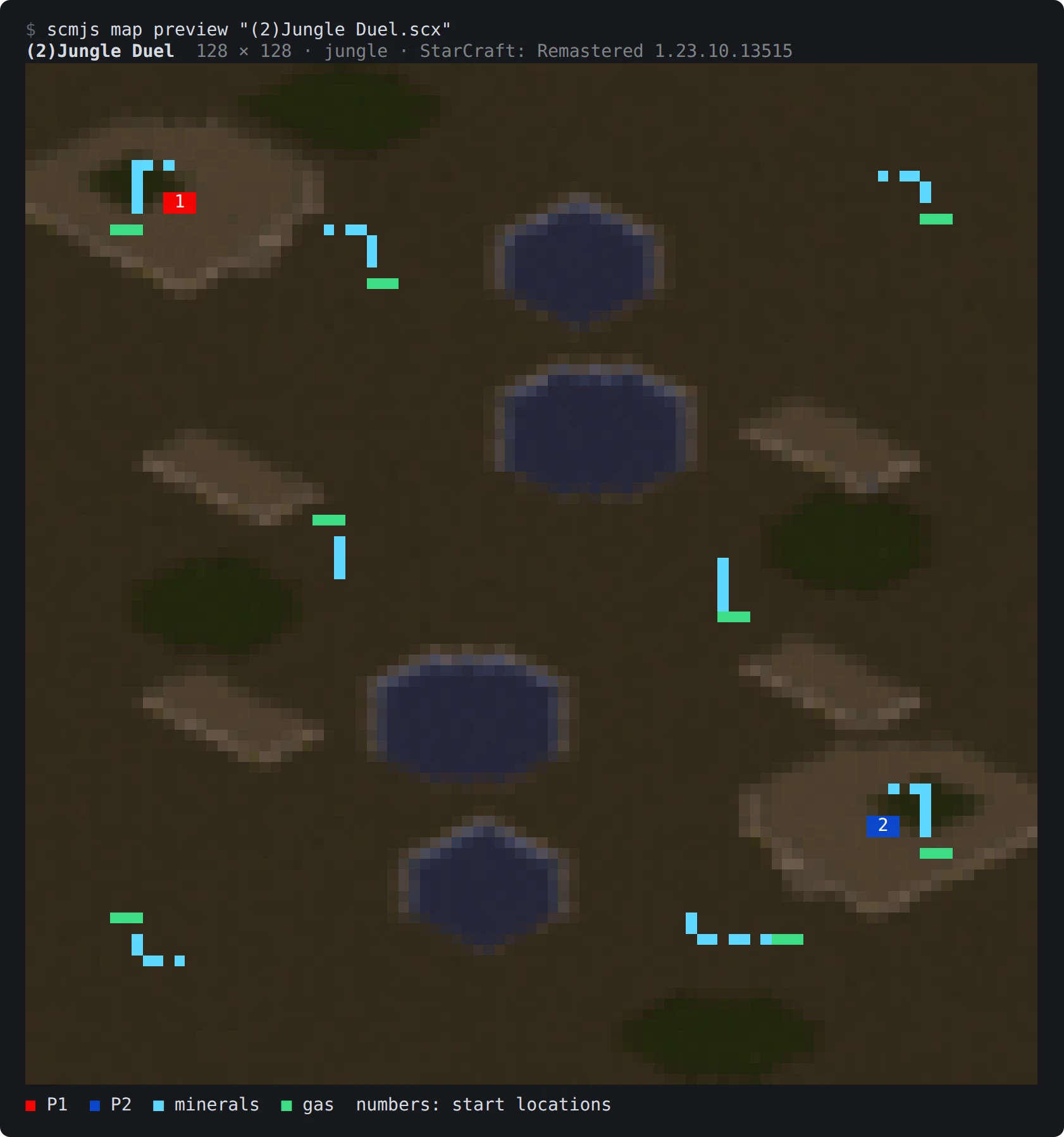
scmjs map preview in a terminal with 24-bit colour. The numbers are the start
locations.
Over the terrain go the things the minimap shows: a box for each unit in its owner's
colour, as big as the unit, mineral fields in blue, geysers in green, and the start
locations framed in their player's colour. --no-units draws the terrain alone.
In the terminal the picture fills the terminal's width, at most two columns a tile, and a
tall map is drawn no more rows high than half the terminal's columns. --width 60 sets
the number of columns, or --scale 0.5 gives half a column a tile. Each character is two
pixels, one above the other, in 24-bit colour where the terminal has it
(COLORTERM=truecolor) and in the nearest of 256 colours where it does not. A start
location is drawn as its player's number.
A terminal without colour, or without the block characters (the old Windows console), gets
letters: shades for the ground, # for a building, o for a unit, $ for a mineral
field or geyser. kitty and iTerm2 can show a picture themselves and are sent a PNG;
--blocks asks for characters there too.
--out ridge.png writes a PNG at --scale pixels a tile: 1, 2, 4 (the default, so a 128
× 128 map is 512 pixels square), 8, 16 or 32, the game's own size. --out - writes the
PNG to standard output, and - as the map reads it from a pipe:
scmjs map preview ridge.scx --out ridge.png --scale 8
scmjs map new - --tileset ice --players 4 | scmjs map preview - --out - > new.png
--json describes the picture without drawing it: its form, size and scale, the tileset,
the copy of the game it came from, and how many start locations, units, buildings, mineral
fields and geysers are on it.
To see where things happened on the map in real games, where units died or where buildings went up, draw a heatmap from replays.
A map's sounds#
scmjs map sounds ridge.scx lists the sounds the map carries: the entries of its WAV
table, which is the Sound Editor's list, and any other sound file in the archive. Each
line gives the slot, the length, the format, the size and the triggers that play it.
$ scmjs map sounds ums.scx
ums.scx · 1 sound, 11 KB
    1  staredit\wav\tone.wav  1.0 s · 11025 Hz · 8-bit · mono · 11 KB  Trigger 1: Play WAV
scmjs map sounds export ridge.scx writes them into a folder, ridge-sounds beside the
map unless --out names another. Each sound comes out as the file that went into the map:
the compression StarEdit and the game use for sounds in an archive is undone, and a WAV or
Ogg file is otherwise written as it is. Two sounds with the same file name get -2, -3
after it.
A name in the WAV table that the map does not carry is listed and not written. That is not
an error. A name under sound\ is one of the game's own sounds, which plays from the
game's files, and is listed as such. --json gives the list, and for export the file
each sound went to.
Maps from scmscx.com#
scmscx.com is the community's map database: years of maps people
have shared, searchable by name, description and file name. scmjs map fetch searches it
and downloads from it. The maps belong to their makers and the site; the command asks the
site the way its own pages do.
$ scmjs map fetch lost temple
scmscx.com · 2,918 files match "lost temple" · the best 10 maps

  Name                           Size       Tileset       Players  Downloads  Id
  (The Lost Temple 8 Players)    128 × 128  Jungle World  8        246        GDj6p383
  PGT - Lost Temple 2.4 [02]     128 × 128  Jungle World  4        170        B8V7fdyj
  PGT - Lost Temple 2.35 [01]    128 × 128  Jungle World  4        35         jVYB3rBz
  …
The list is in the site's order of best match, and lists a map once however many file
names it was uploaded under. --limit 25 lists more, up to 50; each map's details are a
request of their own, which is why the list stops there. --json gives the list to a
script. When nothing matches, the command says so and exits with 1.
To download a map, give its id or its address on the site with --id, or add --first to
take the best match:
scmjs map fetch --id B8V7fdyj
scmjs map fetch lost temple --first --out maps/
scmjs map fetch lost temple --first --open
scmjs map fetch lost temple --first --out - | scmjs map info -
The file keeps the name the site gives it, with the characters Windows does not allow in a
file name changed to _. It is written in this folder, or to the file or folder --out
names; --out - sends it down a pipe. A file that is already there is left alone unless
you add --force. Before anything is written, the map is opened as the editor opens it
and the command says what it is:
PGT - Lost Temple 2.4 [02]
  Map   128 × 128 · Jungle World · StarCraft 1.00
  File  (4)Lost Temple 2.4 PGT.scm · 172 KB
  From  https://scmscx.com/map/B8V7fdyj · uploaded by anonymous · 170 downloads
✔ Written to (4)Lost Temple 2.4 PGT.scm
Anything the site sends that is not a map is refused, and nothing is written. --open
opens the map in scmJS once it is written. The command waits at most ten seconds for the
site, and says so (exit 1) when the site does not answer or turns the request down.
Nothing is kept between runs.
Opening a map in scmJS#
scmjs map open ridge.scx opens the map in the scmJS desktop app when it is installed.
Without the app, it opens the editor at scmjs.dev in your browser and hands it the file:
the command serves a small page on your own computer, that page opens the editor, and the
editor takes the file from it. The file does not leave your computer. If the browser
blocks the editor's window, the page shows a button to open it. --browser uses the
browser even when the app is installed.
| Setting | Effect |
|---|---|
SCMJS_APP |
The desktop app's path, when it is installed somewhere unusual |
BROWSER=none |
Opens no browser; the command prints the page's address for you to open |