
Running a map in the game
These commands start the map in the game itself, the engine of the play page, with the
game's files from your copy of StarCraft (what they
need). Nobody has to play: the game runs as fast as the
computer can run it. Or the players of a recorded game play it: --replay gives the game
the commands from a replay, so the game in a bug report can be traced and tested. A map in
the original StarCraft 1.00 form is run as Brood War, as the editor would convert it. The
Blizzard campaign maps are not something the engine runs yet. Each command exits with 2
when the game could not start.
Which triggers fire#
scmjs map trace starts the map as a Use Map Settings game, with your seat left idle and
the computers as the map sets them, runs it for a while, and records every condition the
game checks and every action it runs. The report has a line per trigger, with how often it
fired, when first and last, and whose it is. Then come the triggers that never fired, each
with the condition that last said no.
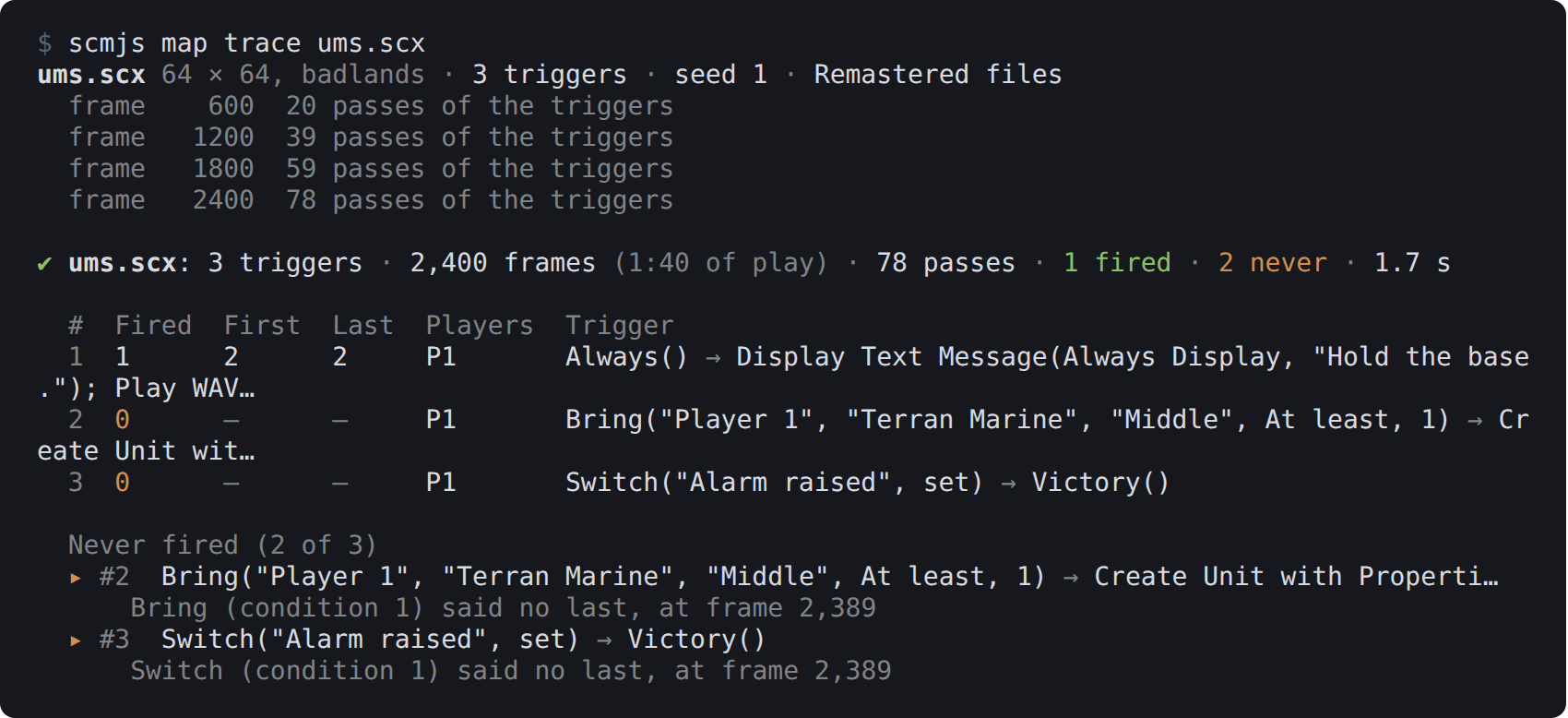
scmjs map trace ums.scx. Nobody brings a Marine to the middle, so the trigger waiting
for one never fires.
The game runs the triggers about every two seconds; each run is a pass, and a trigger that
fires on every pass is a preserved one. A count with +n after it is a trigger whose Wait
held it and then let it go on n times.
| Option | What it does |
|---|---|
--frames |
How long to run, at 24 frames a second. The default, 2,400, is 100 seconds of play; the game may end sooner if a trigger ends it |
--seed |
Fixes the game's luck, so the same map and seed give the same run |
--all |
Lists every trigger, when the map has more than forty |
--json |
The same, per trigger, as data |
Nobody plays, so nothing a player would do happens. A trigger waiting for a unit to be brought somewhere will say so, which is the point.
What the triggers cost#
scmjs map cost runs the map the same way and weighs every trigger the game passes and
every condition and action it runs, as StarCraft: Remastered charges for them. The model
is the one TrigScript's editor uses, measured on the real game: a Deaths condition costs
about five nanoseconds, and the game stays smooth up to about fifteen milliseconds of
triggers a frame. The report says what a frame costs on average where triggers ran and at
most, how that compares with what a frame can carry, and which triggers cost the most:
✔ trigscript-frame-cost.scx: triggers cost 0.025 ms a frame on average where they ran (599 of 601 frames), 1.10 ms at the most (frame 2: 83,787 records, 53,192 triggers)
  Remastered on a fast computer: smooth to about 15 ms of triggers a frame, slows past 37 ms
  83,787 of the records ran in no trigger of the map — a program's own (TrigScript, eudplib), 1.10 ms in all
A TrigScript or eudplib program runs its own records through the EUD trigger chain rather than through the map's trigger list. For such a map the cost is in the first lines, and the triggers listed are only the ones that start the program. TrigScript's editor shows a program's cost line by line.
Triggers in a replay's game#
When someone sends a replay of a game where the map went wrong, --replay plays that game
with the trace on. The players' own commands drive it, people and computers as they
played, to the end of the replay.
scmjs map trace --replay report.rep --order
The report is the one above, with two differences. The first and last firings are given on
the game's clock, m:ss at Fastest as the replay viewer counts it, and only the triggers
owned by the players in the game are listed. --order adds every firing in the order the
game ran them: the time, the frame, whose copy of the trigger it was, and the trigger.
$ scmjs map trace --replay 1631.rep --order
1631.rep 128 × 128, jungle · 4 players · 10:16 · 1,713 triggers (12 copies in the game) · Remastered files

✔ 1631.rep: 1,713 triggers (5 owned by the players) · 14,662 frames (10:16), Ever)Z(bOy won · 473 passes · 4 fired · 1 never · 6.2 s

  #     Fired  First  Last   Players      Trigger
  1709  2      0:00   0:00   P3 P4        Elapsed Time(At least, 0) → Set Resources("Current Player", S…
  1710  2      0:00   0:00   P5 P6        Always() → Run AI Script("Turn ON Shared Vision for Player 1"…
  1711  0      –      –      P3 P4        Command("Current Player", "Buildings", At most, 0) → Defeat()
  1712  1      10:13  10:13  P3 P4        Command("Non Allied Victory Players", "Buildings", At most, 0…
  1713  4      0:00   0:00   P3 P4 P5 P6  Elapsed Time(Exactly, 0) → Display Text Message(Always Displa…

  Never fired (1 of 5)
  ▸ #1711  Command("Current Player", "Buildings", At most, 0) → Defeat()
      Command (condition 1) said no last, at frame 14,634

  In the order they fired (9)
  Clock  Frame   Player          #      Trigger
  0:00   2       P3 ErOs_Class   #1709  Elapsed Time(At least, 0) → Set Resources("Current Player"…
  0:00   2       P3 ErOs_Class   #1713  Elapsed Time(Exactly, 0) → Display Text Message(Always Dis…
  0:00   2       P4 Ever)Z(bOy   #1709  Elapsed Time(At least, 0) → Set Resources("Current Player"…
  0:00   2       P4 Ever)Z(bOy   #1713  Elapsed Time(Exactly, 0) → Display Text Message(Always Dis…
  0:00   2       P5 ErOs_Kyoung  #1710  Always() → Run AI Script("Turn ON Shared Vision for Player…
  0:00   2       P5 ErOs_Kyoung  #1713  Elapsed Time(Exactly, 0) → Display Text Message(Always Dis…
  0:00   2       P6 iCoN`MisO    #1710  Always() → Run AI Script("Turn ON Shared Vision for Player…
  0:00   2       P6 iCoN`MisO    #1713  Elapsed Time(Exactly, 0) → Display Text Message(Always Dis…
  10:13  14,603  P4 Ever)Z(bOy   #1712  Command("Non Allied Victory Players", "Buildings", At most…
With no map named, the game is played on the map inside the replay. Name a map as well to play the replay's commands on that map instead, such as the fixed version of the one in the bug report:
scmjs map trace fixed.scx --replay report.rep
The command says first how the map differs from the one in the replay. A replay is only the players' commands, so a changed map can make the game go out of step. When a unit a player clicked is not there, or a building cannot be placed, the game plays on with commands meant for another game. Changes to triggers alone usually keep it in step. Changes to units, terrain or resources usually do not. The game checks each command against what it has, and the report says when and where the game parted from the replay. What fired before that point is what happened.
scmjs map cost --replay weighs the triggers of the replay's game in the same way.
--frames stops the game sooner. Left out, the whole replay is played. In a game that is
not Use Map Settings, the game runs its own melee triggers rather than the map's, and the
report says so.
Testing a map's triggers#
scmjs map test checks that a map's triggers do what you meant, in the game. You write
scenarios in a tests file: what the game starts with, what happens at given times, how
long to play, and what must be true at the end. Each scenario is one game. A scenario that
fails says what did not hold and what was there instead, and keeps the game's replay so
you can watch what happened.
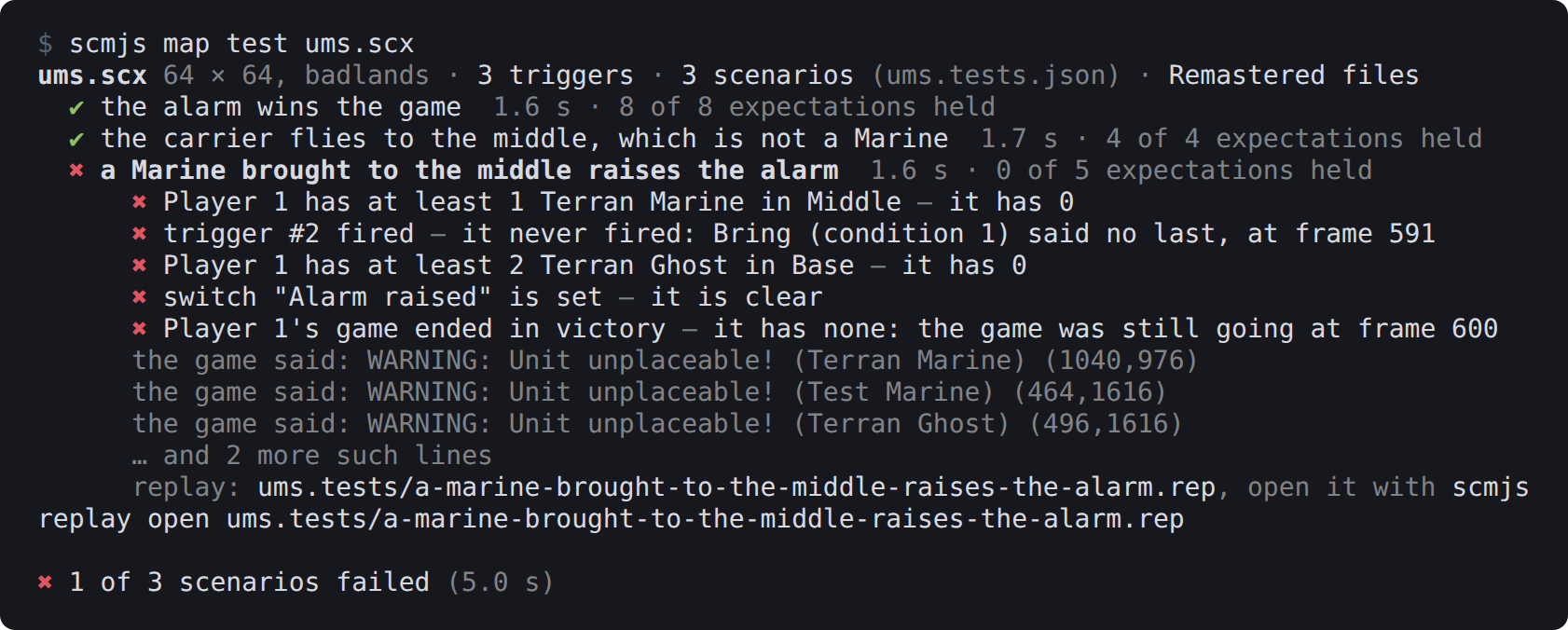
scmjs map test ums.scx, with the tests file kept beside the test map.
Here the third scenario found something real: the test map has no ground a Marine can stand on, so the Marine never appeared and the trigger waiting for it never fired. That is why a failed scenario lists the game's own warnings from its start.
The tests file#
The tests are read from <map>.tests.json beside the map (ums.tests.json for
ums.scx), or from the files named after the map on the command line. The file is JSON:
{
  "scenarios": [
    {
      "name": "the alarm wins the game",
      "frames": "0:20",
      "steps": [
        { "at": 24, "chat": "glhf" },
        { "at": "0:02", "create": "Terran Wraith", "player": 1, "location": "Middle" },
        { "at": "0:05", "switch": "Alarm raised", "state": "set" }
      ],
      "expect": [
        { "trigger": "Opening", "fired": 1 },
        { "text": "Hold the base." },
        { "units": "Terran Wraith", "player": 1, "location": "Middle", "is": 1 },
        { "switch": "Alarm raised", "is": "set" },
        { "outcome": "victory", "player": 1 },
        { "ended": true }
      ]
    },
    {
      "name": "a Marine brought to the middle raises the alarm",
      "frames": "0:25",
      "setup": [
        { "create": "Terran Marine", "player": 1, "location": "Middle" }
      ],
      "expect": [
        { "trigger": 2 },
        { "switch": "Alarm raised", "is": "set" }
      ]
    }
  ]
}
A scenario has a name, and may have frames, seed, setup, steps and expect.
frames is how long to play: a number of frames, 24 to a second at Fastest, or "m:ss";
2,400 unless the file or --frames says otherwise. frames and seed at the top of the
file apply to every scenario that does not set its own.
A scenario may name a replay instead of setup and steps. The replay's commands drive
the game, played on the map being tested, and the scenario plays to the replay's end
unless frames says otherwise:
{
  "name": "the bunker fills at 7:30",
  "replay": "reports/bunker.rep",
  "expect": [
    { "trigger": "Bunker full", "fired": 1 },
    { "outcome": "victory", "player": 1 }
  ]
}
The path is relative to the tests file's folder. seed does nothing here, because the
game uses the replay's own. Such a scenario takes no setup or steps, since anything
added to the game would take it out of step with the replay. scmjs map test record
writes these scenarios for you (below).
Things are named as the trigger window names them:
| Thing | Written as |
|---|---|
| Player | A number from 1 to 12, or "Player 1". Where a trigger would take a group, "All Players", "Force 1", "Foes" and "Allies" too |
| Unit | Its name ("Terran Marine", or "Marine" when that is clear), a class ("Any unit", "Men", "Buildings", "Factories"), or its number in units.dat |
| Location | Its name, "Anywhere", or its number |
| Switch | Its name, "Switch 3", or a number from 1 to 256 |
| Trigger | The number scmjs map trace prints for it, or the text of its Comment action |
A name the map does not have is an error that lists the names it does have.
setup is what the game starts with. Each entry does one thing:
| Entry | Does |
|---|---|
{ "create": unit, "player": p, "count": n, "location": l } |
Creates the units (one unless count says) |
{ "kill": unit, "player": p, "count": n, "location": l } |
Kills the units (all of them unless count says) |
{ "remove": unit, "player": p, "count": n, "location": l } |
Removes the units, as Remove Unit does |
{ "give": unit, "player": p, "to": q, "count": n, "location": l } |
Gives the units to player q |
{ "switch": s, "state": "set" } |
Sets the switch ("clear" and "toggle" too) |
{ "minerals": n, "player": p }, { "gas": n, "player": p } |
Sets the player's minerals or gas; "+100" adds, "-100" takes away |
{ "deaths": unit, "player": p, "count": n } |
Sets the death count, with the same + and - |
{ "action": "Set Countdown Timer(Set To, 60)" } |
Any action, in the trigger window's text form; a list of them works too |
location is Anywhere when left out.
steps happen during the game. Each has at, a frame or "m:ss", and one of the entries
above, or one of these, which are your own commands as a player would give them:
| Entry | Does |
|---|---|
{ "at": t, "order": "move", "unit": u, "location": l, "to": m } |
Orders your units of that type in location l to location m: "move", "attack" (attack-move) or "patrol"; "stop" and "hold" need no to. unit is Any unit and location Anywhere when left out |
{ "at": t, "chat": "text" } |
Sends a chat line, which shows on screen like any other |
You play the map's first slot that is open to a person, as when you start the map alone, and the computers play as the map sets them. Your commands reach the game at the frame given. The other steps are carried out by the game's triggers, which run about every 31 frames (1.3 seconds), so they happen at the first pass after the game's clock reaches their time.
expect is what must be true when the scenario ends:
| Entry | Holds when |
|---|---|
{ "trigger": t, "fired": n } |
The trigger fired that many times; true (the default) is at least once, false is never |
{ "switch": s, "is": "set" } |
The switch is set, or "clear" |
{ "deaths": unit, "player": p, "is": n } |
The player's death count for that unit |
{ "minerals": n, "player": p }, { "gas": n, "player": p } |
The player's minerals or gas |
{ "units": unit, "player": p, "location": l, "is": n } |
How many of the units the player has there, counted as the Bring condition counts them (as Command counts them when there is no location; player is All Players when left out) |
{ "text": "words" } |
The words were on your screen at some point: trigger text, transmissions, chat. "shown": false for words that must not appear. In a replay's game, the screen is the replay viewer's |
{ "outcome": "victory", "player": p } |
The player's game ended in victory ("defeat", "draw", or "none" for no outcome yet) |
{ "ended": true } |
The game ended before the scenario's frames ran out (false: it was still going) |
A count is a number, meaning exactly that many, or a comparison such as ">= 2", "< 5"
or "!= 0". The text shown and how often a trigger fired cover the whole game; everything
else is read when the scenario ends.
How a test runs#
The setup and the timed steps become triggers in a copy of the map. The setup is one trigger placed before the map's own, owned by the first player in the game, with the condition Always, so it runs first in the first pass. Each step is a trigger placed after the map's own with an Elapsed Time condition. Your map file is not changed, and the trigger numbers in the report are the map's own.
Because these triggers are part of the copy, the replay holds them. A failed scenario's
replay is kept in <map>.tests/ beside the map (or where --out says) and plays back the
scenario exactly as it ran. scmjs replay open opens it in the editor, where the test's
own triggers show first and last among the map's.
| Option | What it does |
|---|---|
--seed |
The game's random seed for scenarios that do not set one; the same map, scenario and seed give the same game every time |
--frames |
How long to play, for scenarios and files that do not say |
--out |
Where the failed scenarios' replays go |
-u, --update |
For scenarios that play a replay: the expectations that no longer hold are rewritten to what the game gives now |
--json |
Every scenario with each expectation, whether it held and what the game had |
--format github, junit, sarif |
The failures in the forms CI tools read, as for map check, each placed on the scenario's line in the tests file |
The command exits with 1 when a scenario fails, and with 2 when the tests file or the map
cannot be read or the game could not start. It needs the game, so it does not run on
GitHub's own runners; the workflow scmjs init writes leaves it out and says how to run
it on a runner of your own that has the game.
A test cannot yet have a player leave (you are the only person in the game) or give the computers' own commands, except by playing a replay of a game where they did.
A test from a replay#
scmjs map test record turns a replay into a test. It plays the replay on the map, as
map trace --replay does, and writes a scenario into the
map's tests file with everything the game ended with as expectations:
$ scmjs map test record 1631.scx 1631.rep --name "2v2 to the end"
✔ Recorded "2v2 to the end" into 1631.tests.json · 14,662 frames (10:16) · 40 expectations · 6.5 s
  5 triggers, 1 line shown, 4 outcomes, 1 end, 8 unit counts, 4 minerals, 4 gas, 13 death counts
The scenario it wrote begins:
{
  "name": "2v2 to the end",
  "replay": "1631.rep",
  "frames": 14662,
  "expect": [
    { "trigger": 1709, "fired": 2 },
    { "trigger": 1710, "fired": 2 },
    { "trigger": 1711, "fired": 0 },
    { "trigger": 1712, "fired": 1 },
    { "trigger": 1713, "fired": 4 },
    { "text": "ErOs_Class has left the game.", "shown": true },
    { "outcome": "defeat", "player": 3 },
    { "outcome": "victory", "player": 4 },
The expectations are a snapshot of the end of the game: how often each trigger the players
own fired (0 for the ones that never did), the switches that are set and the named ones
that are clear, the lines shown that were not chat, each player's outcome, whether the
game ended, each player's men and buildings, minerals and gas, and every death count.
Triggers, switches and units are named as the map names them, where the map has a name for
them. Each expectation is one line of the file, so delete the lines you do not care about
and keep the ones the test is for.
| Option | What it does |
|---|---|
--name |
The scenario's name; the replay's file name by default. A scenario with that name is replaced |
--tests |
The tests file to write into; <map>.tests.json beside the map by default, made if it is not there |
--frames |
How much of the replay to play; all of it by default |
--json |
The scenario as written, with the game's end |
From then on scmjs map test plays the replay against the map as it is now. After a
change you meant to make, scmjs map test map.scx -u rewrites the expectations of
replay-driven scenarios that no longer hold to what the game gives now. Only the values
change. The expectations you deleted stay deleted, and a comparison such as ">= 3" that
still holds is left alone. Scenarios with steps are never rewritten. If the map changed so
much that the game parted from the replay, the report says when, as map trace --replay
does.
Which triggers fired across many games#
scmjs map coverage plays a folder of replays on the map, each as
map trace --replay plays one, and adds up what fired. It
answers whether a trigger ever fires when people play the map. A trigger that never fired
in any of the games is either one nobody reaches or one that is broken, so those are
listed clearly.
scmjs map coverage td.scx replays/
Replays are files or folders, sub-folders included. Only replays of this map count: the
same map, or one with the same name and size, as for
map heatmap. Only Use Map Settings games
count too, since in the other game types the game runs its own melee triggers. Every
replay left out is listed with the reason. Several games are played at once: half the
processors, at most four, or --parallel.
$ scmjs map coverage fs.scx replays/ --force
fs.scx · 4 triggers · 6 replays to play, 4 at a time
1/6 ▲ 1570.rep  25:24 · 6 players · 2 triggers fired · parted at 0:00, counted to there · 6.6 s
2/6 ▲ 1571.rep  31:59 · 6 players · 2 triggers fired · parted at 0:00, counted to there · 7.3 s
3/6 ▲ 1544.rep  49:11 · 4 players · 2 triggers fired · parted at 1:46, counted to there · 10.7 s
4/6 ▲ 1631.rep  10:16 · 4 players · 2 triggers fired · parted at 0:34, counted to there · 5.5 s
5/6 ▲ 1635.rep  37:42 · 3 players · 2 triggers fired · parted at 0:00, counted to there · 8.1 s
6/6 ✔ 1603.rep  34:08 · 4 players · 3 triggers fired · 30.5 s

▲ fs.scx: 3 of 4 triggers fired in 6 games; 1 never fired
▲ 5 games parted from the map: 1544.rep at 1:46, 1570.rep at 0:00, 1571.rep at 0:00 and 2 more. What fired after that is not counted: the players' commands were meant for another game.

  #  Games  Fired  First  Players            Trigger
  1  6/6    12     0:00   P1 P2 P3 P4        (no conditions) → Set Resources("Current Player", Set To, …
  2  6/6    15     0:00   P3 P4 P5 P6 P7 P8  (no conditions) → Run AI Script("Turn ON Shared Vision for…
  3  0/6    0      –      P1 P2 P3 P4        Command("Current Player", "Buildings", At most, 0) → Defea…
  4  1/6    1      34:06  P1 P2 P3 P4        Command("Non Allied Victory Players", "Buildings", At most…

  Never fired (1 of 4)
  ▸ #3  Command("Current Player", "Buildings", At most, 0) → Defeat()
      Command (condition 1) said no last, in 1603.rep at 34:08
--force took replays played on other maps, so five of the six games parted from this
one early. Only the last game ran this map as it was played.
For each trigger the table gives the games it fired in, how often it fired in all of them,
and its first firing on the game's clock. Only triggers owned by a player in at least one
of the games are listed. The first line counts the rest separately, and --all lists them
too. A game whose players' commands parted from the map, as explained
above, counts only what fired before that point, and is
marked ▲.
--tests counts the scenarios of the map's tests file as
games as well, and a tests file named among the replays (any .json) counts its
scenarios. Whether a scenario passes does not matter here; that is map test's job.
| Option | What it does |
|---|---|
--tests |
Also count the games of <map>.tests.json beside the map |
--strict |
Exits with 1 when a trigger a player owned never fired |
--format |
github, junit or sarif: the triggers that never fired, for CI. Warnings, or errors with --strict, and a note for each game that parted |
--all |
Lists every trigger, even ones no player in the games owned |
--force |
Takes replays played on another map too. Expect those games to part early |
--parallel |
Games played at once |
--json |
Every game, every trigger with its counts, its text and why it never fired |
Each replay takes about a second for every minute or two of play, so a folder of a hundred games takes a few minutes. Like the other commands that run the game, it needs your copy of StarCraft, so in CI it runs only on a machine that has one.
Rush distances#
scmjs map rush measures how long a rush takes between each pair of start locations. The
game walks a unit from each start location to every other, along the path a unit sent
there in a game would take, and times each walk. An SCV walks unless you name another unit
with --unit: by its name in the editor ("Zerg Zergling"), without the race
(Zergling, Dragoon), or by its number in units.dat. The rows of the table are the
starts walked from and the columns the starts walked to, each with its place on the map as
a clock face from the middle:
$ scmjs map rush "(4)Crossing.scx" --unit Zergling
(4)Crossing.scx 128 × 128, desert · 4 start locations · a Zergling walked 12 times · Remastered files
  1 → 2  4,376 px, 34.6 s
  …

✔ (4)Crossing.scx: a Zergling walked between 4 start locations by the game · 12 walks · 3.4 s

  from ╲ to                    1                 2                 3                 4
  1 11 o'clock                 –  4,376 px, 34.6 s  2,957 px, 23.5 s  3,826 px, 30.5 s
  2 4 o'clock   4,408 px, 34.9 s                 –  3,847 px, 30.9 s  2,871 px, 22.3 s
  3 1 o'clock   2,858 px, 22.7 s  3,847 px, 30.9 s                 –  4,535 px, 36.4 s
  4 8 o'clock   3,857 px, 30.7 s  2,937 px, 23.1 s  4,576 px, 36.8 s                 –

  Shortest 2 → 4: 2,871 px (90 tiles), 22.3 s · air 2,816 px, 1.02× the straight line
  Longest  4 → 3: 4,576 px (143 tiles), 36.8 s · air 3,806 px, 1.20× the straight line
The pixels are the distance the unit walked (32 to a tile) and the seconds are game time at Fastest. The unit sets out five tiles from its start toward the middle of the map and stops at the edge of the town hall at the other start: a neutral Nexus stands on every start while the walks run, so the walk ends where a real rush ends, at the base. The two directions between a pair can differ by a second or so, because the way out of each base is not the same. The shortest and longest walks are compared with the straight line between the two starts, the distance a flyer goes. When the terminal is too narrow for both figures, the seconds and the pixels come as two tables.
A walk that does not arrive is a finding too. Two starts with no ground between them, on an island map or where the terrain walls one off, are reported as having no way; on a map where no two starts are joined, the report says so and lists the straight lines instead. A unit that stops short (at a wall of minerals or buildings the map places, say), gets stuck, or is still walking after seven minutes of game time is named with how far from the base it ended.
The walks run in one game with nobody else in it: about four seconds for a four-player map
and fifteen for an eight-player map of 256 × 256. --seed changes the game's luck, such
as a unit stepping round another; the default is the one the editor's Walkability plugin
uses, so the two agree. --json gives every walk and the table as data. A building or a
flyer is refused (exit 2), as is a map with fewer than two start locations.
Is the map fair to every start#
scmjs map balance is a melee map's report card. The same two sides play game after game
on the map, and the report has a row for each start location: how often the side that
started there won, how long its games lasted and how soon it met the enemy, beside the
numbers that need no game. The sides are your bots: one bot plays the game's own
computer, or two bots play each other, as bot ladder plays them.
scmjs map balance "(4)Crossing.scx" --bots out/mybot.scmbot:p --races p --games 12 --parallel 4
scmjs map balance "(4)Crossing.scx" --bots mybot.scmbot,mybot.scmbot --games 12
$ scmjs map balance "(4)Test4.scx" --bots ualbertabot.scmbot:p,ualbertabot.scmbot:p --games 12 --parallel 4
12 games · UAlbertaBot vs UAlbertaBot (ualbertabot-2) · 4 start locations · 1248410ad2a0 · 4 at once
 2/12 ✔ UAlbertaBot (ualbertabot-2) P (start 4, 8 o'clock) beat UAlbertaBot P (start 3, 1 o'clock) · 9:39 · first contact 2:32 · seed 2
 …

(4)Test4.scx 128 × 128 · 12 games played · UAlbertaBot 8-4 vs UAlbertaBot (ualbertabot-2) 4-8 · 176 s

  Start              Games  Won  Lost  Win rate  Expected  Length  Contact  Rush    Minerals           Gas
  1      11 o'clock  8      1    7     13%       50%       8:10    2:22     32.0 s  9 × 1,500 · 6.4 t  1 × 5,000 · 7.8 t
  2      4 o'clock   3      2    1     67%       33%       11:05   2:16     32.7 s  9 × 1,500 · 6.4 t  1 × 5,000 · 7.8 t
  3      1 o'clock   9      7    2     78%       59%       7:40    2:26     32.0 s  9 × 1,500 · 6.4 t  1 × 5,000 · 7.8 t
  4      8 o'clock   4      2    2     50%       42%       9:13    2:27     32.8 s  9 × 1,500 · 6.4 t  1 × 5,000 · 7.8 t

  Pairs met: 1–2 ×3, 1–3 ×5, 3–4 ×4 · never: 1–4, 2–3, 2–4

▲ Start 1 (11 o'clock) wins only 13% where 50% was expected — its resources and distances are within 10% of the others', so the difference is in the ground or in how the games went.
The map above was made by map generate with its four quarters mirrored, so its starts
differ only in where they face. Twelve games of one bot against itself are enough to see
that this bot does worse from the top left; they are not enough to say why. A verdict to
act on wants more games, and more than one bot.
| Column | Means |
|---|---|
| Games, Won, Lost | The games a side started at this start location, and how they went. A game stopped at --frames is counted in Games only |
| Win rate | Won out of won and lost |
| Expected | What the two sides' own records predict for those games. With two sides of a strength it is 50%; when one side is stronger, a start it was dealt more often is expected to win more |
| Length, Contact | The average game, and the average time the first unit was lost to the other side |
| Rush | The average walk to the other starts, as map rush measures it; --no-rush leaves it out |
| Minerals, Gas | The main's fields and geysers: those nearest this start and within 12 tiles of it, the amount each holds and their average distance in tiles |
The verdict compares each start's win rate with what was expected. Within 10 points everywhere, the map is called balanced within the largest difference. A start further off is named, with the number that sets it apart from the others when one does (less gas, a mineral line further away, shorter walks to the enemy, earlier fights). When the games are too few to tell the difference from chance, the verdict says so and how far chance alone would move that start. When one side won every game, the games say nothing about the starts, and the verdict asks for two sides of a strength: the same bot twice does that.
The game deals the start locations itself, as it does in any melee game, and there is no way yet to ask for a particular one. So each game's replay is played back afterwards to see which start each side was dealt, and the rows are filled from those. Enough games give every start its turn; the line under the table lists the pairs of starts that met and those that never did. A bot playing itself plays each seed once, since the other lobby order deals the same starts and gives nearly the same game.
A game takes from ten seconds to a minute or so, depending on the bots and how long it
lasts; --parallel plays several at once (by default up to four, as the computer's cores
and memory allow; a game takes about 1.5 GB for each bot in it). The replays are deleted
afterwards unless --out names a folder to keep them in, for scmjs replay watch.
--json gives every row, every game with the starts dealt, and the verdict as data. The
command exits with 1 when a game could not be played, and with 2 for a map with fewer than
two start locations.