
Sharing from the terminal
These commands use your scmjs.dev account. Nothing else
in scmjs talks to scmjs.dev.
Signing in#
scmjs login opens a page in your browser, which opens Discord's sign-in as the editor
does (--provider google or battlenet for the others). The command says who signed in
once you have approved it. It waits two minutes. With BROWSER=none it prints the page's
address for you to open.
The session is kept in a file only you can read: ~/.config/scmjs/session.json, or
%APPDATA%\scmjs\session.json on Windows. scmjs logout ends the session on scmjs.dev
and deletes the file.
scmjs account (or scmjs account show) says who you are signed in as, how much of your
storage is in use, and the maps you are sharing for editing with their links, each also as
a QR code with --qr. --json prints it as JSON. scmjs account login and
scmjs account logout are the same as scmjs login and scmjs logout.
When scmjs.dev refuses something, for instance because your storage is full or you are sharing too many maps at once, the command shows scmjs.dev's own message. Until you sign in, the sharing commands say "Sign in first: scmjs login" and exit with 2.
A link to a map#
scmjs map share ridge.scx does what the editor's Account ▸ Copy Link to This Map…
does, from the file: the map is saved to your scmjs.dev account and you get a link anyone
can open a copy of it with, in their own editor and without signing in. The copy is
theirs; nothing they do changes yours. The user guide's Giving someone a
copy says more about such links.
$ scmjs map share ridge.scx
https://scmjs.dev/editor/map/sJ5Z3w12SFSoLCD6zej-b46a
Ridge · 128 × 128 · 61 KB · revision 1, a new map on your account
Anyone with the link opens a copy in their editor, without signing in.
The link is the first line on its own, so scmjs map share ridge.scx | head -1 is just
the link. When your account already has a map with the same file name, the file is saved
as its next revision and the line says which; --new makes a new map anyway. Sharing a
file that is already on the account unchanged stores nothing and gives the link it had.
The link opens the revision you shared, so a link you have posted does not change when you
share the map again.
| Option | What it does |
|---|---|
--name |
The map's name on your account (the scenario's name otherwise) |
--note |
The revision's note |
--new |
A new map on the account, even when one has this file name |
--qr |
A QR code of the link under it |
--no-picture |
No picture for the link's card |
With a copy of StarCraft on the computer, as for map preview, the command draws the
map's picture for the link's card; without one the map goes up without a picture and the
card shows its size instead. - as the map reads it from a pipe. Account ▸ My Maps… in
the editor lists the map with its revisions and links, and removes them.
Editing a map together#
--edit makes a link to edit the map together instead, as Account ▸ Share this Map…
does: whoever opens it edits the same map with you, each in their own editor (see the user
guide's Editing a map together). It stays open until
everyone has left, and closes after a while if nobody comes. --keep day, week, month
or forever keeps it open that long after its last edit, saved on your account as a map
of its own, or as the next revision of the one with the same file name, as the Share
dialog's Keep it open does.
$ scmjs map share ridge.scx --edit --keep week
https://scmjs.dev/editor/share/49vlCkKoYvMJGzIah5I0Vo_y
Ridge · 128 × 128 · 61 KB · shared for editing, kept open for a week after its last edit, stored on your account
Anyone with the link edits the map with you in their editor, without signing in.
A link to a replay#
scmjs replay share game.rep stores the replay on your account (My Maps ▸ Replays; up to
8 MB each, counted with your maps) and prints https://scmjs.dev/editor/replay/<token>.
Anyone opens that link to watch the replay in the editor's replay viewer, and where links
get a card, it shows the map and the players. The map's picture on the card is drawn from
the map in the replay when your copy of the game is on the computer. --note adds a note,
--no-picture leaves the picture out, and --qr draws a QR code. The same replay shared
again gives the link it already has.
A game with other people#
scmjs map play ridge.scx opens scmjs.dev/play in your browser with the map and asks it
for a lobby. The page hosts the game, as when you press Invite Players there, and the
command prints the invite link for you to send around:
ℹ Opening ridge.scx in the play page in your browser
✔ Lobby open: send this link to the people you want to play with
  https://scmjs.dev/play/?game=invite1x4hunfg
✔ Handed to the play page
Opening a lobby needs a scmjs.dev account, so the page asks you to sign in when you are
not, and opens the lobby once you have. The first time, it asks for the game's files too,
as the play page always does. The people you send the link to need their own StarCraft
files and no account. The command waits up to five minutes for the page. --json prints
the link, the invite code and what the page said on the way, and --qr draws a QR code.
QR codes#
--qr on map share, replay share, map play and account draws each link as a QR
code under it, for the people next to you to open on a phone. The link stays the first
line.
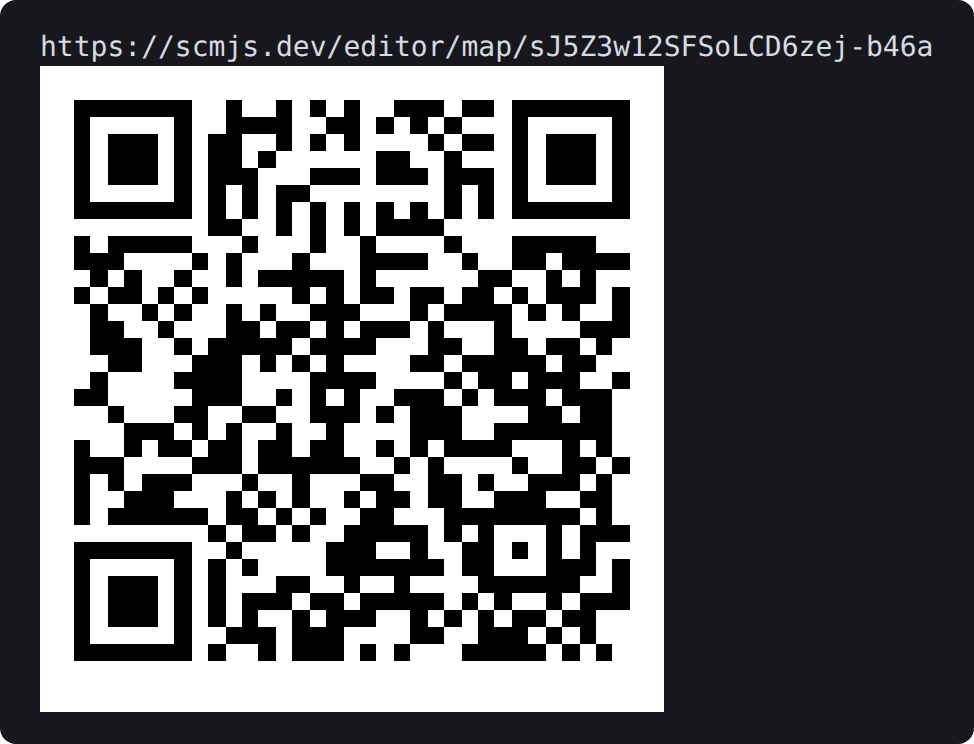
A link and the code --qr draws under it.
The code is drawn with half-block characters, two rows of the code to a line, black on
white where the terminal shows colour. Without colour it is drawn for a dark terminal,
light marks on the dark background, which phone cameras read too. The old Windows console
has no such characters, so there it is drawn with #, twice as wide.
Settings#
| Setting | Effect |
|---|---|
SCMJS_SESSION |
Another file for the session |
SCMJS_SERVER |
Another server than https://api.scmjs.dev, such as one of your own; its links carry its address for the editor |