
Maps in git
A map file is binary, so git on its own can only say that it changed, and cannot merge two changes to it. scmjs gives git a way to read maps as text and to merge them part by part, and gives a pull request Check Map's findings.
Setting up a folder of maps#
scmjs init sets a folder of maps up for git and GitHub in one command. Run it in the
folder, or name the folder:
$ scmjs init maps
maps · 5 maps · in the git repository ladder
  ✔ .gitattributes                 written: maps diff as text and merge part by part
  ✔ .gitignore                     written: the .bak files Save leaves, map test's replays
  ✔ ../.github/workflows/maps.yml  written: checks the 5 maps on push and pull request; scmjs 0.9.0
  ✔ README.md                      written: lists the 5 maps, and the commands
  ✔ git config diff.scmjs          set: textconv, xfuncname, cachetextconv
  ✔ git config merge.scmjs         set: name, driver
ℹ The workflow is at the repository's top, where GitHub reads it, and checks maps/ from there.
What it writes:
.gitattributeshas git read.scx,.scmand.chkfiles throughscmjs map dump, sogit diffandgit log -pshow what changed inside a map, and merge them throughscmjs map merge, so two branches that changed one map in different places merge.- The git settings (
diff.scmjs.textconv,.xfuncnameand.cachetextconv, andmerge.scmjs.nameand.driver) tell git what those lines mean. Settings belong to a clone rather than to the repository, so they are set in the repository the folder is in, and everyone who clones it runsscmjs initonce too; it writes nothing that is already there.git diffandgit mergerunscmjsby name, so it has to be installed (npm install -g @scm-js/cli);initsays so when it is not. .github/workflows/maps.ymlrunsmap check --strict --format githubover the maps on every push and pull request, so a map with errors or warnings fails the run and each finding shows on the pull request beside the map. A map with a TrigScript script also getsmap build --check, which compiles the script and writes nothing. The workflow names this version of@scm-js/cli, so a run gives the same answer until you change the version, as its first lines say. GitHub reads workflows only at a repository's top, so for a folder inside a repository the file goes there and names the folder's maps.README.mdlists the maps (name, file, size, tileset, players) and the commands people need:map check,map dump,map diff --rev HEAD, settling a merge withmap merge, and the git settings a new clone needs..gitignorehas*.bak, the copy of a map the desktop app keeps when Save replaces it, and*.tests/, wherescmjs map testkeeps the replays of failed scenarios.
The workflow has no map test step: that needs a copy of StarCraft, which GitHub's
runners do not have.
init keeps the maps themselves in git and has git read them through scmjs. The other way
is to keep each map as a folder of text and build the map file from it when you need one:
see A map as a folder of text.
Nothing is overwritten. .gitattributes and .gitignore get only the lines they lack, at
the end. A README.md or workflow that is already there is left as it is, and so is a git
setting that holds another value; each is reported on its own line. --force replaces the
README and the workflow and sets the git settings; it never takes a line out of the other
two files.
In a folder that is not in a git repository, the files are written and the git settings
are not. Run scmjs init again after git init, or add --git to have the command run
git init first; it never runs it unasked.
--print writes nothing and prints every file and the git config lines instead, to read
first or paste by hand. --json lists the files and what became of each, with their text
when given --print as well. The command exits with 2 when the folder does not exist.
scmjs help init has its help.
Reading maps in git diff#
Told to read maps through scmjs map dump, git shows what changed inside them in
git diff, git log -p, git show, and the pull requests of tools that honour
.gitattributes. scmjs init sets this up. To do it by hand, once in the repository:
git config diff.scmjs.textconv "scmjs map dump"
git config diff.scmjs.xfuncname "^## .*"
printf '*.scx diff=scmjs\n*.scm diff=scmjs\n*.chk diff=scmjs\n' >> .gitattributes
$ git diff
--- a/ridge.scx
+++ b/ridge.scx
@@ -100,7 +100,7 @@ ## Strings (20)
   2	Hold the base.
-  3	Force 1
+  3	Renegades
   4	Force 2
The second line makes each hunk's heading the part of the map it is in, as
## Strings (20) above. Earlier versions of this guide gave it as "^## ", which shows a
bare ##; scmjs init replaces that value. git config diff.scmjs.cachetextconv true
keeps the text of each version, so a long git log -p does not read every map again. The
.gitattributes lines are committed, so everyone who clones gets them; the git config
lines are per clone, or for every repository on your computer with --global.
A map as a folder of text#
scmjs map unpack --text writes a map as a folder of text files: the header and players
as JSON, the terrain as a grid, the units, locations and settings as tables, and the
strings and triggers in their usual text forms. Keep the folder in git in place of the map
file, and scmjs map pack builds the map from it:
scmjs map unpack ridge.scx --text     # → ridge/, the scenario under ridge/scenario/
scmjs map pack ridge                  # → ridge.scx, built from the text
ridge/
  archive.json                 how the archive was stored, as for any unpacked map
  staredit/wav/tone.wav        the map's other files, as map unpack writes them
  scenario/
    map.json                   type, revision, size, tileset, name, players, forces, sounds, switches
    strings.txt                the string table, as map strings export writes it
    triggers.txt               the triggers, as map triggers export writes them
    briefing.txt               the mission briefing, the same way
    terrain.txt                the tiles, a row of the map per line
    under-doodads.txt          the ground under doodads, where it differs from terrain.txt
    isom.txt                   the isometric terrain, a row per line
    mask.txt                   the fog of war, a row per line
    units.tsv                  the units, one per line, in the map's order
    sprites.tsv, doodads.tsv   the sprites and doodads, one per line
    locations.tsv              the locations in use, numbered as triggers number them
    cuwp.tsv                   the Create Unit with Properties slots
    settings/*.tsv             unit, weapon, upgrade and technology settings, one row each
    sections.json              every section of the scenario, in the file's order
    sections/                  the sections kept as they are: IVE2.bin, VCOD.bin, …
Each change to the map is then a change to a few lines. Moving a mineral field in the editor and unpacking again, or editing the line by hand, gives:
$ git diff -U1
--- a/ridge/scenario/units.tsv
+++ b/ridge/scenario/units.tsv
@@ -2,3 +2,3 @@
 1	336	1744	214	0x0000	0x0000	0x0000	0	100	100	100	0	0	0x0000	0	0	Start Location
-2	176	1552	176	0x0000	0x0000	0x0010	11	100	100	100	1500	0	0x0000	0	0	Mineral Field (Type 1)
+2	272	1552	176	0x0000	0x0000	0x0010	11	100	100	100	1500	0	0x0000	0	0	Mineral Field (Type 1)
 3	240	1552	176	0x0000	0x0000	0x0010	11	100	100	100	1500	0	0x0000	0	0	Mineral Field (Type 1)
so two people who changed different units, triggers or strings merge with git's own line merge, and a pull request shows the change itself. A conflict is a conflict in the text file, settled there.
Nothing is lost. Before writing the folder, unpack packs it again in memory and
compares the result with the map, section by section; an untouched folder packs back into
the same scenario, byte for byte. A section the editor does not model (IVE2, VCOD, a
protected map's extra sections), a section the file has more than one copy of, and any
section whose text could not hold all of it are kept as bytes under sections/, and
unpack lists them:
$ scmjs map unpack ridge.scx --text
✔ ridge.scx: 24 files · 137 KB · → ridge
  Scenario as text  31 sections · 126 KB in 23 files
  Kept as bytes     IVE2 (not modelled), VCOD (not modelled)
A map StarEdit wrote also keeps its string table and its triggers' records beside their text ("Bytes kept beside"). StarEdit lays the string table out its own way and leaves a flag clear in conditions and actions that the text form always sets; the kept bytes are written for as long as the text says what it said. A changed string table is written the way the editor saves one, and a changed trigger is read from its text, while every trigger whose text is unchanged keeps its record exactly.
Editing the text. The text decides: pack reads each file into the editor's model of
the map and writes each section as the editor would save it.
- In the
.tsvtables the columns are the fields of the record in the order the file stores them; positions are in pixels, owners count from 0 (Player 1) to 11 (neutral), and flags are hexadecimal. Thenamecolumn is there to read and is not read back: the number columns decide. terrain.txtholds a tile id per cell in hexadecimal, the tileset's group times 16 plus the megatile within it, so a whole tile group shares its first three digits.strings.txtandtriggers.txtare whatmap strings exportandmap triggers exportwrite. A trigger names its text by what it says, so triggers.txt decides a trigger's text: changing a message there adds it to the string table (asmap triggers importdoes), and the old one stays untilscmjs map strings prune. To change a message in place, change it in both files.map.jsonnames players' types, races and colours, and the forces' flags, by name;nameStringand the like are numbers in the string table.
A file that does not read stops the pack, with the file and line:
$ scmjs map pack ridge
✖ scenario/units.tsv, line 3: x: "abc" is not a number
The map's size is in map.json and in the shape of every grid, so a map is resized with
scmjs map resize, not by hand. map dump and the git textconv are unchanged: they read
a map file, which this folder builds.
TrigScript. A map built from a TrigScript script unpacks as the editor saved it: the
built scenario as text, beside the script's files under trigscript/ and scmjs/.
Packing the folder does not build the script again; run scmjs map build on the packed
map after changing the script.
Comparing two maps#
scmjs map diff a.scx b.scx says what changed between two maps, in a map maker's terms:
the name, size, tileset and version; each player's type, race, colour and force; units and
locations added or removed; triggers and briefing triggers added or removed, one line
each; strings added, removed or changed; the archive's other files; and which sections of
the scenario differ at all.
old.scx → new.scx

Map
  ~ Name           Ridge → Ridge, revised

Triggers +1 −1
  − Player 1: Bring("Player 1", "Terran Marine", "Middle", At least, 1) → Victory()
  + Player 1: Bring("Player 1", "Terran Marine", "Middle", At least, 4) → Victory()

Strings ~1
  ~ 7  Hold the base. → Hold the base. Reinforcements at 4:00.

Sections
  ~ STR   355 B → 371 B
  ~ TRIG  7.0 KB → 7.0 KB
A trigger that changed shows as the old one removed and the new one added. Long lists stop
at twenty; --all lists everything. Like diff, the command exits with 1 when the maps
differ and 0 when they are the same, so a script can ask whether a step changed anything.
--rev compares a map with the version git has at a revision, so one command says what a
commit changed in a map, or what is not committed yet:
scmjs map diff --rev HEAD~1 maps/ridge.scx     # what the last commit changed
scmjs map diff --rev main maps/ridge.scx       # what this branch changed
The older version is read with git show, so this works wherever git diff does. A file
that is not in a repository, or not at that revision, is refused with git's own message.
Where a map changed#
--picture shows where the map changed rather than what. It draws the second map as
map preview does, with your copy of StarCraft, and darkens the
ground that did not change:
| Mark | Means |
|---|---|
| Magenta tiles | Tiles that changed |
| Green box | A unit added |
| Red box | A unit removed |
| Yellow box, with a frame and a line | A unit moved a few tiles (same type and owner): the frame is where it was. A unit edited where it stands is yellow too |
| Outline | A location that changed: green when added, red where one was, yellow where it is now |
| Grey stripes | Tiles only one of the maps has, when one was resized |
Start locations, mineral fields and geysers are drawn to find your way by, with start locations and geysers in greys so they do not read as changes. A line under the picture counts it all.
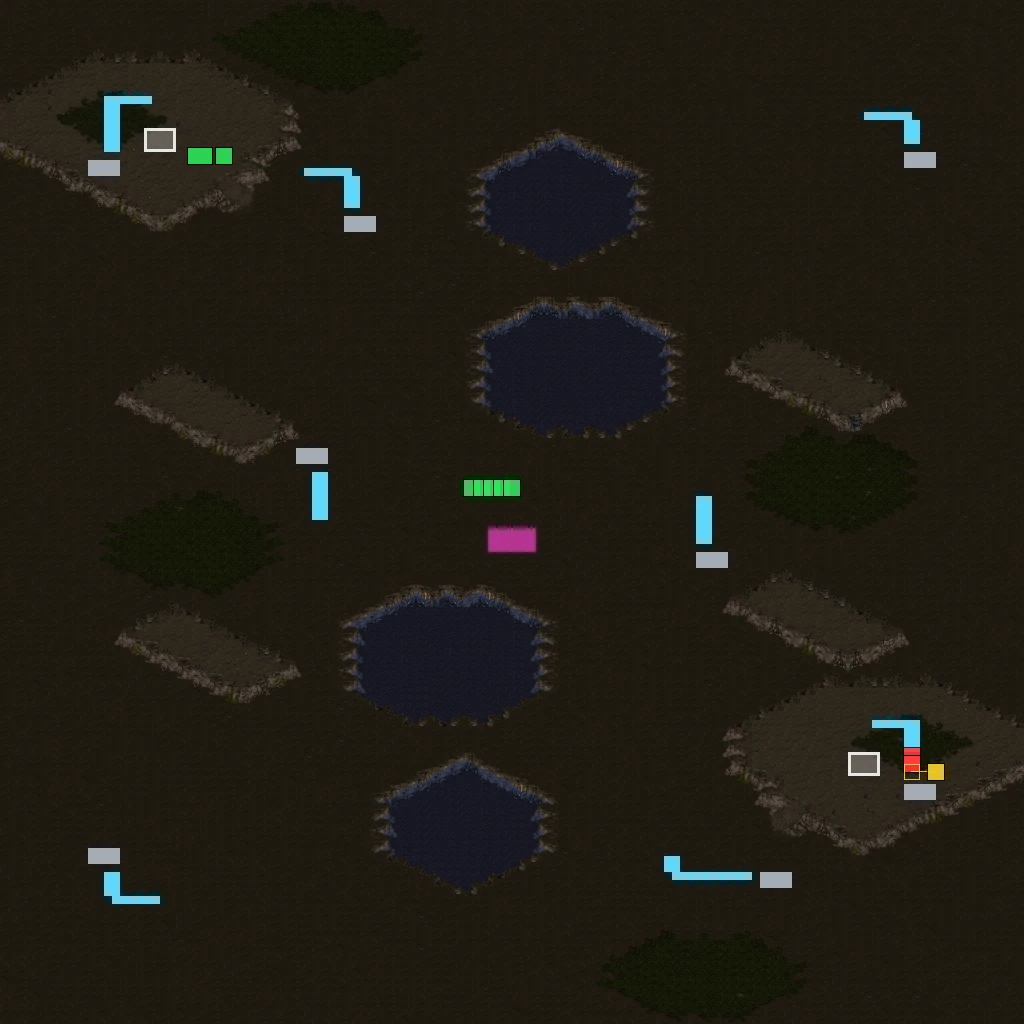
scmjs map diff before.scx after.scx --picture --out review.png --scale 8: Marines and
buildings added (green), mineral fields removed (red) and one moved (yellow), and a patch
of ground changed (magenta).
In the terminal the picture is drawn as map preview draws it, two pixels a character.
Without colour it is letters: A added, R removed, M moved or edited, x a changed
tile, / a tile only one map has, # a location.
scmjs map diff old.scx new.scx --picture
scmjs map diff --rev main maps/ridge.scx --picture --side-by-side --out review.png
--out diff.png writes a PNG at --scale pixels a tile (4 by default). --side-by-side
puts the first map, the changes and the second map in one picture, also in the terminal
when it is wide enough for three pictures of 32 columns; otherwise you get the changes
alone. --json adds what was drawn to the comparison: how many tiles, units and locations
changed, and the box of tiles round the changes.
Tiles are compared by position, so a map resized with its content moved shows every tile as changed. Maps of two tilesets cannot be drawn as one picture: they are drawn side by side with nothing marked, and the command says so. The exit code is the comparison's, picture or not.
A map's history#
scmjs map log lists the commits that changed a map, newest first, and says under each
one what it changed in the map, in the words map diff would use:
$ scmjs map log maps/ridge.scx
maps/ridge.scx · 8 commits

d5587bc  2026-11-07 09:00  Jeany  Tidy the trigger order
         triggers reordered

dbf21a0  2026-11-06 14:00  Mina   Rename Middle to Ridge top
         1 location changed

daa8752  2026-11-06 08:30  Jeany  Say what to do
         description changed

d25740d  2026-11-05 13:10  Mina   Spread the minerals
         2 units moved, 1 removed

68033b5  2026-11-04 16:40  Mina   Room for a third base
         resized 64 × 64 → 96 × 96 · 1 location changed

d38a14e  2026-11-03 09:05  Jeany  Waves, and four marines to win
         3 triggers added, 1 changed · 3 strings added

55d0fd9  2026-11-02 11:20  Mina   Call it Ridge
         name changed

3927771  2026-11-01 10:00  Jeany  Start Ridge from the test scenario
         map added: 64 × 64 Badlands, 21 units, 4 locations, 3 triggers
Each commit is compared with the version before it. A trigger that was replaced in the
same place counts as changed. One that only moved in the list is not counted at all, and
when that is all a commit did, the entry says the triggers were reordered. A unit in a new
place with nothing else different has moved. A string that is a name (the map's, a
location's or a force's) is counted as a change to that name, not as a string as well. A
commit that saved the file again without changing the map says so. For the details of one
commit, git show <commit> shows its changes as text, once the map's text form is set up
as Reading maps in git diff describes.
-n 5 shows the newest five commits. --rev takes what map diff --rev takes, and a
range as well. --rev main..HEAD lists what this branch did to the map. A merge is
compared with its first parent, so the entry shows what the merge brought in. --json
gives each commit's hash, parents, author, date, subject and the list of changes.
Who last changed what#
scmjs map blame is git blame for a map. Instead of a line of text, each row is a
trigger, a location, a string, a group of units or a setting, with the commit, author and
date that last changed it. With no option it shows the triggers, or the settings when the
map has no triggers:
$ scmjs map blame maps/ridge.scx
Triggers (6) · maps/ridge.scx
39277712 (Jeany 2026-11-01 1) Player 1: Always() → Display Text Message(Always Display, "Hold the ridge."); …
d38a14e1 (Jeany 2026-11-03 2) Player 1: Bring("Player 1", "Terran Marine", "Ridge top", At least, 4) → …
39277712 (Jeany 2026-11-01 3) Force 1: Switch("Alarm raised", set) → Victory()
d38a14e1 (Jeany 2026-11-03 4) Player 2: Elapsed Time(At least, 60) → Display Text Message(Always Display, …
d38a14e1 (Jeany 2026-11-03 5) Player 2: Elapsed Time(At least, 180) → Display Text Message(Always Display, …
d38a14e1 (Jeany 2026-11-03 6) Player 2: Elapsed Time(At least, 120) → Display Text Message(Always Display, …
--locations, --strings, --units and --settings show the other kinds, and can be
given together. Units get one row for each kind of unit and owner, and the row counts as
changed when one of them was added, removed, moved or edited. Settings are the name,
description, size, tileset and version, each player and force, the terrain, doodads and
sprites, the unit, upgrade and tech settings and availability, the switch names, the sound
list and each file in the archive.
$ scmjs map blame maps/ridge.scx --locations
Locations (4) · maps/ridge.scx
39277712 (Jeany 2026-11-01 Base     ) #0  192,1600–512,1856
39277712 (Jeany 2026-11-01 Nest     ) #1  1536,192–1856,512
dbf21a0c (Mina  2026-11-06 Ridge top) #2  896,896–1152,1152
68033b5d (Mina  2026-11-04 Anywhere ) #63  0,0–3072,3072
Things are matched between versions the way map diff matches them. Triggers and units
are matched by what they are, so moving a trigger up the list does not change it.
Locations and strings are matched by their number, and settings by name. A trigger's text
is a string, so editing what a trigger says changes the string, not the trigger, and
--strings shows who did that.
--trigger 4 shows one trigger with its whole text and the commit's subject.
--location "Ridge top", by name or by number, and --string 16 do the same for a
location and a string.
Without --rev the map is read as it is on disk. What differs from the last commit is
marked as git blame marks it, with a hash of zeros:
$ scmjs map blame maps/ridge.scx --strings
…
00000000 (Not committed yet 2026-11-07 16) Hold the ridge.
--rev HEAD~3 blames the map as that revision has it. --rev v1.0..HEAD looks only at
the commits since v1.0. Anything older is put on the commit at the start of the range,
with a ^ before its hash, as git blame does. Changes made on a branch and merged are
put on the branch's commit, not on the merge. --json gives every row with its commit.
Both commands work from any folder of the repository, read every version of the map from git once, and stop with a message when the file is not in a repository or has not been committed. Neither follows a map that was renamed, so the history starts at the commit that gave the map its present name.
Merging two versions of a map#
When two people change copies of one map, scmjs map merge puts both sets of changes into
one map, the way git merge does for text files. It takes three files: the version both
started from (the base), yours (ours) and the other one (theirs):
$ scmjs map merge ridge-base.scx ridge.scx ridge-alex.scx
✔ ridge.scx merged: 3 changes from ours, 2 from theirs · written to ridge.scx
  Units      2 from ours
  Locations  1 from theirs
  Triggers   1 from ours, 1 from theirs
  Strings    1 string of theirs renumbered
Each part of the map is compared with the base on both sides. What only one side changed is taken from that side, and what both changed the same way is taken once. What both changed differently is looked at more closely, and is a conflict only where the two changes are to the same thing:
| Part | Merged | A conflict when |
|---|---|---|
| Terrain | Tile by tile (the isometric record and fog of war the same way) | Both changed the same tile differently; the tiles are listed as rectangles |
| Units, doodads, sprites | One by one. They have no names, so each is matched by its type, owner, place and properties. A unit removed and one of the same type and owner added within four tiles is one unit moved or edited | Both edited the same unit differently, or one side removed a unit the other edited |
| Locations | By number; the place, the elevation flags and the name each on their own | Both changed the same field of one location differently |
| Triggers, briefing | As an ordered list: triggers either side added are kept (both, when both added at one place), and triggers either side changed or removed are changed or removed | Both changed the same trigger differently, or one side removed a trigger the other changed |
| Players, forces, unit, upgrade and technology settings, unit properties, switch names, sounds | Field by field: one player's race, one unit's hit points, one force's name | Both changed the same field differently |
| Name, description, revision, text encoding | Each on its own | Both changed it differently |
| Size and tileset | When either side resized the map or changed its tileset, the terrain and everything on it come from that side | Both sides changed the terrain or what is on it, and one of them resized the map or changed its tileset |
| The archive's other files (sounds, scripts) | File by file | Both changed the same file differently |
| Sections the editor does not read | Section by section, compared as bytes | Both changed the same section |
Triggers are matched by what they say, with their text compared as text, so two maps that number their strings differently still match the same trigger. A trigger names a location by its number, so renaming a location on one side does not count as changing every trigger that mentions it.
Strings follow what uses them. A string theirs changed in place keeps its number. A new string of theirs keeps its number unless ours put another string there; then it takes a free number, and the trigger, location or setting that uses it is changed to match. That is the "renumbered" line above. Strings nothing in the map uses are merged by number.
Everything the merge did not change is written exactly as it was in your version, and the file is written as yours was, compressed and encrypted the same way. When only one side changed the map at all, that side's file is taken as it is.
The merged map is written over your version (the second file), as git merge-file does
and as git expects of a merge driver. --out writes it somewhere else, and --out - to
standard output. --dry-run says what would happen and writes nothing. --json gives
each part's changes, and each conflict with what the base, ours and theirs had.
Conflicts#
When both sides changed one thing differently, the command says what each side did, writes nothing, and exits with 1:
$ scmjs map merge ridge-base.scx ridge.scx ridge-alex.scx
✖ ridge.scx: 1 conflict; nothing written
  Triggers  1 from ours, 1 from theirs

Conflicts
  Triggers · trigger 1 of the base
      base   Player 1: Always() → Display Text Message(Always Display, "Hold the line.")
      ours   Player 1: Always() → Display Text Message(Always Display, "Hold fast.")
      theirs Player 1: Always() → Display Text Message(Always Display, "Stand firm.")

Add --ours or --theirs to settle each with that side's version.
--ours or --theirs settles every conflict with that side's version and writes the map;
everything that did not conflict is still merged from both. The conflicts are listed
again, marked with the side taken. To settle some one way and some the other, merge with
one of them and change the rest in the editor afterwards.
Merging in git#
scmjs init makes map merge git's way of merging maps. To do it by hand, once in the
repository:
git config merge.scmjs.name "StarCraft maps, part by part (scmjs map merge)"
git config merge.scmjs.driver "scmjs map merge %O %A %B --out %A --name %P"
printf '*.scx merge=scmjs\n*.scm merge=scmjs\n*.chk merge=scmjs\n' >> .gitattributes
After that, git merge, git pull and git rebase merge maps that both branches
changed. A map with no conflicts is merged and git carries on. A map with a conflict stops
the merge as a text file would: git says
CONFLICT (content): Merge conflict in ridge.scx, the command's list says what clashed,
and the file is left as your version. Settle it by giving the map's name alone, which
reads the three versions git keeps during a merge, then carry on as usual:
scmjs map merge ridge.scx            # the conflicts again
scmjs map merge ridge.scx --theirs   # settled, and written over ridge.scx
git add ridge.scx
git commit
Without the setting, git cannot merge a map at all, and a map both branches changed is
always a conflict. As with git diff, git runs scmjs by name, so it has to be installed
for each clone.
The merge cannot lay one side's terrain over a map the other side resized, so both
changing the ground of a map one of them resized is a conflict over the whole map.
Triggers that a TrigScript script generates are merged as triggers; when both sides
changed the script, its files conflict, and the map should be built again with
scmjs map build once the script is settled. A built map is merged as the map it was
built from and written that way, so build it again after merging.