
Replays
scmjs replay reads replays from any version, from 1.16 to Remastered. To see which of
the map's triggers fired in a replay, and when, see Triggers in a replay's
game. To make a test from one, see A test from a
replay.
What a replay holds#
scmjs replay info (or scmjs info) shows the players in their colours with race, APM
and team, the map, the game's length and speed, when it was played, and how much chat
there was. APM is counted the way the replay viewer counts it: every action except chat,
until the player left.
$ scmjs replay info ualbertabot-vs-computer-z_jungle-duel_PvZ_seed1.rep
UAlbertaBot vs Garm Brood  PvZ
Melee on (2)Jungle Duel

  Length       5:02 · 7,180 frames · Fastest
  Played       1969-12-31 17:00
  Map          (2)Jungle Duel · 128 × 128 · Jungle World
  Game         oracle hosted by UAlbertaBot
  Recorded by  Brood War · 1.16 or earlier
  File         ualbertabot-vs-computer-z_jungle-duel_PvZ_seed1.rep · 179 KB

  Players
    UAlbertaBot  Protoss  129 APM   team 1
    Garm Brood   Zerg     computer  team 2
That replay is from a bot ladder, whose replays carry the game's seed where a real game has its start time, so the date is the first of January 1970 (or the last day of 1969, west of Greenwich).
The map a replay was played on#
scmjs replay map game.rep writes out the map the replay was played on. A replay carries
the whole scenario the game loaded, so the map is there whether or not you still have the
file. It goes beside the replay with the replay's name and .scx, or to --out, as a
bare .chk or as an archive like a new map's, and opens in the editor like any map. Only
the scenario is in a replay, not the map's sounds or other files, so Check Map may say a
sound is missing. --out - writes it to a pipe:
scmjs replay map game.rep --out - | scmjs map info -
Watching a replay in the terminal#
scmjs replay watch game.rep plays the replay in the terminal. The game is the play
page's engine, which plays the replay as the game itself does. You see a minimap redrawn
as the game goes: a dot for every unit in its player's colour, buildings as blocks,
mineral fields and geysers dim, and the ground shaded where the terminal has 24-bit
colour. Under it are the clock and frame, a line per player with minerals, gas, supply,
units alive and APM so far, and the last three lines of chat.
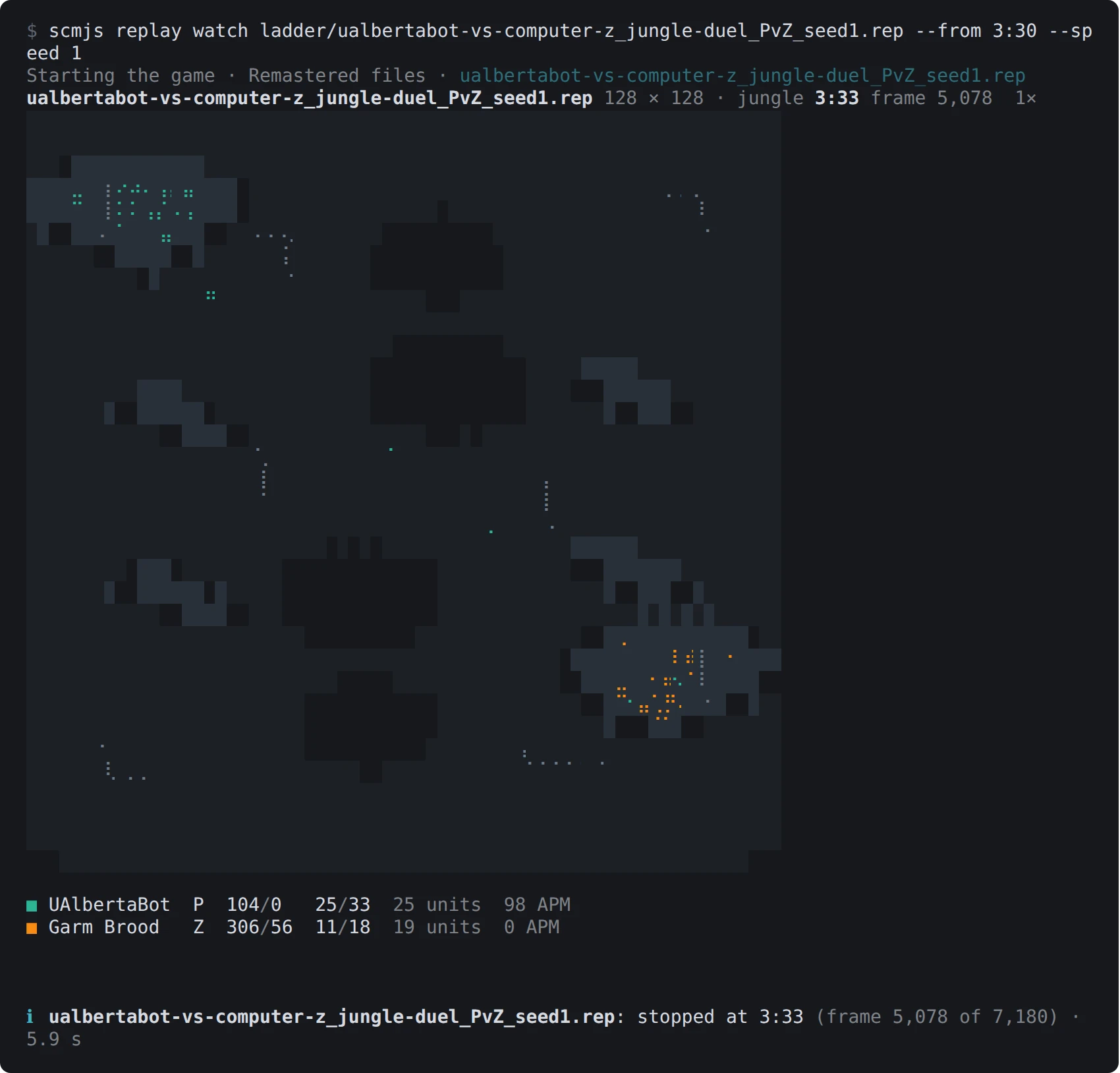
scmjs replay watch on a replay from a bot ladder, stopped at 3:33.
Space pauses, + and - double and halve the speed, and q stops and leaves the last
picture on screen.
| Option | What it does |
|---|---|
--speed 4 |
Plays at four times the game's Fastest; the default is 8. The engine plays a ten-minute game in a few seconds, so any speed holds |
--from 6:30 |
Starts there |
--size 80x30 |
The picture's size in characters; by default it fills as much of the terminal as the map's shape allows |
--every |
The frames between lines when the output is not a terminal |
--json |
A line of JSON per frame with every unit's place, for a script or a plot |
Into a pipe or a file there is no picture: a line per player every minute of game, with
the chat between them. The players' names, colours, chat and APM come from the replay
file, read as replay info reads it; the figures and the picture come from the game.
A player who leaves shows as left at 10:05 on their line from then on, instead of the
zeros the game keeps for them. When the replay has played to its end, the last line says
who won (Question won), or that the game ended at the replay's end when nobody had won
by then. A replay from any version plays, except one from a game that held more units at
once than 1.16.1 allows, which is refused as the play page refuses it. It needs your copy
of StarCraft and the engine.
Where things happened across many games#
scmjs map heatmap map.scx replays/ plays every replay on that map in the game and draws
where things happened as heat over the map's picture. By default that is where units died.
It can also be where units were killed, where buildings went up, or where the armies
walked. Name the replays one by one or give folders, and the .rep files in a folder are
taken.
scmjs map heatmap "Fighting Spirit.scx" replays/
scmjs map heatmap fs.scx replays/ --what buildings --out buildings.png
scmjs map heatmap fs.scx replays/*.rep --what kills --player 1 --until 10:00
Only replays played on this map count. A replay carries the map the game loaded, so the
replay counts when that is the same map as the file, or a map with the same name and size,
such as an earlier version of it. The others are listed as left out, with the map they
were played on, and --force takes them anyway.
replay map gets you the map from one of the replays
when you do not have the file.
Each replay is played to its end, as replay watch
plays it, a few at once. A line reports each one as it is done, with its races, its length
and what it gave. A 35-minute game takes about 25 seconds. What each replay gave is kept
in your cache folder, keyed by the replay's contents, so the next run plays only the
replays it has not seen. Changing --what, --player or --until needs nothing played
again.
| Option | What it does |
|---|---|
--what deaths |
Where units died (the default). Every unit the game counts as killed, placed where it last stood, except a Reaver's Scarabs and spells running out |
--what kills |
The same places, counted for the player who killed the unit; deaths with no killer are left out |
--what buildings |
Where buildings were placed, a Drone's buildings and refineries on geysers included; what stood at the start is not |
--what paths |
Where the armies walked: every second, each army unit that has moved to another tile. Workers are left out, or their mining would outshine everything |
--player 2 |
One player's events, by number as the map's slots count them, or by name as the replays have it (--player Flash). For kills, that is the killer |
--until 8:00 |
Only what happened by then in each game |
--out heat.png |
Writes a PNG at --scale pixels per tile, 4 by default, as map preview does. --out - writes it to standard output |
--side-by-side |
The map as map preview draws it beside the heat |
--parallel 2 |
How many replays are played at once: half your processors by default, at most 4. Each takes about 750 MB of memory |
--json |
The counts per tile, the busiest first, and per unit type, with the replays taken and left out |
The ground is drawn in grey so that no colour of the tileset reads as heat, with the
mineral fields and geysers in grey too and the start locations framed in white. The heat
spreads each event over a tile or two and goes from dark violet where little happened to
pale yellow where the most did. Under the picture are the count, the busiest tile and the
units most counted. The terminal draws it as map preview does, and --width sets its
columns.
A replay the game cannot play is listed with the reason, and the others still count. The command then exits with 1. It needs your copy of StarCraft and the engine.
A video or GIF of a replay#
scmjs replay export game.rep makes a video of the replay with the game's own pictures,
to share where nobody has the game, such as a Discord channel, a forum post or a web page.
The play page's replay viewer draws it in a browser already on your computer, Chrome,
Chromium or Edge started without a window, with the pictures from your own copy of
StarCraft.
scmjs replay export game.rep --from 14:00 --to 14:30           # game.webm beside the replay
scmjs replay export game.rep --out fight.mp4 --follow 2 --from 20:30 --to 20:58
scmjs replay export game.rep --out game.gif --all --speed 16 --to 6:00
The game is stepped picture by picture rather than played and filmed, so the clip plays at
the speed you ask whatever your computer's pace, with no picture dropped. A 720p clip
takes about as long to make as it lasts, less for a quiet part of the game and more for a
big fight. Before that, the game has to run on to --from, which takes about twenty
seconds to reach twenty minutes into a game.
| Option | What it does |
|---|---|
--out clip.webm |
The file: .webm, .mp4 or .gif. By default the replay's name with .webm, beside it |
--from 4:30, --to 5:00 |
Where the clip starts and ends in the game; the whole game by default |
--follow <player> |
The camera stays on that player's play. Name them, give the start of the name, or a number as replay info lists the players. The first person in the replay by default |
--at 64,40 |
The camera holds on this tile |
--all |
The whole map, scaled to fit |
--speed 4 |
Four times the game's Fastest. The default is 1, the game's own pace |
--size 1920x1080 |
The clip's size in pixels: 1280x720 by default, 640x360 for a GIF |
--fps 30 |
Pictures per second, 24 by default and 12 for a GIF. A GIF counts in hundredths of a second, so 12 becomes 12.5 |
--browser <path> |
The browser to draw with, or the SCMJS_BROWSER setting. Otherwise one is found in the usual places |
--json |
The file, its size and the time each part took, as JSON |
Following a player, the camera goes where their army is, and to the biggest fight the army
is in. To know that, the engine runs the game through first and reports every unit, as it
does for replay watch. The camera holds still while what it shows stays near the middle
of the screen, pans to a place within reach, cuts to one further away, and does not chase
a lone scout. The view shows as much of the map as the game's own screen does, at a whole
number of pixels for each of the game's, two at 720p, so the pictures stay sharp.
A .webm (VP9) or a .gif needs nothing more. An .mp4 (H.264) is made from the .webm
with ffmpeg when it is installed. Without it the
command says so and makes nothing. The GIF is made from the pictures as drawn, each with a
palette of its own, which keeps the game's colours exact. A GIF of a camera that moves is
large, so keep it short: eight seconds of a fight at 640x360 is about 12 MB. A 30-second
720p .webm is about 8 to 10 MB. Progress is shown as it goes, and the file's name and
size are printed at the end.
The pictures are the classic game's, whichever copy you have. Remastered's own pictures are not drawn yet, and there is no sound. Besides your copy of StarCraft, the command needs the engine and the play page itself, both fetched once from scmjs.dev and kept.
Opening a replay in scmJS#
scmjs replay open game.rep opens the replay in the replay viewer of the scmJS desktop
app, or of the editor in your browser when the app is not installed, the same way
map open opens a map.
scmjs replay share gives a link that anyone opens to watch the replay: see Sharing from
the terminal.