
Opening the script
Triggers ▸ TrigScript… opens the map's script in a window laid out the way VS Code is,
with the same keys. The Explorer on the left holds the script's files as a tree —
main.ts is where the script starts, the New file and New folder icons add to it, and
a row's pencil and bin rename and remove it — and, under them, the script's programs with
their variables. A file or a folder is moved by dragging it onto a folder, or by renaming
it with a folder before its name, and the imports that pointed at what moved are
rewritten with it; the notice that says so has an Undo. No folder means anything to
TrigScript: tests/ is a habit, not a rule. The strip at the far left switches the
sidebar between the Explorer and Testing, the script's own tests. Open
files are tabs over the code, and the icons right of the tabs are what you run: Play
(F5), Simulate (Ctrl+F5), Apply (Ctrl+Shift+B), Pick from map, the switch to
beside the map, and … for the rest. F1 lists every command. Edits
are saved into the map as you type — the files are members of the map archive, like a
sound — and Ctrl+S saves the map from here too.
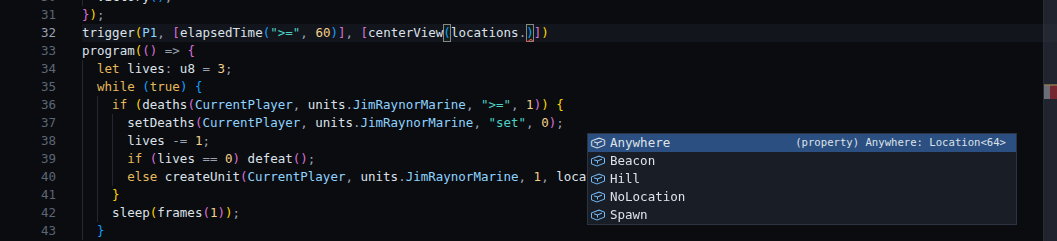
The code is checked as you type, against the map's own names: locations. completes to
the locations the map has, units. to every unit type (and the map's custom names),
switches. to the switches by number and by the names the map gives them, and
players. to the forces. A location passed where a unit belongs is an error as you type
it, and so is a name the map no longer has. The status bar along the bottom counts the
problems, and a click on the count opens Problems, the list of them, under the code
(Ctrl+J shows and hides that panel).
There is no build to remember. Saving the map applies the script, and so do Test Map and anything else that takes the map out of the editor: the script runs, the triggers it recorded go into the map as one contiguous block of the trigger list (replacing the previous block, or adding the first), and its programs, if it has any, are built into the file being written. If the script has an error the map is saved anyway, with the triggers from the last script that worked, and a notice names the file and the line.
Apply does the first half when you ask, which is how to look at the triggers in the
Trigger Editor without saving; the status bar says whether the script's triggers are in
the map, and a click there applies it as well. Play applies the script, builds the map
exactly as Save would and hands it to Test Map, which starts it in the game.
What each of them reported is kept under Output.
The Trigger Editor shows the script's triggers with a script badge and will not edit
them; Open TrigScript there jumps to the file and line that made one. The Text Trigger
Editor fences them in comments. Hand-made triggers around the block are left alone, and a
hand-made trigger inserted before the block just moves it along.
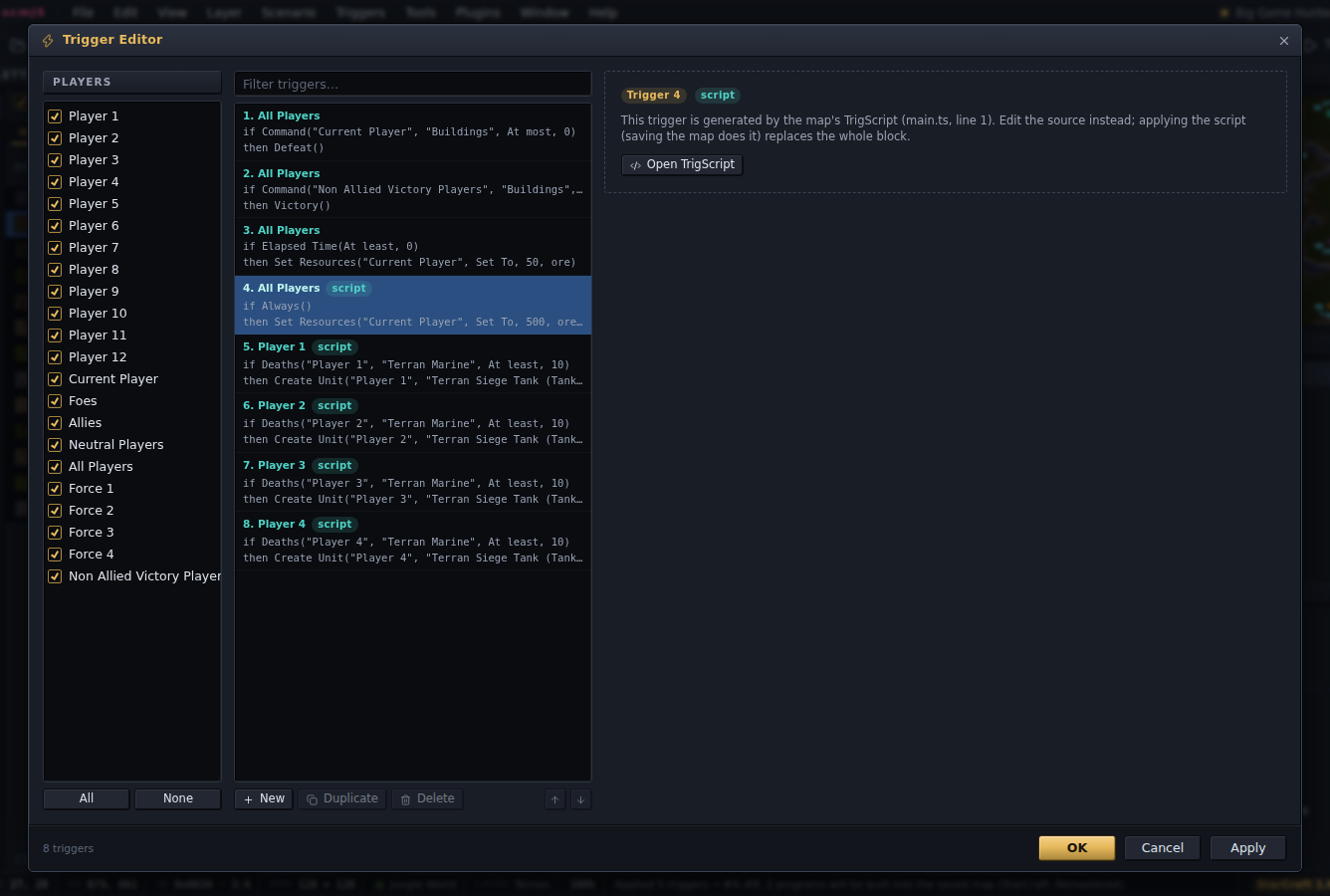
Editing one of the script's triggers by hand makes the block stale, and the editor says
so at the next open: how many of its triggers are still the script's and how many were
changed. The next Apply replaces the unchanged ones and keeps the edited ones as
hand-made triggers right after the block, so a wave system tuned in one trigger does not
come back twice; Append instead on the notice leaves them all alone and adds a fresh
block after them. While a block is stale, saving leaves the script unapplied and says so.
Import map triggers goes the other way: it rewrites the map's hand-made triggers as
trigger() calls, in their order, so a map made in the Trigger Editor can carry on as a
script.
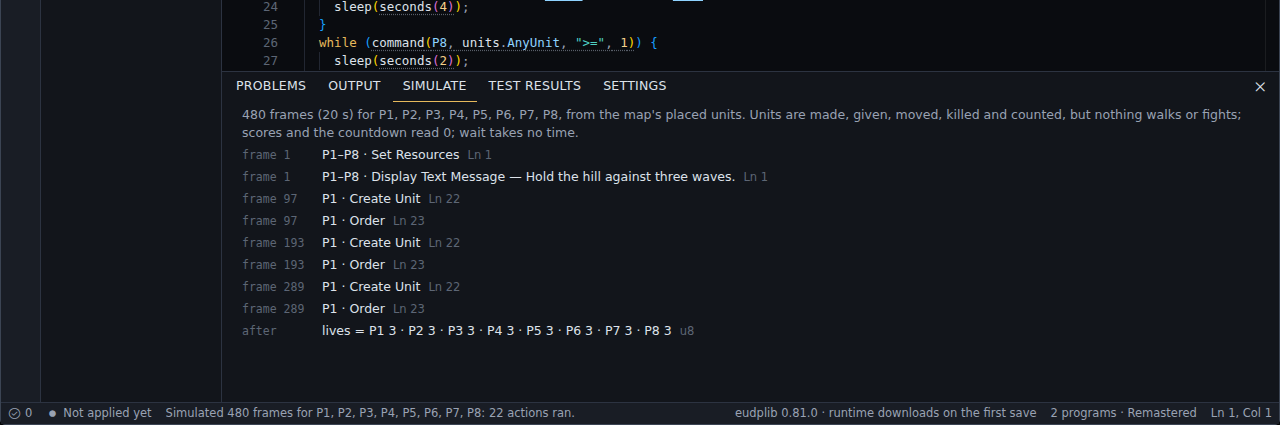
Simulate runs the script for 480 frames, twenty seconds of the game at Fastest, in a
built-in interpreter and lists, under the code, every action that ran, with its frame and
the source line, and the final value of every program variable. Triggers and programs run side by side in
one world, so a death count a program sets is seen by a trigger. It models death
counters, switches, preserve, list order, the game's arithmetic and the map's players —
a program or a trigger of a force runs for each of its players, and each line says whose
it is — and it has units: the ones placed on the map to start with, then whatever
createUnit makes, giveUnits hands over, moveUnit moves and killUnitAt kills, which
bring and command count. What it cannot know without the game it leaves out: nothing
walks, nothing fights and nothing is built, so no unit dies unless the script kills it. A
script that waits for the enemy to be dead waits for ever here. It is a check on the
logic; the fight is what tests stand in for, and Play is for.
A map with a program is built when it is saved. The first time, the eudplib plugin asks to download its runtime, about 15 MB, once; the desktop app and the container image carry it. A notice shows while the build runs (a few seconds) with a button to save without waiting. The file you get is the one to play and to share. It also holds the map as you see it in the editor, which is what comes back when you open it again, so the trigger list never fills with generated triggers. One thing changes for the whole map: the build makes the game run every trigger every frame, not every two seconds, the way hyper triggers do. A preserved trigger that adds a mineral does so twenty-four times a second in such a map.
The files and a record of the last apply live in the map archive under trigscript\ —
main.ts, any other file, and build.json — next to the scenario, so they travel with
the .scx. The Save dialog lists them under the archive's other files, each
with a tick, so a copy for release can leave the source out; the triggers stay either
way.