
Changing a map
This part and the ones after it show exactly what the AI sends to scmJS and gets back. You do not need them to use it, but they help when you want to know why it did what it did.
The model changes a map with the same tools whether it is linked to the editor or a file
on disk. A file is written over unless the tool is given out.
Triggers and strings#
Triggers and strings travel as text: the model exports them, changes the text and imports
it again. Here is "Change the opening message to 'Hold the ridge.' and show me what
changed" on the test map ums.scx, with what each tool was given and what it answered.
The model first asks for the triggers as text, with map_triggers_export and
{ "path": "ums.scx" }:
Trigger("Player 1"){
Conditions:
	Always();

Actions:
	Display Text Message(Always Display, "Hold the base.");
	Play WAV("staredit\\wav\\tone.wav", 1000);
	Set Mission Objectives("Bring a Marine to the middle.");
	Comment("Opening");
}
…
It changes the message in that text and hands the whole text back, with
map_triggers_import and { "path": "ums.scx", "text": "…", "out": "ums-fixed.scx" }:
ums.scx: 3 → 3 triggers
Written to ums-fixed.scx (4076 bytes)
Then it compares the two, with map_diff and { "a": "ums.scx", "b": "ums-fixed.scx" },
and tells you what the answer says:
ums.scx → ums-fixed.scx

Map
  ~ Strings        20 → 21

Triggers +1 −1
  − Player 1: Always() → Display Text Message(Always Display, "Hold the base."); Play WAV(…
  + Player 1: Always() → Display Text Message(Always Display, "Hold the ridge."); Play WAV(…

Strings +1
  + 21  Hold the ridge.

Sections
  ~ STR   355 B → 373 B
  ~ TRIG  7.0 KB → 7.0 KB
The old message is still in the string table, as after any trigger import, until
map_strings_prune drops it. Without out, the import would have written over ums.scx.
Units and locations#
map_units and map_locations list what the map has, and map_edit takes a list of
edits that are applied together or not at all. With two units selected in the linked map,
"make these invincible, put a Marine beside them and add a location called Ramp" is
editor_state, then one map_edit:
{ "path": "ums.scx", "edits": [
  { "op": "update_units", "indices": [17, 18], "invincible": true },
  { "op": "place_unit", "unit": "Terran Marine", "player": 1, "x": 400, "y": 1700 },
  { "op": "add_location", "name": "Ramp", "tiles": { "x0": 20, "y0": 40, "x1": 24, "y1": 44 } }
] }
  0  update_units  2 units changed
  1  place_unit    Terran Marine · Player 1 · 400,1700 · unit 21
  2  add_location  4  Ramp · 640,1280–768,1408
✔ ums.scx: 3 edits · 1 setting changed, 3 units added, 2 units removed, 1 location added, 1 string added · written to the editor, as one undo step · 4.0 KB
An edit also moves and removes units, adds, changes and removes locations, places sprites
and sets fog. Editing units, locations, sprites and
fog lists every kind of edit and its
fields. A position is used as given unless the edit says snap, which puts a building on
the building grid, or check, which refuses a position the editor would refuse.
Terrain and doodads#
map_edit also paints terrain and places doodads. The model reads the tileset's terrains
and the lie of the land with map_terrain, which draws the map as a grid of letters, and
the doodads with map_doodads. "Put a plateau in the middle with a ramp on its south
side, and a few lakes around it" on a flat jungle map is one map_edit:
{ "path": "ridge.scx", "edits": [
  { "op": "paint_terrain", "terrain": "Water", "cover": 0.12, "grain": 10, "seed": 7, "symmetry": "rot180" },
  { "op": "paint_terrain", "terrain": "High Dirt", "tiles": { "x0": 20, "y0": 16, "x1": 44, "y1": 40 }, "shape": "ellipse" },
  { "op": "place_doodad", "doodad": "ramp", "tileX": 30, "tileY": 38, "within": 8 }
] }
  0  paint_terrain  Water · 2,080 tiles changed
  1  paint_terrain  High Dirt · 786 tiles changed
  2  place_doodad   Cliff #13 · 32,38 · 6 × 6 · doodad 0
✔ ridge.scx: 3 edits · 4 sections changed · written to ridge.scx · 11 KB
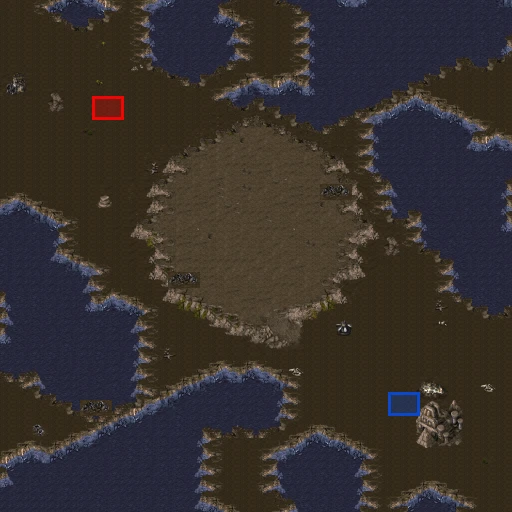
Terrain is painted with the editor's isometric brush, so the cliff round the plateau and the shore round each lake form on their own, and the ramp goes where StarEdit would let it go. Painting terrain and placing doodads has every field: shapes, patches placed by a seed, symmetry, scattering doodads over an area.
These edits read the tileset from your copy of the game,
or from the editor when the map is linked. Painting does not
move what stands on the ground, so ask the model to look at the result (map_preview, or
editor_picture on a linked map) and to run map_check.
For a whole map to start from, map_generate writes a symmetric melee map from a seed:
mains on high ground with a ramp each, naturals, free bases and a middle, walked and
checked before it is written.
Players, forces and settings#
map_settings reads the Scenario menu's settings: the players, the forces, and the unit
types, upgrades and technologies the map changes. map_set sets them, with the map's name
and revision. "Make Player 3 a Protoss computer in the second force, and give Zerglings 50
hit points" is one map_set:
{ "path": "ums.scx",
  "players": [{ "player": 3, "type": "Computer", "race": "Protoss", "force": 2 }],
  "units": [{ "unit": "Zergling", "hitPoints": 50 }] }
Player 3 type: Inactive → Computer
Player 3 race: Inactive → Protoss
Player 3 force: 1 → 2
Zerg Zergling uses the game's numbers: yes → no
Zerg Zergling hit points: 35 → 50
Written to ums.scx (4092 bytes)
Players, forces and other settings has every list and field: forces, a unit's cost and weapons, who may build it, upgrade levels, technologies and switch names. A number for a unit, upgrade or technology is filled in from your copy of the game; the rest needs none.
Everything else#
| To change | The tool |
|---|---|
| The size | map_resize |
| A TrigScript map, built from its script | map_build |
| Anything else the plugin API reaches, such as sounds or single tiles, with a script the model writes | map_run |