
Mod terrain
A mod's tileset can hold ground and pictures the game never had. This section is about laying them, and applies only while a mod's data set is in use (Data sets made from a mod says how to add one); with the game's own data, nothing here is listed.
What the tileset's files say about the added tiles decides which brush lays them:
| The mod adds | Laid with |
|---|---|
| Flat ground: mud on high ground, a swamp, asphalt | The Rect brush (Ground a mod adds) |
| Pictures drawn across many tiles: ruins, buildings, walls, roads | The Tile brush, a block or a piece at a time (Pictures a mod adds) |
| One of its own terrains again at another height, with edges drawn for it: Mud on high ground | The isometric brush (Copied terrain) |
| Another tileset's terrain copied in: Installation's floors inside a Badlands | The isometric brush (Terrain from other tilesets) |
A mod can also say all of this in a file it ships, and then nothing has to be found or learned (Terrain a mod declares).
Ground a mod adds#
A mod's tileset can hold flat ground the game never had: Cosmonarchy's Jungle has mud on high ground, a swamp, asphalt and more. The tileset's files give that ground no terrain type and nothing the isometric brush could join it with, so the Isometric tab does not list it. The Rect tab lists what it can stand behind, below the game's terrains:
- The game's ground at another height. Where a pair of tile groups has exactly the pictures of one of the game's terrains under other flags, it is listed under that terrain's name and its height: Mud (mid ground), Mud (high ground). Mid ground is the level of High Dirt. The Tile tab names those groups the same way, and its Flat terrain filter includes them.
- Ground the open map lays. A pair the map already uses as ground, left and right halves side by side, is listed as Group and its number. Nothing in a tileset tells flat ground from the pieces of a seam between two terrains of nearly one colour, so the map is what the editor goes by.
- A pair you pick. In the Tile tab, right-click and choose Paint This Tile's Pair with the Rect Brush to lay any pair as ground, on a map that has none of it yet. Alt+click on such ground in the map picks it too.
- Ground the mod names. A mod's terrain file can name its flat ground; those names are listed too, and so are the names a plugin gives.
All of these paint, flood-fill and take part in Tools ▸ Replace Terrain… like the game's terrains. Replacing Mud with Mud (mid ground) raises a mud flat without changing how it looks.
Pictures a mod adds#
Most of what a mod adds is not flat ground but pictures: ruins, buildings, walls, roads, drawn over thousands of tile groups the way the game's doodads are. They are laid with the Tile brush:
- In the Tile tab's filter, choose Added by and the data set's name. The choice is there when the tileset has more groups than the game's, and lists only those.
- Switch to the sheet. The pictures appear whole. Drag over one to pick it as a block and click on the map to lay it, or drag on the map to run a wall or a floor along.
- For the parts the mod's own maps lay whole, switch to the pieces view and choose Learn from Maps… with the folder of the mod's maps. The pieces are then listed ready to pick.
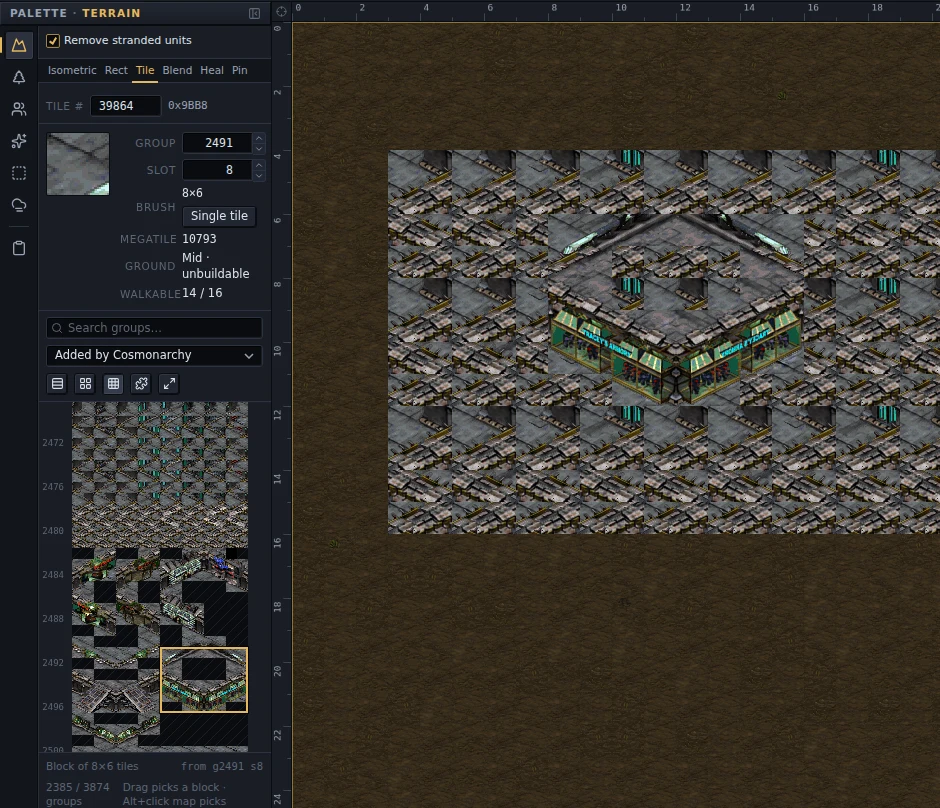
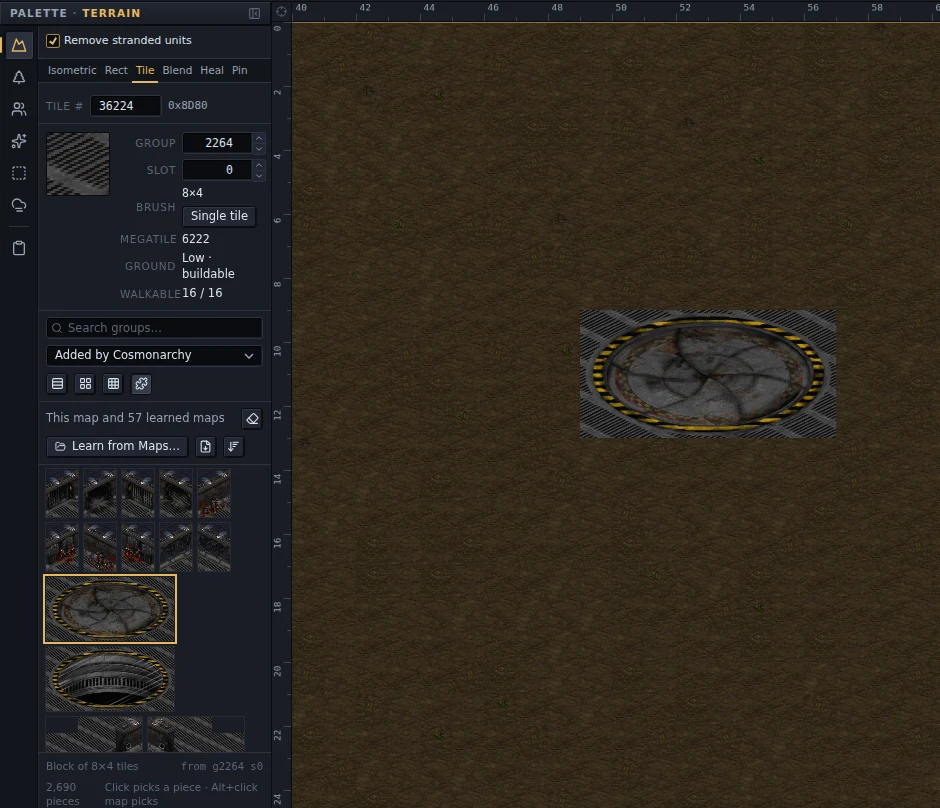
With Added by chosen, the grid and the pieces leave out what the mod repeats from the game's own part of the table. The seams around a picture are the mod's own tiles too: pick them from the sheet, or let the Blend brush find the tiles that continue an edge.
Copied terrain#
A tileset made for a mod sometimes holds one of its own terrains again at another height: the same Mud, say, on mid and on high ground. The Rect tab already offers such a copy ("Mud (mid ground)", as Ground a mod adds says). Often the mod also drew that terrain's edges again at that height: the pieces that join Mud to the ground around it, Mud kept as it was and the other side repainted as the ground the copy is meant to sit on. The isometric brush cannot use those pieces from the tileset's tables, because they have no terrain type.
When a tileset holds a copy, the editor looks through it once, by itself, for such pieces: the Isometric tab says so in a quiet line while it does, and lists what it found under Copied terrain, named as the Rect tab names the copy. It finds them by their pictures (each keeps the original edge piece's picture where that piece shows the terrain), their flags (raised as the copy is) and the way the pieces are laid out in the tileset, never by where a particular mod put them. What it found is kept in the browser, so the next time a map on the same tileset files opens, the list is there at once.
Painting a copied terrain works as the isometric brush does: the brush size, symmetry and pinned tiles apply, and a stroke is one step to undo. The terrain is laid by the tileset's own brush and each tile is written as the tile the mod drew for it. A tileset may hold the same pieces several times, each set drawn to sit on a different ground (Mud against High Dirt, Mud against Raised Jungle); the stroke takes the set that joins the ground under it best. Where that ground is one of the tileset's terrains, the brush lays it under the stroke first, so a copy painted elsewhere gets its own ground and that ground's usual cliffs or edges around it. Where the pieces are drawn for ground the tileset has no terrain type for, the stroke lays only where that ground already is, and the status line says how many diamonds it left.
The editor keeps where copied terrain was painted as a small file inside the map
(scmjs\copies.bin), saved with it, moved by Resize, undone with the stroke and shared on
a shared map; the game never reads it. When another isometric stroke cuts into a patch,
the patch is laid again in the same step: the part the ground still holds stays with its
edges, and what the other stroke took is given to that stroke's ground. A few seams can
show where the patch was cut, and a small patch close to the cut can be given up entirely;
the status line says how many diamonds were given up and how many seams there are. A tile
laid by hand over a patch is left where it is.
A terrain is listed only when its pieces walk and build as the original terrain does at the copy's height. One whose tileset lacks some of the edge's shapes is listed after the complete ones, marked incomplete, with a hover that says how many shapes are missing; the brush lays the tile that joins best in those places, and the status line counts those cells. Cliffs are not offered this way: their faces carry heights of their own that a copy does not raise the same way.
Terrain from other tilesets#
A tileset made for a mod often holds another tileset's ground copied in: Installation's floors and walls inside a Badlands, say. That ground has no terrain type in the tileset, so the isometric brush cannot lay it from the tileset's own tables. It can lay it from the other tileset's: the Isometric tab's From other tilesets list paints such a terrain with its own tileset's brush, cliffs and edges included, and writes each tile as this tileset's copy of the same picture.
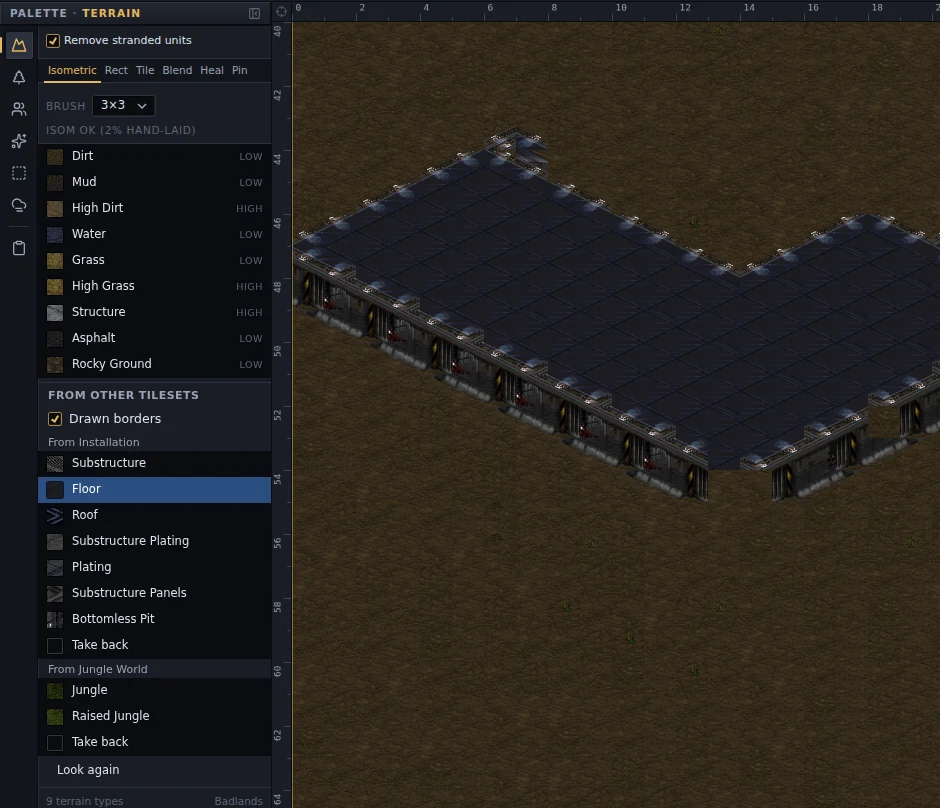
The first time, the list is a button, Find terrain from other tilesets. It looks through the game's other seven tilesets for terrains whose every tile has a copy here.
- It runs in the background, so you can keep editing: about ten seconds for a mod's Badlands of 40,000 tiles, with a progress bar and a Stop button. A search you stopped carries on from where it was.
- What it finds is kept in the browser. The next time a map on the same tileset files opens, the list is there at once.
- Copies are found by their pictures. A mod's copies are rarely exact, since they were redrawn into the tileset's own colours, so a tile counts as a copy when it looks the same up close. Where one tile of an otherwise whole terrain has no copy, the nearest picture stands in for it, and the terrain's hover says how many do.
- A mod's terrain file skips the search. The terrains it gives are listed straight away, and their hover says the mod's file named the tiles.
Painting works as the isometric brush does: the brush size, symmetry and pinned tiles apply, and a stroke is one step to undo.
- Only the tiles around the stroke are written. Ground that no borrowed stroke has painted counts as the other tileset's base ground, the one a new map of that tileset is made of (Floor for Installation), and the rest of the map is left as it is.
- Later strokes continue earlier ones. The editor keeps the other tileset's record of what you painted inside the map file, so cliffs and edges carry on across strokes and sessions. The record is saved with the map, follows undo and Resize, and is shared on a shared map. The game does not read it (What the editor adds to a map).
- Painting over it with another brush gives the ground back. That part counts as base ground again at the next borrowed stroke, so a stroke does not continue edges that are gone.
- Take back, at the end of each tileset's list, undoes borrowed ground by painting: each cell gets the tile it had before the borrowed brush wrote it, and the border around what is left is laid again. Painting all of a patch back leaves the map as it was.
Two things it does not do:
- Walk and build as the other tileset does. Each tile walks, builds and stands at the height this tileset's copy says, and a mod often keeps its copies under other flags than the original: in Cosmonarchy's Badlands, about half of Installation's tiles have a copy that walks the same. View ▸ Walkability and the Elevation and Buildability overlays show what was laid.
- Join the two grounds where no border is known. Without a drawn border for a pair of grounds, the two simply touch. The status line after a stroke counts the seams; the Heal brush softens them, and the pieces view lists the transition pieces the mod's own maps use there.
Drawn borders#
A mod that copies another tileset's ground in usually draws its own pieces for where that ground meets the tileset's: a trim along a floor's edge, a cliff wall from a raised floor down to dirt. With Drawn borders on, a stroke lays those pieces where its ground meets the tileset's own, instead of the other tileset's edge to its base ground.
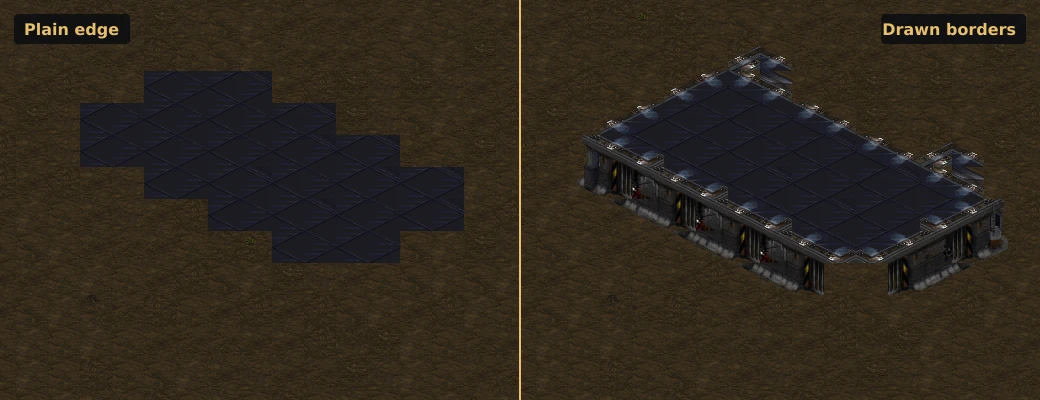
The switch is under the list's heading. It is on to begin with wherever a border is known, and the editor remembers how you left it. The hover on each terrain says which grounds it has borders against.
The editor learns the borders from the mod's maps, in this order:
- Find terrain from other tilesets, so the editor knows which tiles are copies. The more of the other tilesets it knows, the better it tells a copy from a drawn piece.
- Learn from Maps… in the Tile tab's pieces view. It reads the borders as it reads the pieces, the map in front included, and says how many it found for each pair of grounds.
A mod's terrain file or a plugin can carry the borders instead, and then nothing has to be learned.
The border is laid when the stroke ends, as part of the same undo step:
- Each border cell gets the piece the maps lay in its place, chosen so that it joins its neighbours.
- Where no piece joins, the cell is left as the plain edge: the borrowed ground's own tile on its side, the map's ground on the other. A shape of border that no map lays is left plain too.
- On the map's side, the tile that was there stays wherever it already joins, so plain ground is not scattered with pieces.
The status line counts the cells drawn, the cells left as the plain edge ("left hard"), and the border tiles that walk unlike either ground, which part of a cliff piece usually does.