
Triggers in the game
These commands start the map in the game itself, the engine of the play page, with the
game's files from your copy of StarCraft (what they
need). Nobody has to play: the game runs as fast as the
computer can run it. Or the players of a recorded game play it: --replay gives the game
the commands from a replay, so the game in a bug report can be traced and tested.
| Command | Answers |
|---|---|
map trace |
Which triggers fire when nobody plays, and why the others never do |
map cost |
What the triggers cost Remastered each frame |
map trace --replay |
Which triggers fired in a game somebody played, and when |
map test |
Whether the triggers do what you meant: scenarios you write, played and checked |
map test record |
The same from a replay: its game's end written down as a test |
map coverage |
Which triggers ever fire across a folder of replays |
A map in the original StarCraft 1.00 form is run as Brood War, as the editor would convert
it, and a campaign map saved as a file, such as Enslavers, runs as any other map. Each
command exits with 2 when the game could not start, a wrong --starcraft folder included.
From a bug report to a test#
The commands work together when someone sends you a replay of a game where the map went wrong:
scmjs map trace --replay report.rep --order
scmjs map test record ridge.scx report.rep --name "bunker bug"
scmjs map test ridge.scx
map trace --replayplays the replay's game and lists every trigger that fired, in order, and each one that never did with the condition that stopped it. That usually shows the fault.map test recordplays the replay on your map and writes a scenario intoridge.tests.jsonwith what the game ended with as its expectations, the fault included.- In the tests file, keep the lines the fault is about and change them to what should have happened. Delete the rest.
- Fix the map.
map testnow plays the replay on the fixed map, and fails until the fix holds. Keep the test: it fails again if the fault comes back.
A fix to the triggers alone usually keeps the game in step with the replay. A change to units, terrain or resources usually does not (Triggers in a replay's game says why).
Which triggers fire#
scmjs map trace starts the map as a Use Map Settings game, with your seat left idle and
the computers as the map sets them, runs it for a while, and records every condition the
game checks and every action it runs. The report has a line per trigger, with how often it
fired, when first and last, and whose it is. Then come the triggers that never fired, each
with the condition that last said no.
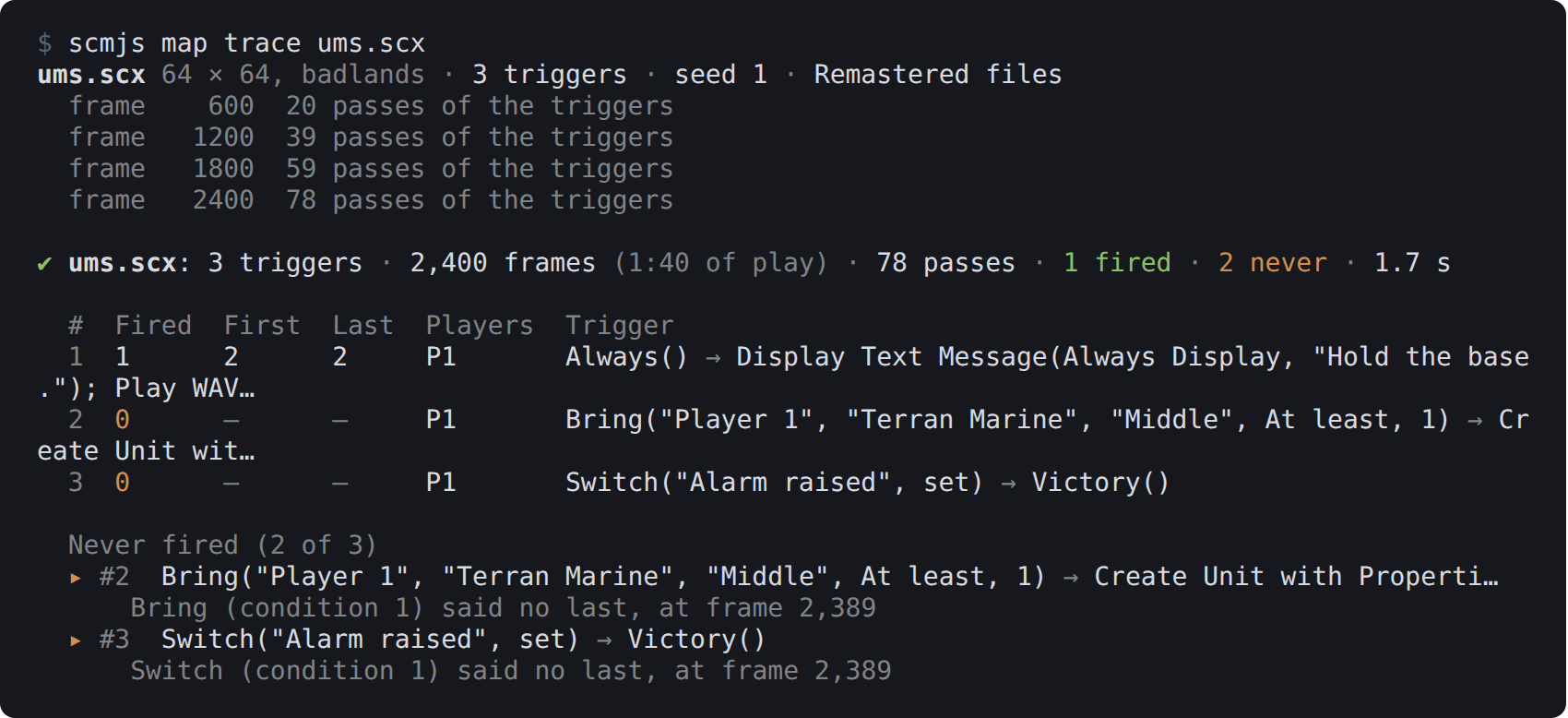
scmjs map trace ums.scx. Nobody brings a Marine to the middle, so the trigger waiting
for one never fires.
The game runs the triggers about every two seconds; each run is a pass, and a trigger that
fires on every pass is a preserved one. A count with +n after it is a trigger whose Wait
held it and then let it go on n times.
| Option | What it does |
|---|---|
--frames |
How long to run, at 24 frames a second, or a time such as 1:40. The default, 2,400, is 100 seconds of play; the game may end sooner if a trigger ends it |
--every |
Frames between the progress lines, 600 by default (a minute of play, 1,440, with --replay); 0 for none |
--seed |
Fixes the game's luck, so the same map and seed give the same run. A replay's game has the replay's own seed, so --seed with --replay is refused |
--all |
Lists every trigger, when the map has more than forty |
--json |
The same, per trigger, as data: each with its number as the text gives it, its text, and its players from 1 (playerNumbers; players counts from 0) |
Nobody plays, so nothing a player would do happens. A trigger waiting for a unit to be
brought somewhere will say so, which is the point. When the map ends the game early, as a
map that defeats an idle player does, the report says so:
map test plays a scenario with steps. The progress lines go
to standard error, so the report alone can be sent to a file.
What the triggers cost#
scmjs map cost runs the map the same way and weighs every trigger the game passes and
every condition and action it runs, as StarCraft: Remastered charges for them. The model
is the one TrigScript's editor uses, measured on the real game: a Deaths condition costs
about five nanoseconds, and the game stays smooth up to about fifteen milliseconds of
triggers a frame. The report says what a frame costs on average where triggers ran and at
most, how that compares with what a frame can carry, and which triggers cost the most:
✔ trigscript-frame-cost.scx: triggers cost 0.025 ms a frame on average where they ran (599 of 601 frames), 1.10 ms at the most (frame 2: 83,787 records, 53,192 triggers)
  Remastered on a fast computer: smooth to about 15 ms of triggers a frame, slows past 37 ms
  83,787 of the records ran in no trigger of the map — a program's own (TrigScript, eudplib), 1.10 ms in all
A TrigScript or eudplib program runs its own records through the EUD trigger chain rather than through the map's trigger list. For such a map the cost is in the first lines, and the triggers listed are only the ones that start the program. TrigScript's editor shows a program's cost line by line.
Triggers in a replay's game#
When someone sends a replay of a game where the map went wrong, --replay plays that game
with the trace on. The players' own commands drive it, people and computers as they
played, to the end of the replay.
scmjs map trace --replay report.rep --order
A replay of a mod needs that mod named with --mod, and the command checks that the mod's
data set is the one the replay names before it plays. A game the mod's plugins ran in is
refused: the engine's runners lay a mod's files over the game's and run no plugin.
The report is the one above, with two differences. The first and last firings are given on
the game's clock, m:ss at Fastest as the replay viewer counts it, and only the triggers
owned by the players in the game are listed. --order adds every firing in the order the
game ran them: the time, the frame, whose copy of the trigger it was, and the trigger.
$ scmjs map trace --replay 1631.rep --order
1631.rep 128 × 128, jungle · 4 players · 10:16 · 1,713 triggers (12 copies in the game) · Remastered files

✔ 1631.rep: 1,713 triggers (5 owned by the players) · 14,662 frames (10:16), Ever)Z(bOy won · 473 passes · 4 fired · 1 never · 6.2 s

  #     Fired  First  Last   Players      Trigger
  1709  2      0:00   0:00   P3 P4        Elapsed Time(At least, 0) → Set Resources("Current Player", S…
  1710  2      0:00   0:00   P5 P6        Always() → Run AI Script("Turn ON Shared Vision for Player 1"…
  1711  0      –      –      P3 P4        Command("Current Player", "Buildings", At most, 0) → Defeat()
  1712  1      10:13  10:13  P3 P4        Command("Non Allied Victory Players", "Buildings", At most, 0…
  1713  4      0:00   0:00   P3 P4 P5 P6  Elapsed Time(Exactly, 0) → Display Text Message(Always Displa…

  Never fired (1 of 5)
  ▸ #1711  Command("Current Player", "Buildings", At most, 0) → Defeat()
      Command (condition 1) said no last, at frame 14,634

  In the order they fired (9)
  Clock  Frame   Player          #      Trigger
  0:00   2       P3 ErOs_Class   #1709  Elapsed Time(At least, 0) → Set Resources("Current Player"…
  0:00   2       P3 ErOs_Class   #1713  Elapsed Time(Exactly, 0) → Display Text Message(Always Dis…
  0:00   2       P4 Ever)Z(bOy   #1709  Elapsed Time(At least, 0) → Set Resources("Current Player"…
  0:00   2       P4 Ever)Z(bOy   #1713  Elapsed Time(Exactly, 0) → Display Text Message(Always Dis…
  0:00   2       P5 ErOs_Kyoung  #1710  Always() → Run AI Script("Turn ON Shared Vision for Player…
  0:00   2       P5 ErOs_Kyoung  #1713  Elapsed Time(Exactly, 0) → Display Text Message(Always Dis…
  0:00   2       P6 iCoN`MisO    #1710  Always() → Run AI Script("Turn ON Shared Vision for Player…
  0:00   2       P6 iCoN`MisO    #1713  Elapsed Time(Exactly, 0) → Display Text Message(Always Dis…
  10:13  14,603  P4 Ever)Z(bOy   #1712  Command("Non Allied Victory Players", "Buildings", At most…
With no map named, the game is played on the map inside the replay. Name a map as well to play the replay's commands on that map instead, such as the fixed version of the one in the bug report:
scmjs map trace fixed.scx --replay report.rep
The command says first how the map differs from the one in the replay. A replay is only the players' commands, so a changed map can make the game go out of step. When a unit a player clicked is not there, or a building cannot be placed, the game plays on with commands meant for another game. Changes to triggers alone usually keep it in step. Changes to units, terrain or resources usually do not. The game checks each command against what it has, and the report says when and where the game parted from the replay. What fired before that point is what happened.
scmjs map cost --replay weighs the triggers of the replay's game in the same way.
--frames stops the game sooner. Left out, the whole replay is played. In a game that is
not Use Map Settings, the game runs its own melee triggers rather than the map's, and the
report says so.
Testing a map's triggers#
scmjs map test checks that a map's triggers do what you meant, in the game. You write
scenarios in a tests file: what the game starts with, what happens at given times, how
long to play, and what must be true at the end. Each scenario is one game. A scenario that
fails says what did not hold and what was there instead, and keeps the game's replay so
you can watch what happened.
The smallest tests file is one scenario with something to expect. This one plays ten seconds of the map and expects the first trigger to fire and its text to show:
{
  "scenarios": [
    {
      "name": "the opening text shows",
      "frames": "0:10",
      "expect": [
        { "trigger": 1 },
        { "text": "Hold the base." }
      ]
    }
  ]
}
Saved as ums.tests.json beside ums.scx, it runs with the map's name alone:
$ scmjs map test ums.scx
ums.scx 64 × 64, badlands · 3 triggers · 1 scenario (ums.tests.json) · Remastered files
  ✔ the opening text shows  2.1 s · 2 of 2 expectations held

✔ the scenario passed (2.6 s)
When an expectation does not hold, the scenario says what the game had instead. Here the file expected "Hold the line.":
  ✖ the opening text shows  2.0 s · 1 of 2 expectations held
      ✖ "Hold the line." was shown — it was not; 6 lines shown, the last "Hold the base."
      …
      replay: ums.tests/ums.tests.the-opening-text-shows.rep, open it with scmjs replay open …

✖ the scenario failed (2.5 s)
The test map's own tests file has three scenarios, and the third fails:
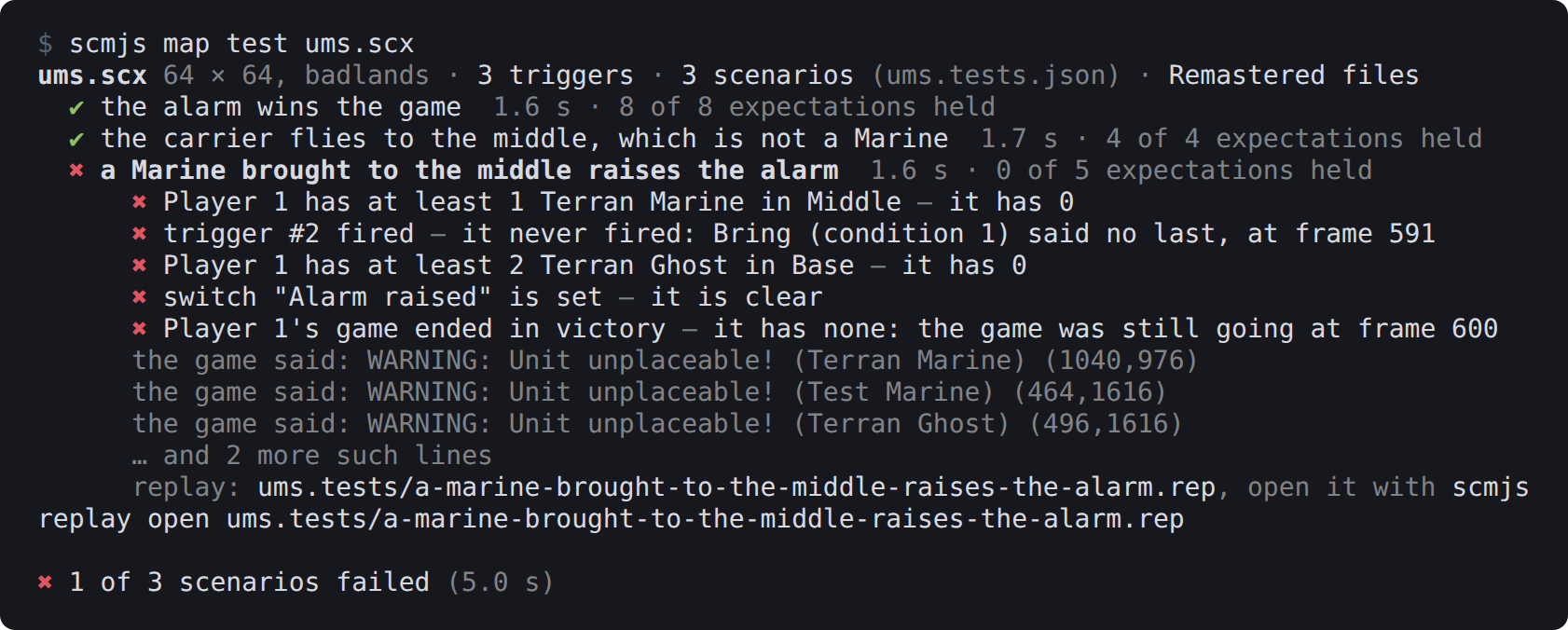
scmjs map test ums.scx, with the tests file kept beside the test map.
Here the third scenario found something real: the test map has no ground a Marine can stand on, so the Marine never appeared and the trigger waiting for it never fired. That is why a failed scenario lists the game's own warnings from its start.
The tests file#
The tests are read from <map>.tests.json beside the map (ums.tests.json for
ums.scx), or from the files named after the map on the command line. The file is JSON. A
fuller one than the first, with a set-up, timed steps and more to expect:
{
  "scenarios": [
    {
      "name": "the alarm wins the game",
      "frames": "0:20",
      "steps": [
        { "at": 24, "chat": "glhf" },
        { "at": "0:02", "create": "Terran Wraith", "player": 1, "location": "Middle" },
        { "at": "0:05", "switch": "Alarm raised", "state": "set" }
      ],
      "expect": [
        { "trigger": "Opening", "fired": 1 },
        { "text": "Hold the base." },
        { "units": "Terran Wraith", "player": 1, "location": "Middle", "is": 1 },
        { "switch": "Alarm raised", "is": "set" },
        { "outcome": "victory", "player": 1 },
        { "ended": true }
      ]
    },
    {
      "name": "a Marine brought to the middle raises the alarm",
      "frames": "0:25",
      "setup": [
        { "create": "Terran Marine", "player": 1, "location": "Middle" }
      ],
      "expect": [
        { "trigger": 2 },
        { "switch": "Alarm raised", "is": "set" }
      ]
    }
  ]
}
A scenario has a name and an expect list, and may have frames, seed, setup and
steps. A scenario that expects nothing would pass whatever the game did, so it is
refused, as are two scenarios of one name in a file. A key the tests do not know, at any
level, is refused with where it is and the nearest key they do know
("frams": did you mean "frames"?), so a misspelt key never goes unnoticed. A key that
starts with // is a comment and is left alone. frames is how long to play: a number of
frames, 24 to a second at Fastest, or "m:ss"; 2,400 unless the file or --frames says
otherwise. frames and seed at the top of the file apply to every scenario that does
not set its own.
A scenario may name a replay instead of setup and steps. The replay's commands drive
the game, played on the map being tested, and the scenario plays to the replay's end
unless frames says otherwise:
{
  "name": "the bunker fills at 7:30",
  "replay": "reports/bunker.rep",
  "expect": [
    { "trigger": "Bunker full", "fired": 1 },
    { "outcome": "victory", "player": 1 }
  ]
}
The path is relative to the tests file's folder. seed does nothing here, because the
game uses the replay's own. Such a scenario takes no setup or steps, since anything
added to the game would take it out of step with the replay. scmjs map test record
writes these scenarios for you (below).
Things are named as the trigger window names them:
| Thing | Written as |
|---|---|
| Player | A number from 1 to 12, or "Player 1". Where a trigger would take a group, "All Players", "Force 1", "Foes" and "Allies" too |
| Unit | Its name ("Terran Marine", or "Marine" when that is clear), a class ("Any unit", "Men", "Buildings", "Factories"), or its number in units.dat |
| Location | Its name, "Anywhere", or its number |
| Switch | Its name, "Switch 3", or a number from 1 to 256 |
| Trigger | The number scmjs map trace prints for it, or the text of its Comment action |
A name the map does not have is an error that lists the names it does have.
setup is what the game starts with. Each entry does one thing:
| Entry | Does |
|---|---|
{ "create": unit, "player": p, "count": n, "location": l } |
Creates the units (one unless count says) |
{ "kill": unit, "player": p, "count": n, "location": l } |
Kills the units (all of them unless count says), as Kill Unit does: it adds to no death count, so a Deaths condition does not see it. Set the count with deaths, or create units that fight |
{ "remove": unit, "player": p, "count": n, "location": l } |
Removes the units, as Remove Unit does |
{ "give": unit, "player": p, "to": q, "count": n, "location": l } |
Gives the units to player q |
{ "switch": s, "state": "set" } |
Sets the switch ("clear" and "toggle" too) |
{ "minerals": n, "player": p }, { "gas": n, "player": p } |
Sets the player's minerals or gas; "+100" adds, "-100" takes away |
{ "deaths": unit, "player": p, "count": n } |
Sets the death count, with the same + and - |
{ "action": "Set Countdown Timer(Set To, 60)" } |
Any action, in the trigger window's text form; a list of them works too |
location is Anywhere when left out.
steps happen during the game. Each has at, a frame or "m:ss", and one of the entries
above, or one of these, which are your own commands as a player would give them:
| Entry | Does |
|---|---|
{ "at": t, "order": "move", "unit": u, "location": l, "to": m } |
Orders your units of that type in location l to location m: "move", "attack" (attack-move) or "patrol"; "stop" and "hold" need no to. unit is Any unit and location Anywhere when left out. to may also be a tile, [x, y], so the map needs no location for every place a test walks to |
{ "at": t, "chat": "text" } |
Sends a chat line, which shows on screen like any other |
You play the map's first slot that is open to a person, as when you start the map alone, and the computers play as the map sets them. Your commands reach the game at the frame given. The other steps are carried out by the game's triggers, which run about every 31 frames (1.3 seconds), so they happen at the first pass after the game's clock reaches their time.
expect is what must be true when the scenario ends:
| Entry | Holds when |
|---|---|
{ "trigger": t, "fired": n } |
The trigger fired that many times; true (the default) is at least once, false is never |
{ "switch": s, "is": "set" } |
The switch is set, or "clear" |
{ "deaths": unit, "player": p, "is": n } |
The player's death count for that unit |
{ "minerals": n, "player": p }, { "gas": n, "player": p } |
The player's minerals or gas |
{ "units": unit, "player": p, "location": l, "is": n } |
How many of the units the player has there, counted as the Bring condition counts them (as Command counts them when there is no location; player is All Players when left out) |
{ "text": "words" } |
The words were on your screen at some point: trigger text, transmissions, chat. "shown": false for words that must not appear. In a replay's game, the screen is the replay viewer's |
{ "outcome": "victory", "player": p } |
The player's game ended in victory ("defeat", "draw", or "none" for no outcome yet) |
{ "ended": true } |
The game ended before the scenario's frames ran out (false: it was still going) |
A count is a number, meaning exactly that many, or a comparison such as ">= 2", "< 5"
or "!= 0". The text shown and how often a trigger fired cover the whole game; everything
else is read when the scenario ends.
How a test runs#
The setup and the timed steps become triggers in a copy of the map. The setup is one trigger placed before the map's own, owned by the first player in the game, with the condition Always, so it runs first in the first pass. Each step is a trigger placed after the map's own with an Elapsed Time condition. Your map file is not changed, and the trigger numbers in the report are the map's own.
Because these triggers are part of the copy, the replay holds them. A failed scenario's
replay is kept in <map>.tests/ beside the map (or where --out says) and plays back the
scenario exactly as it ran. It is named after the tests file and the scenario, as the
clips are (ums.tests.loses.rep), and it is removed once the scenario passes.
scmjs replay open opens it in the editor, where the test's own triggers show first and
last among the map's.
--clips also keeps a clip of each failed scenario, to see what went wrong without
opening the replay: the eight seconds of its game up to the moment it ended, and two more,
as replay export draws them, the camera following your
units. A clip is a GIF named after the tests file and the scenario, such as
ums.tests.a-marine-brought-to-the-middle-raises-the-alarm.gif, in <map>.clips/ beside
the map, or in the folder --clips names. --clips-format webm makes WebM files instead.
Each clip gets a line after the summary, --json lists them, and --format github,
junit and sarif name a scenario's clip in its failure. The clips are drawn in a
browser on your computer, as replay export draws, so they need Chrome, Chromium or Edge;
without one the command says so once and the result of the tests stands. A scenario that
plays a replay has no clip of its own, since its game is that replay.
$ scmjs map test ums.scx --clips
…
✖ 1 of 3 scenarios failed (7.3 s)
  ✔ ums.clips/ums.tests.a-marine-brought-to-the-middle-raises-the-alarm.gif · 254 KB · 0:08 · 0:17–0:25 of the game
  1 clip of the failed scenario in ums.clips
| Option | What it does |
|---|---|
--clips [folder] |
A GIF of the end of each failed scenario's game, in <map>.clips/ or the folder named |
--clips-format webm |
The clips as WebM files rather than GIFs |
--seed |
The game's random seed for scenarios that do not set one; the same map, scenario and seed give the same game every time |
--frames |
How long to play, for scenarios and files that do not say: frames, or a time such as 0:20 |
--out |
Where the failed scenarios' replays go |
-u, --update |
For scenarios that play a replay: the expectations that no longer hold are rewritten to what the game gives now |
--json |
Every scenario with each expectation, whether it held and what the game had |
--format github, junit, sarif |
The failures in the forms CI tools read, as for map check, each placed on the scenario's line in the tests file |
The command exits with 1 when a scenario fails, and with 2 when the tests file or the map
cannot be read or the game could not start. It needs the game, so it does not run on
GitHub's own runners; the workflow scmjs init writes leaves it out and says how to run
it on a runner of your own that has the game.
A test cannot yet have a player leave (you are the only person in the game) or give the computers' own commands, except by playing a replay of a game where they did.
Seeing what a game did#
A passing scenario prints one line. --show adds what its game did: where it ran to and
how it ended, the lines you were shown, and the map's triggers that fired, in the order
they first did.
$ scmjs map test ums.scx --only "the opening text shows" --show
ums.scx 64 × 64, badlands · 3 triggers · 1 scenario (ums.tests.json) · 1.16.1 files
  ✔ the opening text shows  0.8 s · 2 of 2 expectations held
      ran to 0:10 (frame 240): the game was still going; Player 1 has 0 minerals and 0 gas
      shown (6 lines):
        0:00  "WARNING: Unit unplaceable! (Terran Marine) (1040,976)"
        …
        0:00  "Hold the base."
      fired (1 trigger), by when first:
        0:00  #1 "Opening"

✔ the scenario passed (1.1 s)
A list longer than 30 lines is cut unless --all is given. --only plays the scenario of
that name and no other; give it again for each further one.
To try something without writing a file, send the scenarios on standard input with - in
place of a tests file: a list of scenarios, or a whole tests file. A scenario sent this
way may leave expect out. It is then played to see what happens, and what its game did
is printed without --show:
$ echo '[{"name": "what happens in ten seconds", "frames": "0:10"}]' | scmjs map test ums.scx -
ums.scx 64 × 64, badlands · 3 triggers · 1 scenario (standard input) · 1.16.1 files
  ℹ what happens in ten seconds  0.8 s · expects nothing
      ran to 0:10 (frame 240): the game was still going; Player 1 has 0 minerals and 0 gas
      …

ℹ 1 scenario played, expecting nothing (1.2 s)
--save writes the scenarios read from standard input into <map>.tests.json once they
have been played, replacing one of the same name. A scenario that is kept needs a name and
something to expect. --json has what each game did as happened beside its results.
A test from a replay#
scmjs map test record turns a replay into a test. It plays the replay on the map, as
map trace --replay does, and writes a scenario into the
map's tests file with everything the game ended with as expectations:
$ scmjs map test record 1631.scx 1631.rep --name "2v2 to the end"
✔ Recorded "2v2 to the end" into 1631.tests.json · 14,662 frames (10:16) · 40 expectations · 6.5 s
  5 triggers, 1 line shown, 4 outcomes, 1 end, 8 unit counts, 4 minerals, 4 gas, 13 death counts
The scenario it wrote begins:
{
  "name": "2v2 to the end",
  "replay": "1631.rep",
  "frames": 14662,
  "expect": [
    { "trigger": 1709, "fired": 2 },
    { "trigger": 1710, "fired": 2 },
    { "trigger": 1711, "fired": 0 },
    { "trigger": 1712, "fired": 1 },
    { "trigger": 1713, "fired": 4 },
    { "text": "ErOs_Class has left the game.", "shown": true },
    { "outcome": "defeat", "player": 3 },
    { "outcome": "victory", "player": 4 },
The expectations are a snapshot of the end of the game: how often each trigger the players
own fired (0 for the ones that never did), the switches that are set and the named ones
that are clear, the lines shown that were not chat, each player's outcome, whether the
game ended, each player's men and buildings, minerals and gas, and every death count.
Triggers, switches and units are named as the map names them, where the map has a name for
them. Each expectation is one line of the file, so delete the lines you do not care about
and keep the ones the test is for.
| Option | What it does |
|---|---|
--name |
The scenario's name; the replay's file name by default. A scenario with that name is replaced |
--tests |
The tests file to write into; <map>.tests.json beside the map by default, made if it is not there |
--frames |
How much of the replay to play, in frames or as a time such as 5:00; all of it by default |
--json |
The scenario as written, with the game's end |
From then on scmjs map test plays the replay against the map as it is now. After a
change you meant to make, scmjs map test map.scx -u rewrites the expectations of
replay-driven scenarios that no longer hold to what the game gives now. Only the values
change. The expectations you deleted stay deleted, and a comparison such as ">= 3" that
still holds is left alone. Scenarios with steps are never rewritten. If the map changed so
much that the game parted from the replay, the report says when, as map trace --replay
does.
Which triggers fired across many games#
scmjs map coverage plays a folder of replays on the map, each as
map trace --replay plays one, and adds up what fired. It
answers whether a trigger ever fires when people play the map. A trigger that never fired
in any of the games is either one nobody reaches or one that is broken, so those are
listed clearly.
scmjs map coverage td.scx replays/
Replays are files or folders, sub-folders included. Only replays of this map count: the
same map, or one with the same name and size, as for
map heatmap. Only Use Map Settings games
count too, since in the other game types the game runs its own melee triggers. Every
replay left out is listed with the reason, as for map heatmap: a file that cannot be
read is left out and the rest are counted, and when nothing named can be read, the command
says so and exits with 2. Several games are played at once: half the processors, at most
four, or --parallel.
$ scmjs map coverage fs.scx replays/ --any-map
fs.scx · 4 triggers · 6 replays to play, 4 at a time
1/6 ▲ 1570.rep  25:24 · 6 players · 2 triggers fired · parted at 0:00, counted to there · 6.6 s
2/6 ▲ 1571.rep  31:59 · 6 players · 2 triggers fired · parted at 0:00, counted to there · 7.3 s
3/6 ▲ 1544.rep  49:11 · 4 players · 2 triggers fired · parted at 1:46, counted to there · 10.7 s
4/6 ▲ 1631.rep  10:16 · 4 players · 2 triggers fired · parted at 0:34, counted to there · 5.5 s
5/6 ▲ 1635.rep  37:42 · 3 players · 2 triggers fired · parted at 0:00, counted to there · 8.1 s
6/6 ✔ 1603.rep  34:08 · 4 players · 3 triggers fired · 30.5 s

▲ fs.scx: 3 of 4 triggers fired in 6 games; 1 never fired
▲ 5 games parted from the map: 1544.rep at 1:46, 1570.rep at 0:00, 1571.rep at 0:00 and 2 more. What fired after that is not counted: the players' commands were meant for another game.

  #  Games  Fired  First  Players            Trigger
  1  6/6    12     0:00   P1 P2 P3 P4        (no conditions) → Set Resources("Current Player", Set To, …
  2  6/6    15     0:00   P3 P4 P5 P6 P7 P8  (no conditions) → Run AI Script("Turn ON Shared Vision for…
  3  0/6    0      –      P1 P2 P3 P4        Command("Current Player", "Buildings", At most, 0) → Defea…
  4  1/6    1      34:06  P1 P2 P3 P4        Command("Non Allied Victory Players", "Buildings", At most…

  Never fired (1 of 4)
  ▸ #3  Command("Current Player", "Buildings", At most, 0) → Defeat()
      Command (condition 1) said no last, in 1603.rep at 34:08
--any-map took replays played on other maps, so five of the six games parted from this
one early. Only the last game ran this map as it was played.
For each trigger the table gives the games it fired in, how often it fired in all of them,
and its first firing on the game's clock. Only triggers owned by a player in at least one
of the games are listed. The first line counts the rest separately, and --all lists them
too. A game whose players' commands parted from the map, as explained
above, counts only what fired before that point, and is
marked ▲.
--tests counts the scenarios of the map's tests file as
games as well, and a tests file named among the replays (any .json) counts its
scenarios. Whether a scenario passes does not matter here; that is map test's job.
| Option | What it does |
|---|---|
--tests |
Also count the games of <map>.tests.json beside the map |
--strict |
Exits with 1 when a trigger a player owned never fired |
--format |
github, junit or sarif: the triggers that never fired, for CI. Warnings, or errors with --strict, and a note for each game that parted |
--all |
Lists every trigger, even ones no player in the games owned |
--any-map |
Takes replays played on another map too: their players' commands are played on this map, so expect those games to part early |
--parallel |
Games played at once |
--json |
Every game, every trigger with its counts, its text and why it never fired |
Each replay takes about a second for every minute or two of play, so a folder of a hundred games takes a few minutes. Like the other commands that run the game, it needs your copy of StarCraft, so in CI it runs only on a machine that has one.